เริ่มต้นใช้งาน Executor
เวอร์ชันแพ็กเกจ
โค้ดในหน้านี้พัฒนาโดยใช้ requirements ต่อไปนี้ แนะนำให้ใช้เวอร์ชันเหล่านี้หรือใหม่กว่า
qiskit[all]~=2.5.2
qiskit-ibm-runtime~=0.47.0
samplomatic~=0.21.0
# Added by doQumentation — required packages for this notebook
!pip install -q qiskit qiskit-ibm-runtime samplomatic
คล้ายกับ Sampler primitive, Executor สุ่มตัวอย่าง output registers จากการรัน quantum circuit แต่ไม่มี error suppression หรือ mitigation ในตัว แต่เป็นส่วนหนึ่งของ directed execution model ที่ให้เครื่องมือสำหรับบันทึก design intents ฝั่ง client และเลื่อนการสร้าง circuit variants ที่มีค่าใช้จ่ายสูงไปยัง server side Executor ทำตาม directives ที่ระบุใน circuit annotations และ options สร้างและ bind ค่า parameter รัน circuits ที่ bind แล้วบน hardware และส่งคืนผลการรันและ metadata โดยไม่ตัดสินใจโดยปริยายและให้คุณควบคุมและมีความโปร่งใสอย่างสมบูรณ์
Qiskit package ยังไม่มี base class สำหรับ Executor primitive
ก่อนเริ่มต้น
ตัวอย่างโค้ดบางส่วนในหน้านี้ใช้ samplex ซึ่งเป็นส่วนหนึ่งของ Samplomatic package ดังนั้น ก่อนรัน code blocks เหล่านั้น คุณต้องติดตั้ง Samplomatic ตามที่แสดงใน code block ต่อไปนี้ สำหรับข้อมูลเพิ่มเติม ดู เอกสาร Samplomatic
pip install samplomatic

# For visualization support, include the visualization dependencies.
# pip install samplomatic[vis]
ขั้นตอนการใช้ Executor primitive
1. เริ่มต้นบัญชี
เนื่องจาก IBM Quantum Compute Service เป็นบริการแบบ managed คุณต้องเริ่มต้นบัญชีก่อน จากนั้นจึงเลือก QPU ที่ต้องการใช้คำนวณค่าความคาดหวัง
ทำตามขั้นตอนใน ตั้งค่าบัญชี IBM Cloud® หากยังไม่มีบัญชีที่ตั้งค่าไว้
from qiskit_ibm_runtime import QiskitRuntimeService, Executor
from qiskit_ibm_runtime.quantum_program import QuantumProgram
from qiskit.circuit import QuantumCircuit
from qiskit.transpiler import generate_preset_pass_manager
from samplomatic.transpiler import generate_boxing_pass_manager
from samplomatic import build

# Initialize the service and choose a backend
service = QiskitRuntimeService()
backend = service.least_busy(operational=True, simulator=False)
print(backend)
<IBMBackend('ibm_fez')>
2. สร้างและ transpile circuit
คุณต้องมีอย่างน้อยหนึ่ง circuit เพื่อใช้ Executor primitive โดยอาจมี parameter หรือไม่ก็ได้
# Generate the circuit
circuit = QuantumCircuit(2)
circuit.h(0)
circuit.h(1)
circuit.cz(0, 1)
circuit.h(1)

# Using `measure_all` automatically creates the necessary
# classical registers.
circuit.measure_all()
Circuit ต้องถูกแปลงเพื่อใช้เฉพาะคำสั่งที่ QPU รองรับ (เรียกว่า instruction set architecture (ISA) circuits) ใช้ transpiler เพื่อทำสิ่งนี้
# Transpile the circuit
preset_pass_manager = generate_preset_pass_manager(
    backend=backend, optimization_level=0
)
isa_circuit = preset_pass_manager.run(circuit)
3. เริ่มต้น QuantumProgram
เริ่มต้น QuantumProgram ด้วย workload ของคุณ QuantumProgram ประกอบด้วย QuantumProgramItems โดยทั่วไปแต่ละ item ประกอบด้วย circuit, ชุดค่า parameter และอาจมี samplex สำหรับ randomize เนื้อหา circuit สำหรับรายละเอียดทั้งหมด ดู Executor inputs and outputs
cell ต่อไปนี้เริ่มต้น QuantumProgram และระบุให้ทำ 25 shots จากนั้น append transpiled target circuit
# Initialize an empty program
program = QuantumProgram(shots=25)

# Append the circuit to the program
program.append_circuit_item(isa_circuit)
4. ทางเลือก: จัดกลุ่ม gates และ measurements เป็น annotated boxes
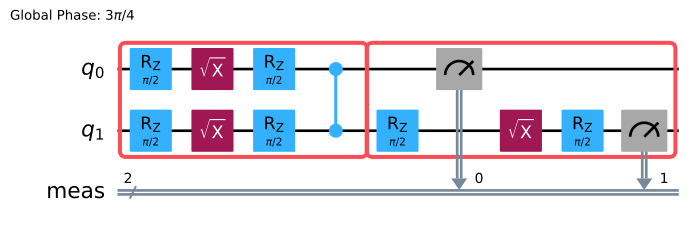
การจัดกลุ่มคำสั่งเป็น boxes และ annotate เป็นวิธีหลักในการระบุ intent ในตัวอย่างต่อไปนี้ เราใช้ generate_boxing_pass_manager และพารามิเตอร์ twirling เพื่อจัดกลุ่ม two-qubit gates และ measurements เป็น boxes และใช้ twirling annotation
# Generate a boxing pass manager to group gates
# and measurements into boxes and add
# a`Twirl` annotation.
boxes_pm = generate_boxing_pass_manager(
    # Add gate twirling
    enable_gates=True,
    # Add measurement twirling
    enable_measures=True,
)

boxed_circuit = boxes_pm.run(isa_circuit)
boxed_circuit.draw("mpl", idle_wires=False)
5. ทางเลือก: สร้าง template circuit และ samplex แล้วเพิ่มเข้าโปรแกรม
จากนั้น ใช้เมธอด Samplomatic build เพื่อสร้างคู่ template circuit และ samplex template circuit มีโครงสร้างเทียบเท่ากับ circuit ดั้งเดิม อย่างไรก็ตาม single-qubit gates ถูกแทนที่ด้วย parameterized gates เพื่อ implement annotations ที่กำหนด (gate และ measurement twirling ในตัวอย่างนี้) samplex เข้ารหัสข้อมูลทั้งหมดที่จำเป็นสำหรับการสร้างพารามิเตอร์แบบสุ่มสำหรับ template circuit
หลังจากสร้างคู่ template circuit และ samplex แล้ว ใช้เมธอด append_samplex_item เพื่อเพิ่มคู่นั้นเข้าโปรแกรม
ดูเอกสาร Samplomatic API สำหรับรายละเอียดทั้งหมดเกี่ยวกับ samplomatic.samplex.Samplex และ arguments ของมัน
# Build the template circuit and the samplex
template_circuit, samplex = build(boxed_circuit)

# Append the template circuit and samplex as a `samplex_item`
program.append_samplex_item(
    template_circuit,
    samplex=samplex,
    shape=(num_randomizations := 20,),
)
6. เรียกใช้ Executor และรับผลลัพธ์
รัน QuantumProgram บน IBM® backend โดยใช้ Executor primitive กับตัวเลือกเริ่มต้น ดู Executor options เพื่อเรียนรู้เกี่ยวกับตัวเลือกที่ใช้ได้
# Initialize an Executor with the default options
executor = Executor(mode=backend)

# Submit the job
job = executor.run(program)
job
<RuntimeJobV2('dab7lcrvpcac73ddek40', 'executor')>
# Retrieve the result
result = job.result()
ผลลัพธ์มีประเภทเป็น QuantumProgramResult ดู Executor input and output เพื่อเรียนรู้เกี่ยวกับ result object
ขั้นตอนถัดไป
- ลองดู ตัวอย่าง Executor บางส่วน
- ทำความเข้าใจ Executor input and output
- เรียนรู้เกี่ยวกับ Executor broadcasting semantics