IBM Circuit function
- Qiskit Functions เป็นฟีเจอร์ทดลองที่ใช้งานได้เฉพาะผู้ใช้ IBM Quantum® Premium Plan, Flex Plan และ On-Prem (ผ่าน IBM Quantum Platform API) Plan เท่านั้น อยู่ในสถานะ preview release และอาจมีการเปลี่ยนแปลงได้
ภาพรวม
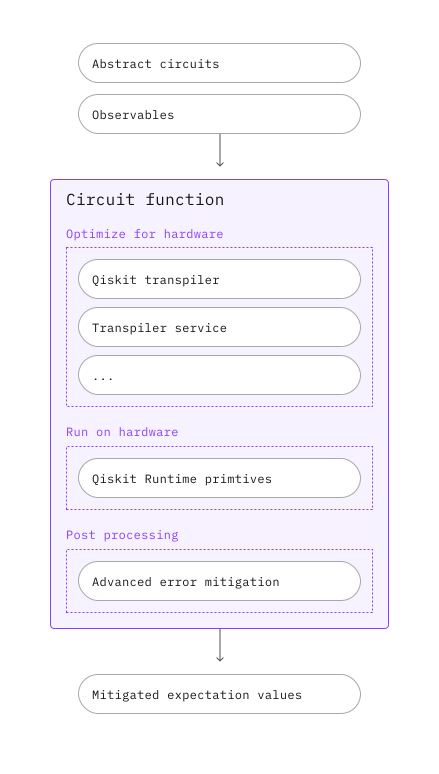
IBM® Circuit function รับ abstract PUBs เป็น input และส่งคืนค่า expectation values ที่ผ่านการลดความผิดพลาดแล้วเป็น output Circuit function นี้มี pipeline อัตโนมัติและปรับแต่งได้ เพื่อให้นักวิจัยสามารถมุ่งเน้นการค้นพบอัลกอริทึมและแอปพลิเคชันได้
คำอธิบาย
หลังจากส่ง PUB แล้ว abstract circuits และ observables จะถูก transpile, รันบนฮาร์ดแวร์ และประมวลผลหลังการรันโดยอัตโนมัติ เพื่อส่งคืนค่า expectation values ที่ผ่านการลดความผิดพลาด ทำได้โดยผสมผสานเครื่องมือต่อไปนี้:
- Qiskit Transpiler Service รวมถึงการเลือก AI-driven และ heuristic transpilation passes อัตโนมัติ เพื่อแปลง abstract circuits ให้เป็น ISA circuits ที่ปรับให้เหมาะสมกับฮาร์ดแวร์
- เทคนิคการระงับและลดความผิดพลาดสำหรับการคำนวณระดับ utility-scale รวมถึง measurement และ gate twirling, dynamical decoupling, Twirled Readout Error eXtinction (TREX), Zero-Noise Extrapolation (ZNE) และ Probabilistic Error Amplification (PEA)
- Qiskit Runtime Estimator สำหรับรัน ISA PUBs บนฮาร์ดแวร์และส่งคืนค่า expectation values ที่ผ่านการลดความผิดพลาด
เริ่มต้นใช้งาน
ยืนยันตัวตนโดยใช้ API key และเลือก Qiskit Function ดังนี้ (ตัวอย่างนี้สมมติว่าได้ บันทึกบัญชีแล้ว ในสภาพแวดล้อมภายในเครื่อง)
# Added by doQumentation — required packages for this notebook
!pip install -q qiskit qiskit-ibm-catalog qiskit-ibm-runtime
from qiskit_ibm_catalog import QiskitFunctionsCatalog

catalog = QiskitFunctionsCatalog(channel="ibm_quantum_platform")

function = catalog.load("ibm/circuit-function")
ตัวอย่าง
ลองใช้ตัวอย่างพื้นฐานนี้เพื่อเริ่มต้น:
from qiskit.circuit.random import random_circuit
from qiskit_ibm_runtime import QiskitRuntimeService

# You can skip this step if you have a target backend, e.g.
# backend_name = "ibm_brisbane"
# You'll need to specify the credentials when initializing QiskitRuntimeService, if they were not previously saved.
service = QiskitRuntimeService()
backend = service.least_busy(operational=True, simulator=False)

circuit = random_circuit(num_qubits=2, depth=2, seed=42)
observable = "Z" * circuit.num_qubits
pubs = [(circuit, observable)]

job = function.run(
    # Use `backend_name=backend_name` if you didn't initialize a backend object
    backend_name=backend.name,
    pubs=pubs,
)
ตรวจสอบ สถานะ หรือดู ผลลัพธ์ ของ Qiskit Function workload ดังนี้:
print(job.status())
result = job.result()
QUEUED
ผลลัพธ์มีรูปแบบเดียวกับ Estimator result:
print(f"The result of the submitted job had {len(result)} PUB\n")
print(
    f"The associated PubResult of this job has the following DataBins:\n {result[0].data}\n"
)
print(f"And this DataBin has attributes: {result[0].data.keys()}")
print(
    f"The expectation values measured from this PUB are: \n{result[0].data.evs}"
)
The result of the submitted job had 1 PUB

The associated PubResult of this job has the following DataBins:
 DataBin(evs=np.ndarray(<shape=(), dtype=float64>), stds=np.ndarray(<shape=(), dtype=float64>), ensemble_standard_error=np.ndarray(<shape=(), dtype=float64>))

And this DataBin has attributes: dict_keys(['evs', 'stds', 'ensemble_standard_error'])
The expectation values measured from this PUB are:
1.02116704805492
Input
ดูตารางต่อไปนี้สำหรับ input parameters ทั้งหมดที่ IBM Circuit function รองรับ ส่วน Options ถัดไปจะอธิบายรายละเอียดเพิ่มเติมเกี่ยวกับ options ที่มี
| ชื่อ | ประเภท | คำอธิบาย | จำเป็น | ค่าเริ่มต้น | ตัวอย่าง |
|---|---|---|---|---|---|
| backend_name | str | ชื่อ Backend ที่ต้องการส่งคำขอ | ใช่ | N/A | ibm_fez |
| pubs | Iterable[EstimatorPubLike] | iterable ของ abstract PUB-like (primitive unified bloc) objects เช่น tuples (circuit, observables) หรือ (circuit, observables, parameter_values) ดู Overview of PUBs สำหรับข้อมูลเพิ่มเติม Circuits สามารถเป็น abstract (non-ISA) ได้ | ใช่ | N/A | (circuit, observables, parameter_values) |
| options | dict | Input options ดูส่วน Options สำหรับรายละเอียด | ไม่ | ดูส่วน Options สำหรับรายละเอียด | {"optimization_level": 3} |
| instance | str | ชื่อ cloud resource ของ instance ที่ต้องการใช้ในรูปแบบนั้น | ไม่ | หากบัญชีของคุณมีสิทธิ์เข้าถึงหลาย instances จะมีการเลือกแบบสุ่ม | CRN |
Options
โครงสร้าง
คล้ายกับ Qiskit Runtime primitives options สำหรับ IBM Circuit function สามารถระบุเป็น nested dictionary ได้ Options ที่ใช้บ่อย เช่น optimization_level และ mitigation_level อยู่ที่ระดับแรก ส่วน options ขั้นสูงอื่น ๆ ถูกจัดกลุ่มตามหมวดหมู่ เช่น resilience
ค่าเริ่มต้น
หากไม่ระบุค่าสำหรับ option ใด จะใช้ค่าเริ่มต้นที่กำหนดโดยบริการ
Mitigation level
IBM Circuit function รองรับ mitigation_level ด้วย ระดับ mitigation ระบุว่าจะใช้การระงับและลดความผิดพลาดมากแค่ไหนกับ job ระดับที่สูงกว่าจะให้ผลลัพธ์ที่แม่นยำกว่า แต่ใช้เวลาประมวลผลนานกว่า ระดับการลดความผิดพลาดขึ้นอยู่กับวิธีที่ใช้ ระดับ mitigation จะแยกการเลือกวิธี error mitigation และ suppression โดยละเอียดออกไป เพื่อให้ผู้ใช้พิจารณาการแลกเปลี่ยนระหว่างต้นทุนและความแม่นยำที่เหมาะสมกับแอปพลิเคชันของตน ตารางต่อไปนี้แสดงวิธีที่สอดคล้องกับแต่ละระดับ
แม้ชื่อจะคล้ายกัน แต่ mitigation_level ใช้เทคนิคที่แตกต่างจากที่ resilience_level ของ Estimator ใช้
คล้ายกับ resilience_level ใน Qiskit Runtime Estimator mitigation_level กำหนดชุด options ที่คัดสรรมาแล้ว options ที่ระบุเพิ่มเติมนอกเหนือจาก mitigation level จะถูกใช้ทับชุด options พื้นฐานที่กำหนดโดย mitigation level ดังนั้นในทางหลักการ คุณอาจตั้ง mitigation level เป็น 1 แต่ปิด measurement mitigation ได้ แม้จะไม่แนะนำ
| Mitigation Level | เทคนิค |
|---|---|
| 1 [ค่าเริ่มต้น] | Dynamical decoupling + measurement twirling + TREX |
| 2 | Level 1 + gate twirling + ZNE via gate folding |
| 3 | Level 1 + gate twirling + ZNE via PEA |
ตัวอย่างต่อไปนี้แสดงการตั้ง mitigation level:
options = {"mitigation_level": 2}

job = function.run(backend_name=backend.name, pubs=pubs, options=options)
Options ทั้งหมดที่มี
นอกจาก mitigation_level แล้ว IBM Circuit function ยังมี options ขั้นสูงจำนวนหนึ่งที่ให้ปรับแต่งการแลกเปลี่ยนระหว่างต้นทุนและความแม่นยำได้ ตารางต่อไปนี้แสดง options ทั้งหมดที่มี:
| Option | Sub-option | Sub-sub-option | คำอธิบาย | ตัวเลือก | ค่าเริ่มต้น |
|---|---|---|---|---|---|
| default_precision | ความแม่นยำเริ่มต้นที่ใช้สำหรับ PUB หรือการเรียก run()ที่ไม่ได้ระบุ PUB แต่ละรายการสามารถระบุความแม่นยำของตัวเองได้ หากวิธี run() ได้รับความแม่นยำ ค่านั้นจะถูกใช้กับ PUBs ทั้งหมดในการเรียก run() ที่ไม่ได้ระบุของตัวเอง | float > 0 | 0.015625 | ||
| max_execution_time | เวลาการรันสูงสุดเป็นวินาที ซึ่งอ้างอิงจากการใช้งาน QPU (ไม่ใช่ wall clock time) การใช้งาน QPU คือเวลาที่ QPU ทุ่มเทให้กับการประมวลผล job ของคุณ หาก job เกินขีดจำกัดเวลานี้ จะถูกยกเลิกโดยบังคับ | จำนวนวินาทีเป็น Integer ในช่วง [1, 10800] | |||
| mitigation_level | ระดับการระงับและลดความผิดพลาด ดูส่วน Mitigation level สำหรับข้อมูลเพิ่มเติมเกี่ยวกับวิธีที่ใช้ในแต่ละระดับ | 1 / 2 / 3 | 1 | ||
| optimization_level | ระดับการปรับแต่ง circuits ระดับที่สูงกว่า จะสร้าง circuits ที่ปรับแต่งดีกว่า แต่ใช้เวลา transpilation นานกว่า | 1 / 2 / 3 | 2 | ||
| dynamical_decoupling | enable | เปิดใช้งาน dynamical decoupling หรือไม่ ดู เทคนิคการระงับและลดความผิดพลาด สำหรับคำอธิบายวิธีนี้ | True/False | True | |
| sequence_type | ลำดับ dynamical decoupling ที่ใช้ * XX: ใช้ลำดับ tau/2 - (+X) - tau - (+X) - tau/2* XpXm: ใช้ลำดับ tau/2 - (+X) - tau - (-X) - tau/2* XY4: ใช้ลำดับtau/2 - (+X) - tau - (+Y) - tau (-X) - tau - (-Y) - tau/2 | 'XX'/'XpXm'/'XY4' | 'XX' | ||
| twirling | enable_gates | ใช้ 2-qubit Clifford gate twirling หรือไม่ | True/False | False | |
| enable_measure | เปิดใช้งาน twirling ของการวัดหรือไม่ | True/False | True | ||
| resilience | measure_mitigation | เปิดใช้งานวิธี TREX measurement error mitigation หรือไม่ ดู เทคนิคการระงับและลดความผิดพลาด สำหรับคำอธิบายวิธีนี้ | True/False | True | |
| zne_mitigation | เปิดใช้งานวิธี Zero Noise Extrapolation error mitigation หรือไม่ ดู เทคนิคการระงับและลดความผิดพลาด สำหรับคำอธิบายวิธีนี้ | True/False | False | ||
| zne | amplifier | เทคนิคที่ใช้ขยายสัญญาณรบกวน หนึ่งใน: - gate_folding (ค่าเริ่มต้น) ใช้ 2-qubit gate folding เพื่อขยายสัญญาณรบกวน หาก noise factor ต้องการขยายเฉพาะบาง gates จะเลือก gates เหล่านั้นแบบสุ่ม- gate_folding_front ใช้ 2-qubit gate folding เพื่อขยายสัญญาณรบกวน หาก noise factor ต้องการขยายเฉพาะบาง gates จะเลือก gates จากด้านหน้าของ DAG circuit ที่เรียงตามลำดับโทโพโลยี- gate_folding_back ใช้ 2-qubit gate folding เพื่อขยายสัญญาณรบกวน หาก noise factor ต้องการขยายเฉพาะบาง gates จะเลือก gates จากด้านหลังของ DAG circuit ที่เรียงตามลำดับโทโพโลยี- pea ใช้เทคนิคที่เรียกว่า Probabilistic error amplification (PEA) เพื่อขยายสัญญาณรบกวน ดู เทคนิคการระงับและลดความผิดพลาด สำหรับคำอธิบายวิธีนี้ | gate_folding / gate_folding_front / gate_folding_back / pea | gate_folding | |
| noise_factors | Noise factors ที่ใช้สำหรับการขยายสัญญาณรบกวน | รายการ floats; แต่ละ float >= 1 | (1, 1.5, 2) สำหรับ PEA และ (1, 3, 5) สำหรับกรณีอื่น | ||
| extrapolator | Noise factors สำหรับประเมิน fit extrapolation models option นี้ไม่ส่งผลต่อการรันหรือการ fitting model แต่อย่างใด เพียงกำหนดจุดที่ออบเจกต์ extrapolator ถูกประเมินเพื่อส่งคืนในฟิลด์ข้อมูลที่ชื่อว่า evs_extrapolated และ stds_extrapolated | หนึ่งหรือมากกว่าใน exponential,linear, double_exponential,polynomial_degree_(1 <= k <= 7) | (exponential, linear) | ||
| pec_mitigation | เปิดใช้งานวิธี Probabilistic Error Cancellation error mitigation หรือไม่ ดู เทคนิคการระงับและลดความผิดพลาด สำหรับคำอธิบายวิธีนี้ | True/False | False | ||
| pec | max_overhead | ค่า overhead สูงสุดที่อนุญาตสำหรับการสุ่มตัวอย่าง circuit หรือ None หากไม่มีขีดจำกัดสูงสุด | None/ integer >1 | 100 |
ในตัวอย่างต่อไปนี้ การตั้ง mitigation level เป็น 1 จะปิด ZNE mitigation ในตอนแรก แต่การตั้ง zne_mitigation เป็น True จะแทนที่การตั้งค่าที่เกี่ยวข้องจาก mitigation_level
options = {"mitigation_level": 1, "resilience": {"zne_mitigation": True}}
Output
Output ของ Circuit function คือ PrimitiveResult ซึ่งมีสองฟิลด์:
-
หนึ่งหรือมากกว่า PubResult objects ที่สามารถ index โดยตรงจาก
PrimitiveResult -
Metadata ระดับ job
แต่ละ PubResult มีฟิลด์ data และ metadata
-
ฟิลด์
dataมีอย่างน้อยอาร์เรย์ของค่า expectation values (PubResult.data.evs) และอาร์เรย์ของ standard errors (PubResult.data.stds) และอาจมีข้อมูลเพิ่มเติมขึ้นอยู่กับ options ที่ใช้ -
ฟิลด์
metadataมี metadata ระดับ PUB (PubResult.metadata)
โค้ดตัวอย่างต่อไปนี้อธิบายรูปแบบ PrimitiveResult (และ PubResult ที่เกี่ยวข้อง)
print(f"The result of the submitted job had {len(result)} PUB")
print(
    f"The expectation values measured from this PUB are: \n{result[0].data.evs}"
)
print(f"And the associated metadata is: \n{result[0].metadata}")
The result of the submitted job had 1 PUB
The expectation values measured from this PUB are:
1.02116704805492
And the associated metadata is:
{'shots': 4096, 'target_precision': 0.015625, 'circuit_metadata': {}, 'resilience': {}, 'num_randomizations': 32}
การดึงข้อความข้อผิดพลาด
หากสถานะ workload เป็น ERROR ใช้ job.result() เพื่อดึงข้อความข้อผิดพลาดเพื่อช่วย debug ดังนี้:
job = function.run(
    backend_name="bad_backend_name", pubs=pubs, options=options
)

print(job.result())
รับการสนับสนุน
ติดต่อ IBM Quantum support และรวมข้อมูลต่อไปนี้:
- Qiskit Function Job ID (
qiskit-ibm-catalog),job.job_id - คำอธิบายโดยละเอียดของปัญหา
- ข้อความหรือรหัสข้อผิดพลาดที่เกี่ยวข้อง
- ขั้นตอนในการทำซ้ำปัญหา
ขั้นตอนต่อไป
- ลอง tutorial Error mitigation with the IBM Circuit function