ตั้งค่าระดับการปรับแต่งของ Transpiler
Package versions
โค้ดในหน้านี้ถูกพัฒนาโดยใช้ข้อกำหนดต่อไปนี้ เราแนะนำให้ใช้เวอร์ชันเหล่านี้หรือใหม่กว่า
qiskit[all]~=2.5.2
qiskit-ibm-runtime~=0.47.0
อุปกรณ์ควอนตัมจริงนั้นมีสัญญาณรบกวนและข้อผิดพลาดของ Gate ดังนั้นการปรับแต่ง Circuit เพื่อลดความลึกและจำนวน Gate จึงสามารถปรับปรุงผลลัพธ์ที่ได้จากการรัน Circuit เหล่านั้นได้อย่างมาก
ฟังก์ชัน generate_preset_pass_manager มีอาร์กิวเมนต์ตำแหน่งบังคับหนึ่งตัวคือ optimization_level ซึ่งควบคุมความพยายามที่ Transpiler ใช้ในการปรับแต่ง Circuit อาร์กิวเมนต์นี้เป็นจำนวนเต็มที่รับค่าได้คือ 0, 1, 2 หรือ 3
ระดับการปรับแต่งที่สูงขึ้นจะสร้าง Circuit ที่ปรับแต่งมากขึ้นแต่ใช้เวลา compile นานขึ้น
ตารางต่อไปนี้อธิบายการปรับแต่งที่ทำในแต่ละการตั้งค่า
| ระดับการปรับแต่ง | คำอธิบาย |
|---|---|
| 0 | ไม่มีการปรับแต่ง: โดยทั่วไปใช้สำหรับการกำหนดคุณสมบัติของฮาร์ดแวร์
|
| 1 | การปรับแต่งระดับเบา:
|
| 2 | การปรับแต่งระดับกลาง:
|
| 3 | การปรับแต่งระดับสูง:
|
ระดับการปรับแต่งในทางปฏิบัติ
เนื่องจาก Gate แบบสองคิวบิตโดยทั่วไปเป็นแหล่งข้อผิดพลาดที่สำคัญที่สุด เราจึงสามารถประมาณ "ประสิทธิภาพฮาร์ดแวร์" ของการ transpile ได้โดยการนับจำนวน Gate แบบสองคิวบิตใน Circuit ที่ได้ ที่นี่ เราจะลองระดับการปรับแต่งต่างๆ กับ Circuit อินพุตที่ประกอบด้วย unitary สุ่มตามด้วย SWAP Gate
# Added by doQumentation — required packages for this notebook
!pip install -q numpy qiskit qiskit-ibm-runtime
from qiskit import QuantumCircuit
from qiskit.circuit.library import UnitaryGate
from qiskit.quantum_info import Operator, random_unitary

UU = random_unitary(4, seed=12345)
rand_U = UnitaryGate(UU)

qc = QuantumCircuit(2)
qc.append(rand_U, range(2))
qc.swap(0, 1)
qc.draw("mpl", style="iqp")

ตัวอย่างเหล่านี้ใช้ mock Backend FakeSherbrooke จาก qiskit_ibm_runtime แต่คุณสามารถลองใช้กับ Backend จริงหรือ fake Backend ที่รองรับ Qiskit ใดก็ได้ ผลลัพธ์ของคุณอาจแตกต่างออกไป
ก่อนอื่น มา transpile โดยใช้ระดับการปรับแต่ง 0
from qiskit.transpiler import generate_preset_pass_manager
from qiskit_ibm_runtime.fake_provider import FakeSherbrooke

backend = FakeSherbrooke()

pass_manager = generate_preset_pass_manager(
    optimization_level=0, backend=backend, seed_transpiler=12345
)
qc_t1_exact = pass_manager.run(qc)
qc_t1_exact.draw("mpl", idle_wires=False)
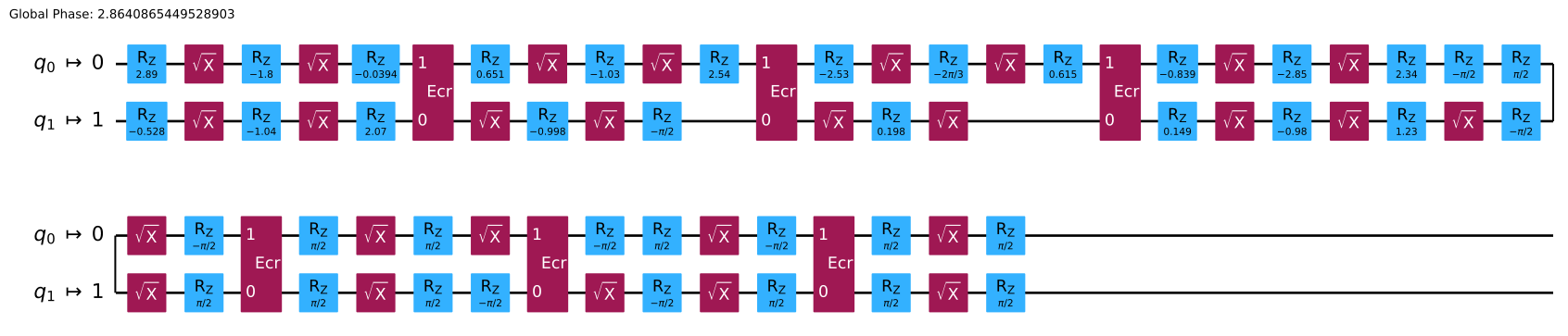
Circuit ที่ transpile แล้วมี ECR Gate แบบสองคิวบิตอยู่หก Gate
ทำซ้ำสำหรับระดับการปรับแต่ง 1:
from qiskit.transpiler import generate_preset_pass_manager
from qiskit_ibm_runtime.fake_provider import FakeSherbrooke

backend = FakeSherbrooke()

pass_manager = generate_preset_pass_manager(
    optimization_level=1, backend=backend, seed_transpiler=12345
)
qc_t1_exact = pass_manager.run(qc)
qc_t1_exact.draw("mpl", idle_wires=False)
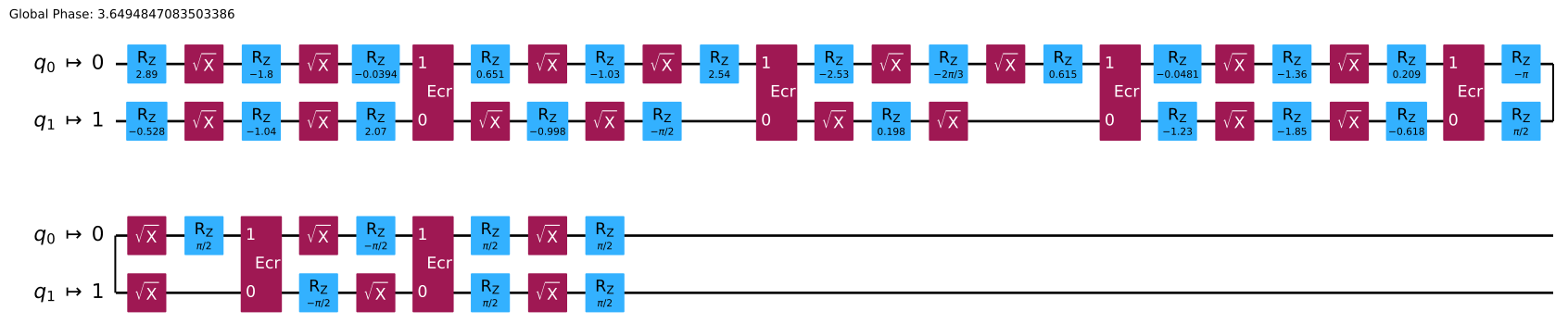
Circuit ที่ transpile แล้วยังคงมี ECR Gate หกตัว แต่จำนวน Gate แบบ single-qubit ลดลง
ทำซ้ำสำหรับระดับการปรับแต่ง 2:
pass_manager = generate_preset_pass_manager(
    optimization_level=2, backend=backend, seed_transpiler=12345
)
qc_t2_exact = pass_manager.run(qc)
qc_t2_exact.draw("mpl", idle_wires=False)

ผลลัพธ์เหมือนกับระดับการปรับแต่ง 1 โปรดทราบว่าการเพิ่มระดับการปรับแต่งไม่ได้ให้ผลเสมอไป
ทำซ้ำอีกครั้ง สำหรับระดับการปรับแต่ง 3:
pass_manager = generate_preset_pass_manager(
    optimization_level=3, backend=backend, seed_transpiler=12345
)
qc_t3_exact = pass_manager.run(qc)
qc_t3_exact.draw("mpl", idle_wires=False)

ตอนนี้มีเพียง ECR Gate สามตัว เราได้ผลลัพธ์นี้เพราะที่ระดับการปรับแต่ง 3 Qiskit พยายามสังเคราะห์บล็อก Gate แบบสองคิวบิตขึ้นใหม่ และ Gate แบบสองคิวบิตใดๆ ก็สามารถสร้างได้ด้วย ECR Gate ไม่เกินสาม Gate เราสามารถได้ ECR Gate น้อยลงอีกถ้าตั้งค่า approximation_degree ให้น้อยกว่า 1 ซึ่งยอมให้ Transpiler ทำการประมาณค่าที่อาจนำข้อผิดพลาดบางส่วนมาใน Gate decomposition (ดู พารามิเตอร์ที่ใช้บ่อยสำหรับการ transpilation):
pass_manager = generate_preset_pass_manager(
    optimization_level=3,
    approximation_degree=0.99,
    backend=backend,
    seed_transpiler=12345,
)
qc_t3_approx = pass_manager.run(qc)
qc_t3_approx.draw("mpl", idle_wires=False)

Circuit นี้มีเพียง ECR Gate สองตัว แต่เป็น Circuit แบบประมาณ เพื่อทำความเข้าใจว่าผลกระทบของมันแตกต่างจาก Circuit แบบแม่นยำอย่างไร เราสามารถคำนวณ fidelity ระหว่าง unitary operator ที่ Circuit นี้ implement และ unitary แบบแม่นยำ ก่อนทำการคำนวณ เราจะลด Circuit ที่ transpile แล้วซึ่งมี 127 Qubit ลงมาเป็น Circuit ที่มีเฉพาะ Qubit ที่ active ซึ่งมีอยู่สองตัว
import numpy as np

def trace_to_fidelity_2q(trace: float) -> float:
    return (4.0 + trace * trace.conjugate()) / 20.0

# Reduce circuits down to 2 qubits so they are easy to simulate
qc_t3_exact_small = QuantumCircuit.from_instructions(qc_t3_exact)
qc_t3_approx_small = QuantumCircuit.from_instructions(qc_t3_approx)

# Compute the fidelity
exact_fid = trace_to_fidelity_2q(
    np.trace(np.dot(Operator(qc_t3_exact_small).adjoint().data, UU))
)
approx_fid = trace_to_fidelity_2q(
    np.trace(np.dot(Operator(qc_t3_approx_small).adjoint().data, UU))
)
print(
    f"Synthesis fidelity\nExact: {exact_fid:.3f}\nApproximate: {approx_fid:.3f}"
)
Synthesis fidelity
Exact: 1.000+0.000j
Approximate: 0.992+0.000j
การปรับระดับการปรับแต่งสามารถเปลี่ยนแปลงด้านอื่นๆ ของ Circuit ได้เช่นกัน ไม่ใช่แค่จำนวน ECR Gate สำหรับตัวอย่างว่าการตั้งค่าระดับการปรับแต่งเปลี่ยน layout อย่างไร ดู การแสดงคอมพิวเตอร์ควอนตัม
ขั้นตอนต่อไป
- เพื่อเรียนรู้เพิ่มเติมเกี่ยวกับฟังก์ชัน
generate_preset_passmanagerเริ่มต้นด้วยหัวข้อ การตั้งค่าเริ่มต้นของ Transpilation และตัวเลือกการกำหนดค่า - เรียนรู้เพิ่มเติมเกี่ยวกับการ transpilation ด้วยหัวข้อ ขั้นตอนของ Transpiler
- ลองทำคู่มือ เปรียบเทียบการตั้งค่า Transpiler
- ลองทำ tutorial สร้าง repetition codes
- ดู เอกสาร API ของ Transpile