ขั้นตอนของ Transpiler
Package versions
โค้ดในหน้านี้พัฒนาโดยใช้ข้อกำหนดดังต่อไปนี้ แนะนำให้ใช้เวอร์ชันเหล่านี้หรือใหม่กว่า
qiskit[all]~=2.5.2
หน้านี้อธิบายขั้นตอนต่าง ๆ ของ transpilation pipeline ที่สร้างไว้ล่วงหน้าใน Qiskit SDK มีหกขั้นตอน:
-
init -
layout -
routing -
translation -
optimization -
scheduling
ฟังก์ชัน generate_preset_pass_manager สร้าง staged pass manager แบบ preset ที่ประกอบด้วยขั้นตอนเหล่านี้ pass เฉพาะที่ประกอบแต่ละขั้นตอนขึ้นอยู่กับ argument ที่ส่งให้ generate_preset_pass_manager โดย optimization_level เป็น positional argument ที่ต้องระบุ เป็นจำนวนเต็มที่มีค่าได้ 0, 1, 2 หรือ 3 ค่าที่สูงกว่าหมายถึงการปรับแต่งที่หนักกว่าแต่มีต้นทุนสูงกว่า (ดู Transpilation defaults and configuration options)
วิธีที่แนะนำในการ transpile circuit คือสร้าง preset staged pass manager แล้วรัน pass manager นั้นกับ circuit ตามที่อธิบายใน Transpile with pass managers อย่างไรก็ตาม ทางเลือกที่ง่ายกว่าแต่ปรับแต่งได้น้อยกว่าคือใช้ฟังก์ชัน transpile ฟังก์ชันนี้รับ circuit โดยตรงเป็น argument เช่นเดียวกับ generate_preset_pass_manager pass ของ transpiler ที่ใช้จะขึ้นอยู่กับ argument เช่น optimization_level ที่ส่งให้ transpile ที่จริงแล้ว ภายในฟังก์ชัน transpile จะเรียก generate_preset_pass_manager เพื่อสร้าง preset staged pass manager และรันกับ circuit
ขั้นตอน Init
ขั้นตอนแรกนี้ทำงานน้อยมากตามค่าเริ่มต้น และมีประโยชน์เป็นหลักหากต้องการรวมการปรับแต่งเริ่มต้นของตัวเอง เนื่องจาก layout และ routing algorithms ส่วนใหญ่ถูกออกแบบมาให้ทำงานกับ gate แบบ single- และ two-qubit เท่านั้น ขั้นตอนนี้จึงใช้แปลง gate ที่ทำงานกับ qubit มากกว่าสองตัว ให้เป็น gate ที่ทำงานกับหนึ่งหรือสอง qubit เท่านั้น
สำหรับข้อมูลเพิ่มเติมเกี่ยวกับการนำการปรับแต่งเริ่มต้นของตัวเองมาใช้ในขั้นตอนนี้ ดูส่วนเกี่ยวกับ plugins และการปรับแต่ง pass managers
ขั้นตอน Layout
ขั้นตอนถัดไปเกี่ยวข้องกับ layout หรือ connectivity ของ Backend ที่ circuit จะถูกส่งไป โดยทั่วไป quantum circuits เป็น abstract entities ที่ qubit ของมันเป็นตัวแทน "virtual" หรือ "logical" ของ qubit จริงที่ใช้ในการคำนวณ ในการรัน sequence ของ gate จำเป็นต้องมีการ mapping แบบ one-to-one จาก qubit "virtual" ไปยัง qubit "physical" ในอุปกรณ์ quantum จริง การ mapping นี้ถูกเก็บเป็นออบเจ็กต์ Layout และเป็นส่วนหนึ่งของข้อจำกัดที่กำหนดไว้ใน instruction set architecture (ISA) ของ Backend
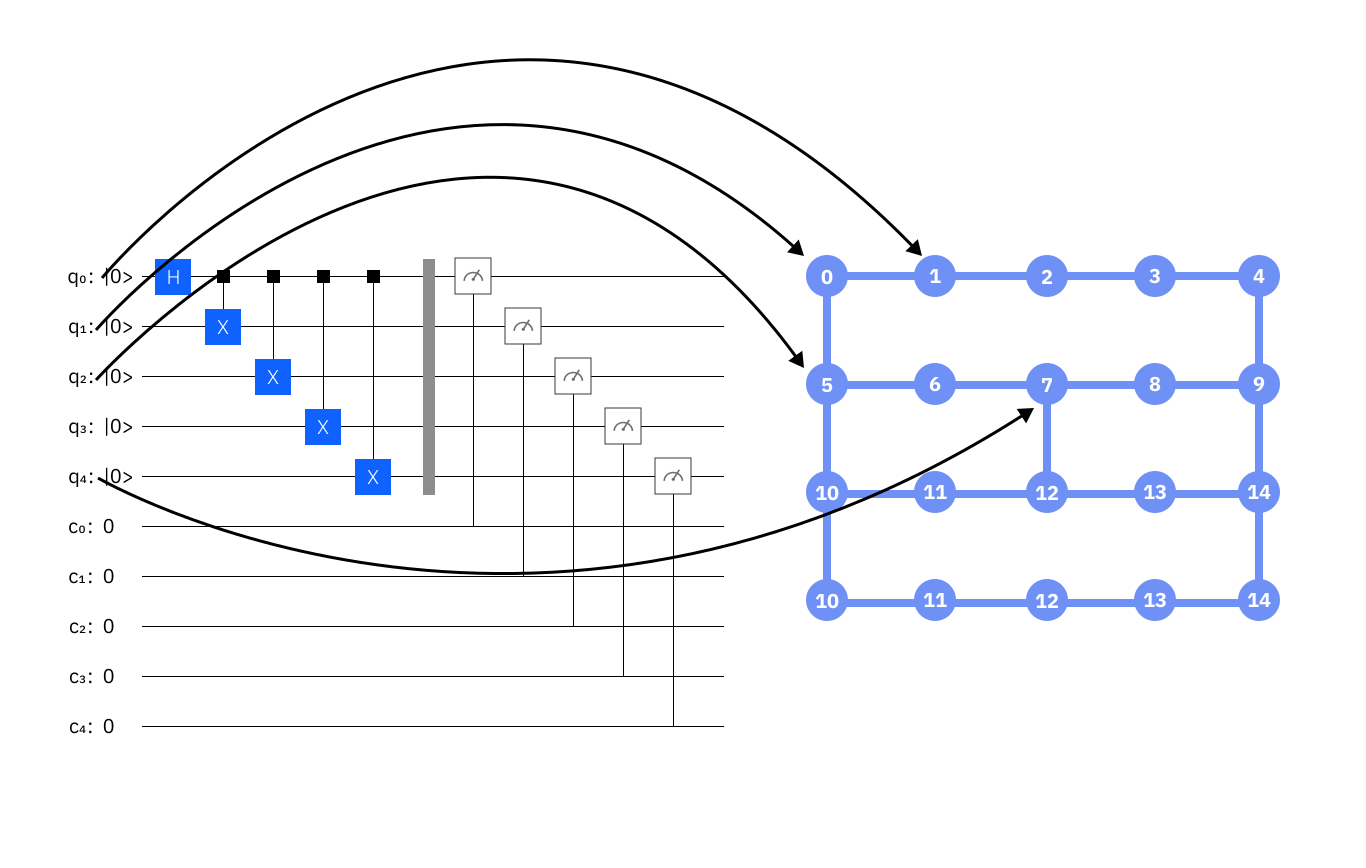
การเลือก mapping มีความสำคัญอย่างมากในการลดจำนวน SWAP operations ที่จำเป็นในการ map input circuit ไปยัง device topology และเพื่อให้แน่ใจว่าใช้ qubit ที่ calibrate ดีที่สุด เนื่องจากความสำคัญของขั้นตอนนี้ preset pass managers จึงลองใช้หลายวิธีเพื่อหา layout ที่ดีที่สุด โดยทั่วไปจะมีสองขั้นตอน: ขั้นแรก ลองหา layout ที่ "perfect" (layout ที่ไม่ต้องการ SWAP operations ใด ๆ) จากนั้น pass แบบ heuristic ที่พยายามหา layout ที่ดีที่สุดหากหา perfect layout ไม่ได้ มี Passes สองตัวที่มักใช้สำหรับขั้นตอนแรกนี้:
-
TrivialLayout: Map qubit virtual แต่ละตัวไปยัง qubit physical ที่มีหมายเลขเดียวกันบน device แบบง่าย ๆ (เช่น [0,1,1,3] -> [0,1,1,3]) นี่เป็นพฤติกรรมเดิมที่ใช้เฉพาะในoptimzation_level=1เพื่อพยายามหา perfect layout หากล้มเหลว จะลองVF2Layoutถัดไป -
VF2Layout: เป็นAnalysisPassที่เลือก layout ที่เหมาะสมโดยจัดการขั้นตอนนี้เป็นปัญหา subgraph isomorphism แก้ด้วยอัลกอริทึม VF2++ หากพบ layout มากกว่าหนึ่งตัว จะรัน scoring heuristic เพื่อเลือก mapping ที่มี average error ต่ำที่สุด
จากนั้นสำหรับขั้นตอน heuristic จะใช้ pass สองตัวตามค่าเริ่มต้น:
-
DenseLayout: หา sub-graph ของ device ที่มี connectivity สูงสุดและมีจำนวน qubit เท่ากับ circuit (ใช้สำหรับ optimization level 1 หากมี control flow operations เช่น IfElseOp อยู่ใน circuit) -
SabreLayout: Pass นี้เลือก layout โดยเริ่มจาก random layout เริ่มต้นและรันSabreSwapalgorithm ซ้ำ ๆ Pass นี้ใช้เฉพาะใน optimization levels 1, 2 และ 3 หากหา perfect layout ผ่านVF2Layoutpass ไม่ได้ สำหรับรายละเอียดเพิ่มเติมเกี่ยวกับอัลกอริทึมนี้ ดูที่ paper arXiv:1809.02573.
ขั้นตอน Routing
เพื่อ implement two-qubit gate ระหว่าง qubit ที่ไม่ได้เชื่อมต่อโดยตรงบน quantum device จำเป็นต้องแทรก SWAP gate หนึ่งตัวหรือมากกว่าลงใน circuit เพื่อย้าย qubit states ไปเรื่อย ๆ จนกว่าจะอยู่ติดกันบน device gate map แต่ละ SWAP gate แทนการดำเนินการที่มีต้นทุนสูงและมีสัญญาณรบกวน ดังนั้น การหาจำนวน SWAP gate ขั้นต่ำที่จำเป็นในการ map circuit ไปยัง device ที่กำหนดจึงเป็นขั้นตอนสำคัญในกระบวนการ transpilation เพื่อประสิทธิภาพ ขั้นตอนนี้มักคำนวณพร้อมกับ Layout stage ตามค่าเริ่มต้น แต่มีความแตกต่างกันในเชิงตรรกะ ขั้นตอน Layout เลือก hardware qubit ที่จะใช้ ในขณะที่ขั้นตอน Routing แทรก SWAP gate ในจำนวนที่เหมาะสมเพื่อรัน circuit โดยใช้ layout ที่เลือก
อย่างไรก็ตาม การหา SWAP mapping ที่เหมาะสมที่สุดนั้นยาก ที่จริงแล้วมันเป็นปัญหา NP-hard และมีต้นทุนสูงเกินไปในการคำนวณสำหรับทุกอย่างยกเว้น quantum devices และ input circuits ที่เล็กที่สุด เพื่อแก้ปัญหานี้ Qiskit ใช้อัลกอริทึม stochastic heuristic ที่เรียกว่า SabreSwap เพื่อคำนวณ SWAP mapping ที่ดี แต่ไม่จำเป็นต้องเหมาะสมที่สุด การใช้วิธี stochastic หมายความว่า circuit ที่สร้างขึ้นไม่รับประกันว่าจะเหมือนกันในแต่ละครั้งที่รัน แน่นอน การรัน circuit เดียวกันซ้ำ ๆ ส่งผลให้เกิดการกระจายของ circuit depths และ gate counts ที่ output ด้วยเหตุนี้ ผู้ใช้หลายคนจึงเลือกที่จะรัน routing function (หรือ StagedPassManager ทั้งหมด) หลายครั้งและเลือก circuit ที่มี depth ต่ำสุดจากการกระจายของ outputs
ตัวอย่างเช่น ลองดู GHZ circuit ขนาด 15 qubit ที่รัน 100 ครั้ง โดยใช้ initial_layout ที่ "ไม่ดี" (ไม่ได้เชื่อมต่อ)
# Added by doQumentation — required packages for this notebook
!pip install -q matplotlib qiskit
import matplotlib.pyplot as plt
from qiskit import QuantumCircuit
from qiskit.transpiler import generate_preset_pass_manager
from qiskit.providers.fake_provider import GenericBackendV2

backend = GenericBackendV2(15)

ghz = QuantumCircuit(15)
ghz.h(0)
ghz.cx(0, range(1, 15))

depths = []
for seed in range(100):
    pass_manager = generate_preset_pass_manager(
        optimization_level=1,
        backend=backend,
        layout_method="trivial",  # Fixed layout mapped in circuit order
        seed_transpiler=seed,  # For reproducible results
    )
    depths.append(pass_manager.run(ghz).depth())

plt.figure(figsize=(8, 6))
plt.hist(depths, align="left", color="#AC557C")
plt.xlabel("Depth", fontsize=14)
plt.ylabel("Counts", fontsize=14)
Text(0, 0.5, 'Counts')
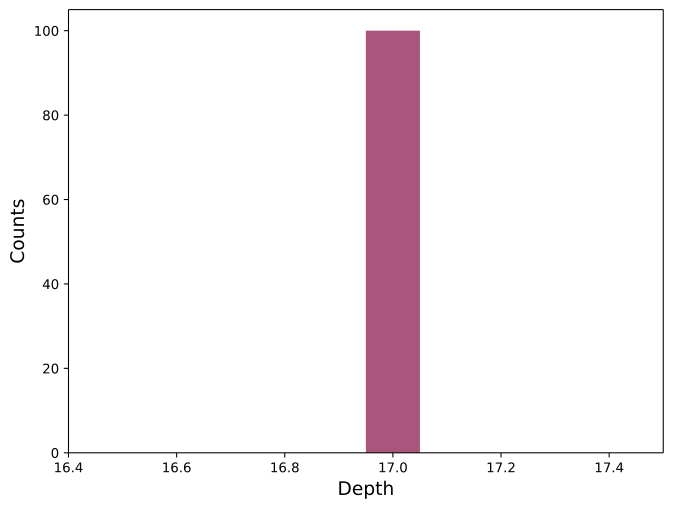
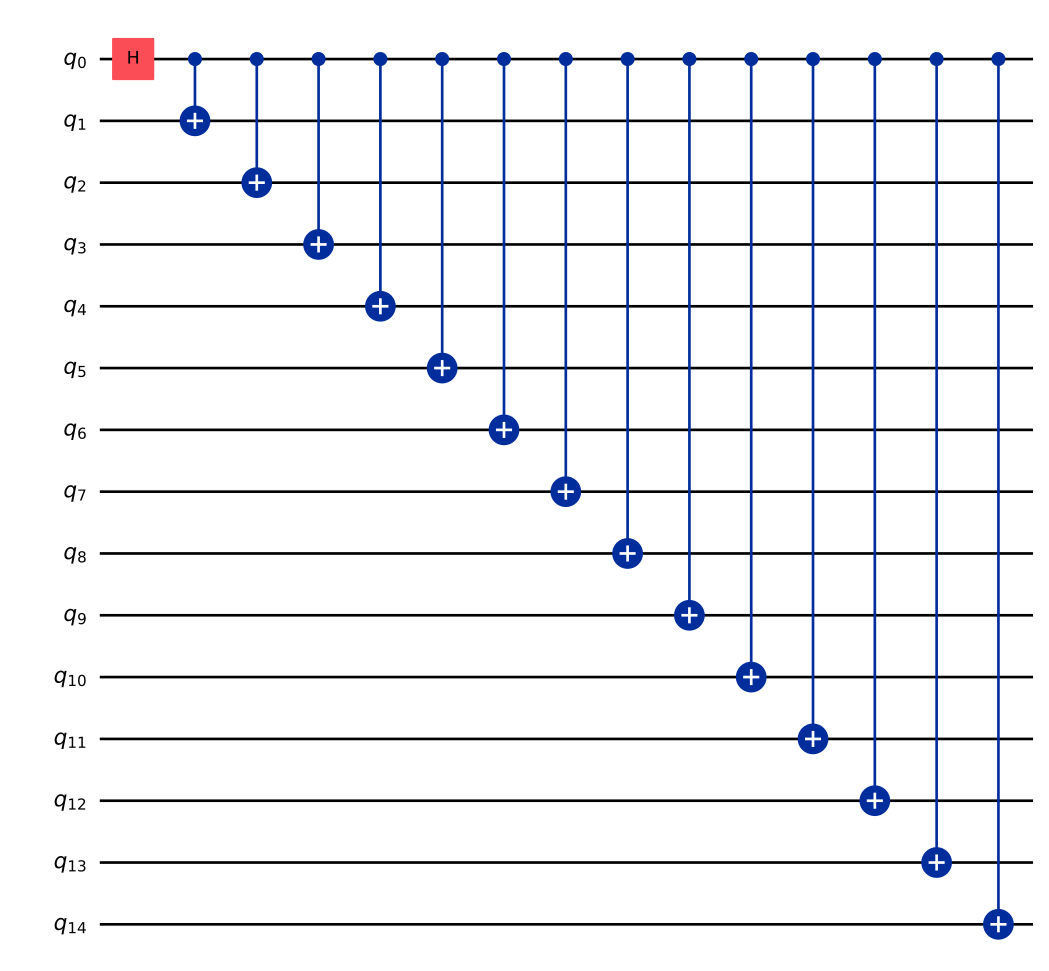
การกระจายที่กว้างนี้แสดงให้เห็นว่า SWAP mapper คำนวณ mapping ที่ดีที่สุดได้ยากเพียงใด เพื่อให้เข้าใจมากขึ้น มาดูทั้ง circuit ที่กำลังรันและ qubit ที่ถูกเลือกบน hardware
ghz.draw("mpl", idle_wires=False)
from qiskit.visualization import plot_circuit_layout

# Plot the hardware graph and indicate which hardware qubits were chosen to run the circuit
transpiled_circ = pass_manager.run(ghz)
plot_circuit_layout(transpiled_circ, backend)
อย่างที่เห็น circuit นี้ต้องรัน two-qubit gate ระหว่าง qubit 0 และ 14 ซึ่งอยู่ห่างกันมากบน connectivity graph ดังนั้นการรัน circuit นี้จึงต้องแทรก SWAP gates เพื่อรัน two-qubit gates ทั้งหมดโดยใช้ SabreSwap pass
สังเกตด้วยว่า SabreSwap algorithm แตกต่างจาก SabreLayout method ที่ใหญ่กว่าในขั้นตอนก่อนหน้า ตามค่าเริ่มต้น SabreLayout รันทั้ง layout และ routing และคืนค่า circuit ที่แปลงแล้ว ซึ่งทำเพื่อเหตุผลทางเทคนิคเฉพาะบางประการที่ระบุไว้ใน API reference page ของ pass
ขั้นตอน Translation
เมื่อเขียน quantum circuit คุณสามารถใช้ quantum gate (unitary operation) ใด ๆ ก็ได้ตามต้องการ พร้อมกับ non-gate operations เช่น คำสั่ง qubit measurement หรือ reset อย่างไรก็ตาม quantum devices ส่วนใหญ่รองรับเฉพาะ quantum gate และ non-gate operations จำนวนหนึ่งในรูปแบบ native เหล่านี้เป็นส่วนหนึ่งของ ISA ของ target และขั้นตอนนี้ของ preset PassManagers จะแปล (หรือ unroll) gate ที่ระบุใน circuit ไปยัง native basis gates ของ Backend ที่ระบุ ซึ่งเป็นขั้นตอนสำคัญเพราะช่วยให้ circuit สามารถรันบน Backend ได้ แต่โดยทั่วไปจะทำให้ depth และจำนวน gate เพิ่มขึ้น
มีสองกรณีพิเศษที่สำคัญที่ควรเน้น เพื่อแสดงให้เห็นว่าขั้นตอนนี้ทำอะไร
- หาก SWAP gate ไม่ใช่ native gate ของ target Backend จะต้องใช้ CNOT gate สาม gate:
print("native gates:" + str(sorted(backend.operation_names)))
qc = QuantumCircuit(2)
qc.swap(0, 1)
qc.decompose().draw("mpl")
native gates:['cx', 'delay', 'id', 'measure', 'reset', 'rz', 'sx', 'x']

เนื่องจากประกอบด้วย CNOT gate สามตัว SWAP จึงเป็นการดำเนินการที่มีต้นทุนสูงบน quantum devices ที่มีสัญญาณรบกวน อย่างไรก็ตาม การดำเนินการดังกล่าวมักจำเป็นสำหรับการฝัง circuit เข้าไปใน gate connectivities ที่จำกัดของหลาย devices ดังนั้น การลดจำนวน SWAP gates ใน circuit จึงเป็นเป้าหมายหลักในกระบวนการ transpilation
- Toffoli หรือ controlled-controlled-not gate (
ccx) เป็น three-qubit gate เนื่องจาก basis gate set ของเราประกอบด้วยเฉพาะ single- และ two-qubit gates การดำเนินการนี้จึงต้องถูก decompose อย่างไรก็ตาม มีต้นทุนค่อนข้างสูง:
qc = QuantumCircuit(3)
qc.ccx(0, 1, 2)
qc.decompose().draw("mpl")
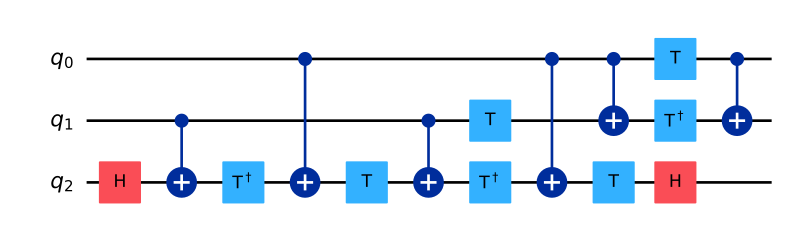
สำหรับทุก Toffoli gate ใน quantum circuit hardware อาจรัน CNOT gate ได้ถึงหก gate และ single-qubit gates จำนวนหนึ่ง ตัวอย่างนี้แสดงให้เห็นว่าอัลกอริทึมใด ๆ ที่ใช้ Toffoli gates หลายตัวจะได้ circuit ที่มี depth ขนาดใหญ่และจะได้รับผลกระทบจากสัญญาณรบกวนอย่างเห็นได้ชัด
ขั้นตอน Optimization
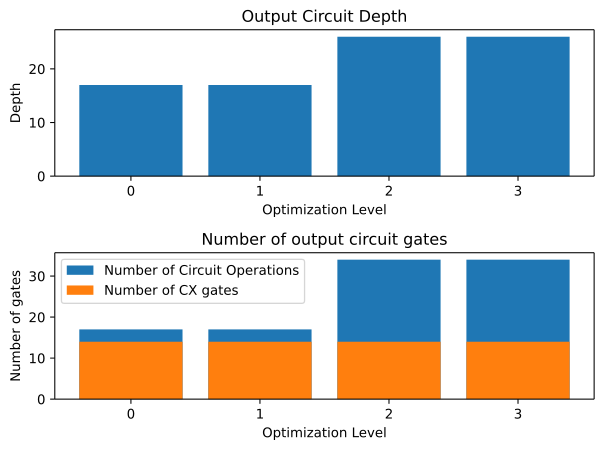
ขั้นตอนนี้เน้นที่การ decompose quantum circuits ลงใน basis gate set ของ target device และต้องต่อสู้กับ depth ที่เพิ่มขึ้นจากขั้นตอน layout และ routing โชคดีที่มีหลาย routines สำหรับปรับแต่ง circuits โดยรวม gate เข้าด้วยกันหรือกำจัด gate ออก ในบางกรณี วิธีการเหล่านี้มีประสิทธิภาพมากจนทำให้ circuit output มี depth ต่ำกว่า input แม้หลังจาก layout และ routing ไปยัง hardware topology แล้ว ในกรณีอื่น ๆ ทำได้ไม่มากนัก และการคำนวณอาจทำได้ยากบน devices ที่มีสัญญาณรบกวน ขั้นตอนนี้คือที่ที่ optimization levels ต่าง ๆ เริ่มแตกต่างกัน
-
สำหรับ
optimization_level=1ขั้นตอนนี้เตรียมOptimize1qGatesDecompositionและCXCancellationซึ่งรวม chains ของ single-qubit gates และยกเลิก CNOT gates ที่อยู่ติดกัน -
สำหรับ
optimization_level=2ขั้นตอนนี้ใช้ passCommutativeCancellationแทนCXCancellationซึ่งลบ gate ที่ซ้ำซ้อนโดยใช้ประโยชน์จาก commutation relations -
สำหรับ
optimization_level=3ขั้นตอนนี้เตรียม pass ดังต่อไปนี้:
นอกจากนี้ ขั้นตอนนี้ยังรัน final checks เพื่อตรวจสอบให้แน่ใจว่าคำสั่งทั้งหมดใน circuit ประกอบด้วย basis gates ที่มีอยู่บน target Backend
ตัวอย่างด้านล่างที่ใช้ GHZ state แสดงผลกระทบของการตั้งค่า optimization level ต่าง ๆ ต่อ circuit depth และ gate count
ผลลัพธ์ transpilation อาจแตกต่างกันเนื่องจาก SWAP mapper แบบ stochastic ดังนั้น ตัวเลขด้านล่างอาจเปลี่ยนแปลงทุกครั้งที่รัน code

โค้ดต่อไปนี้สร้าง 15-qubit GHZ state และเปรียบเทียบ optimization_levels ของ transpilation ในแง่ของ circuit depth ที่ได้ gate counts และ multi-qubit gate counts
ghz = QuantumCircuit(15)
ghz.h(0)
ghz.cx(0, range(1, 15))

depths = []
gate_counts = []
multiqubit_gate_counts = []
levels = [str(x) for x in range(4)]
for level in range(4):
    pass_manager = generate_preset_pass_manager(
        optimization_level=level,
        backend=backend,
        seed_transpiler=1234,
    )
    circ = pass_manager.run(ghz)
    depths.append(circ.depth())
    gate_counts.append(sum(circ.count_ops().values()))
    multiqubit_gate_counts.append(circ.count_ops()["cx"])

fig, (ax1, ax2) = plt.subplots(2, 1)
ax1.bar(levels, depths, label="Depth")
ax1.set_xlabel("Optimization Level")
ax1.set_ylabel("Depth")
ax1.set_title("Output Circuit Depth")
ax2.bar(levels, gate_counts, label="Number of Circuit Operations")
ax2.bar(levels, multiqubit_gate_counts, label="Number of CX gates")
ax2.set_xlabel("Optimization Level")
ax2.set_ylabel("Number of gates")
ax2.legend()
ax2.set_title("Number of output circuit gates")
fig.tight_layout()
plt.show()
ขั้นตอน Scheduling
ขั้นตอนสุดท้ายนี้จะรันเฉพาะเมื่อมีการเรียกใช้โดยตรง (คล้ายกับ Init stage) และไม่รันตามค่าเริ่มต้น (แม้ว่าจะสามารถระบุวิธีการได้โดยตั้งค่า argument scheduling_method เมื่อเรียก generate_preset_pass_manager) ขั้นตอน scheduling มักใช้เมื่อ circuit ถูกแปลไปยัง target basis แล้ว map ไปยัง device แล้ว และปรับแต่งแล้ว pass เหล่านี้มุ่งเน้นที่การคำนึงถึง idle time ทั้งหมดใน circuit ในระดับสูง scheduling pass สามารถนึกถึงได้ว่าเป็นการแทรก delay instructions อย่างชัดเจนเพื่อคำนึงถึง idle time ระหว่างการรัน gate และเพื่อตรวจสอบว่า circuit จะรันนานแค่ไหนบน Backend
นี่คือตัวอย่าง:
ghz = QuantumCircuit(5)
ghz.h(0)
ghz.cx(0, range(1, 5))

# Use fake backend
backend = GenericBackendV2(5)

# Run with optimization level 3 and 'asap' scheduling pass
pass_manager = generate_preset_pass_manager(
    optimization_level=3,
    backend=backend,
    scheduling_method="asap",
    seed_transpiler=1234,
)

circ = pass_manager.run(ghz)
circ.draw(output="mpl", idle_wires=False)
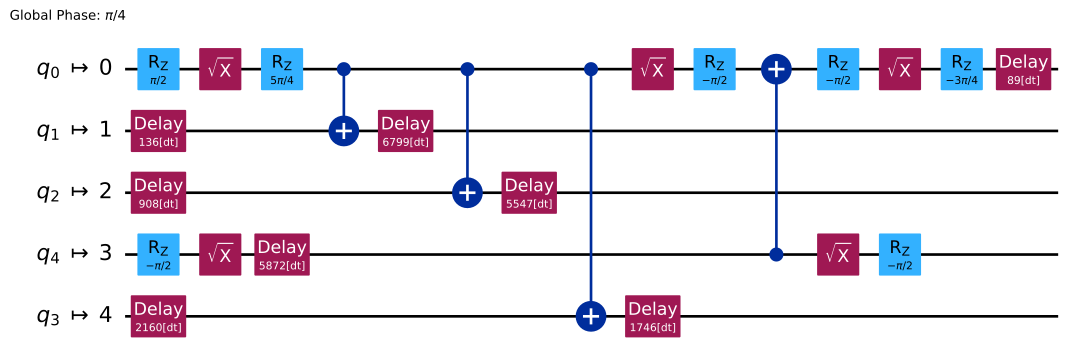

Transpiler แทรก Delay instructions เพื่อคำนึงถึง idle time บนแต่ละ qubit เพื่อให้เข้าใจ timing ของ circuit ได้ดีขึ้น เราสามารถดูด้วยฟังก์ชัน timeline.draw():
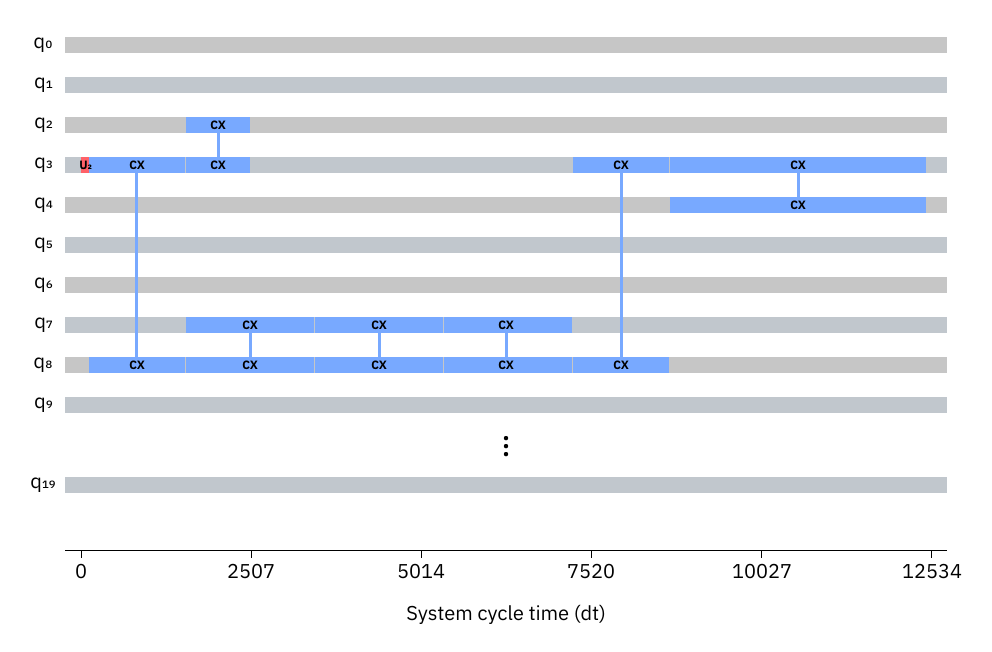 การ schedule circuit ประกอบด้วยสองส่วน: การวิเคราะห์และการ constraint mapping ตามด้วย padding pass ส่วนแรกต้องรัน scheduling analysis pass (ตามค่าเริ่มต้นคือ
 ALAPSchedulingAnalysis) ซึ่งวิเคราะห์ circuit และบันทึก start time ของแต่ละคำสั่งใน circuit ลงใน schedule เมื่อ circuit มี schedule เริ่มต้นแล้ว สามารถรัน pass เพิ่มเติมเพื่อคำนึงถึง timing constraints บน target Backend ได้ สุดท้าย สามารถรัน padding pass เช่น PadDelay หรือ PadDynamicalDecoupling ได้
ขั้นตอนถัดไป
- เพื่อเรียนรู้วิธีใช้ฟังก์ชัน
generate_preset_passmanagerเริ่มต้นด้วยหัวข้อ Transpilation default settings and configuration options - เรียนรู้เพิ่มเติมเกี่ยวกับ transpilation ด้วยหัวข้อ Transpiler with pass managers
- ลองใช้คู่มือ Compare transpiler settings
- ดู Transpile API documentation.