ไลบรารี Circuit
เวอร์ชันของแพ็กเกจ
โค้ดในหน้านี้พัฒนาโดยใช้ requirements ต่อไปนี้ แนะนำให้ใช้เวอร์ชันเหล่านี้หรือใหม่กว่า
qiskit[all]~=2.5.2
Qiskit SDK มีไลบรารีของ Circuit ยอดนิยมที่พร้อมใช้เป็นส่วนประกอบในโปรแกรมของตัวเอง การใช้ Circuit ที่กำหนดไว้ล่วงหน้าช่วยประหยัดเวลาในการค้นคว้า เขียนโค้ด และแก้บั๊ก ไลบรารีนี้ประกอบด้วย Circuit ยอดนิยมในการคำนวณเชิงควอนตัม, Circuit ที่ยากต่อการจำลองแบบคลาสสิก และ Circuit ที่มีประโยชน์สำหรับการทดสอบประสิทธิภาพฮาร์ดแวร์ควอนตัม
หน้านี้แสดงรายการหมวดหมู่ Circuit ต่าง ๆ ที่ไลบรารีมีให้ สำหรับรายการ Circuit ทั้งหมด ดูที่ เอกสาร API ของ circuit library
เกตมาตรฐาน
ไลบรารี Circuit ยังมีเกตควอนตัมมาตรฐานด้วย บางเกตเป็นเกตที่พื้นฐานกว่า (เช่น UGate) และบางเกตเป็น multi-qubit gates ที่มักต้องสร้างจากเกต single-qubit และ two-qubit หากต้องการเพิ่มเกตที่ import มาลงใน Circuit ให้ใช้เมธอด append โดยอาร์กิวเมนต์แรกคือเกต และอาร์กิวเมนต์ถัดไปคือรายการ Qubit ที่จะให้เกตนั้นกระทำ
ตัวอย่างเช่น โค้ดเซลล์ต่อไปนี้สร้าง Circuit ที่มีเกต Hadamard และเกต multi-controlled-X
# Added by doQumentation — installs the packages this notebook needs if they are missing
import importlib.util

_needed = {"qiskit": "qiskit"}
_missing = [pip for module, pip in _needed.items()
            if importlib.util.find_spec(module) is None]
# One at a time, so a package that fails to install does not block the others
for _pip in _missing:
    %pip install -q {_pip}
if not _missing:
    print("\u2713 All required packages are installed")
from qiskit import QuantumCircuit
from qiskit.circuit.library import HGate, MCXGate

mcx_gate = MCXGate(3)
hadamard_gate = HGate()

qc = QuantumCircuit(4)
qc.append(hadamard_gate, [0])
qc.append(mcx_gate, [0, 1, 2, 3])
qc.draw("mpl")

ดู Standard gates ในเอกสาร API ของ circuit library
Circuit แบบ N-local
Circuit เหล่านี้สลับชั้นของ single-qubit rotation gates กับชั้นของ multi-qubit entangling gates
ตระกูล Circuit นี้เป็นที่นิยมในอัลกอริทึมควอนตัมเชิง variational เพราะสามารถสร้างสถานะควอนตัมได้หลากหลาย อัลกอริทึม variational จะปรับพารามิเตอร์เกตเพื่อหาสถานะที่มีคุณสมบัติบางอย่าง (เช่น สถานะที่แทนคำตอบที่ดีสำหรับปัญหา optimization) เพื่อจุดประสงค์นี้ Circuit จำนวนมากในไลบรารีจึงเป็น parameterized ซึ่งหมายความว่าสามารถกำหนดได้โดยไม่ต้องระบุค่าคงที่
โค้ดเซลล์ต่อไปนี้ import Circuit แบบ n_local ซึ่งเกต entangling เป็นเกตแบบ two-qubit Circuit นี้สลับบล็อกของ single-qubit gates แบบ parameterized กับบล็อก entangling ของเกตแบบ two-qubit โค้ดต่อไปนี้สร้าง Circuit สาม Qubit โดยใช้ RX-gates แบบ single-qubit และ CZ-gates แบบ two-qubit
from qiskit.circuit.library import n_local

two_local = n_local(3, "rx", "cz")
two_local.draw("mpl")
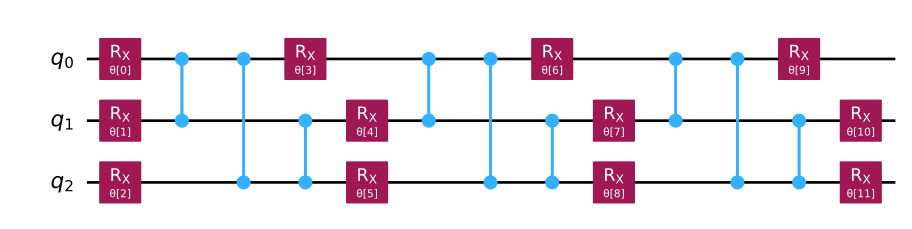
สามารถดูออบเจ็กต์คล้ายรายการของพารามิเตอร์ Circuit ได้จากแอตทริบิวต์ parameters
two_local.parameters
ParameterView([ParameterVectorElement(θ[0]), ParameterVectorElement(θ[1]), ParameterVectorElement(θ[2]), ParameterVectorElement(θ[3]), ParameterVectorElement(θ[4]), ParameterVectorElement(θ[5]), ParameterVectorElement(θ[6]), ParameterVectorElement(θ[7]), ParameterVectorElement(θ[8]), ParameterVectorElement(θ[9]), ParameterVectorElement(θ[10]), ParameterVectorElement(θ[11])])
นอกจากนี้ยังสามารถกำหนดค่าจริงให้พารามิเตอร์เหล่านี้โดยใช้ dictionary ในรูปแบบ { Parameter: number } เพื่อสาธิต โค้ดเซลล์ต่อไปนี้กำหนดพารามิเตอร์ทุกตัวใน Circuit เป็น 0
bound_circuit = two_local.assign_parameters(
    {p: 0 for p in two_local.parameters}
)
bound_circuit.decompose().draw("mpl")
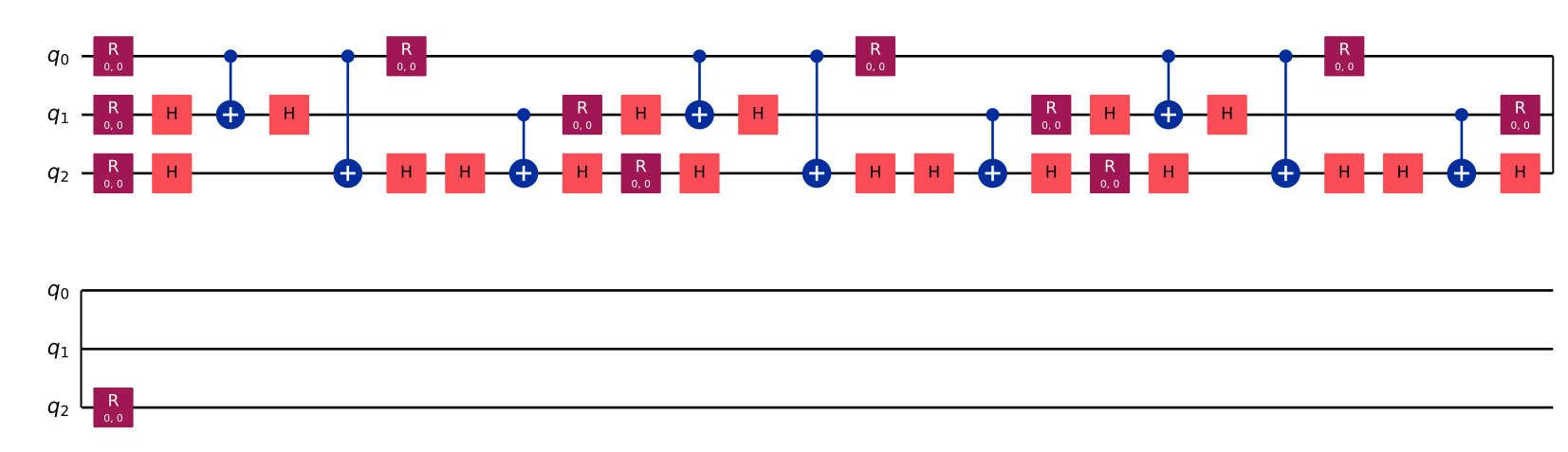
สำหรับข้อมูลเพิ่มเติม ดู N-local gates ในเอกสาร API ของ circuit library หรือเรียนใน คอร์สออกแบบอัลกอริทึม Variational บน IBM Quantum Learning
Circuit สำหรับเข้ารหัสข้อมูล (data-encoding)
Circuit แบบ parameterized เหล่านี้ใช้เข้ารหัสข้อมูลลงในสถานะควอนตัมเพื่อประมวลผลด้วยอัลกอริทึม quantum machine learning Circuit บางส่วนที่ Qiskit รองรับ ได้แก่:
- Amplitude encoding ซึ่งเข้ารหัสแต่ละตัวเลขลงใน amplitude ของ basis state วิธีนี้สามารถเก็บตัวเลขได้ ตัวในสถานะเดียว แต่อาจมีต้นทุนสูงในการ implement
- Basis encoding ซึ่งเข้ารหัสจำนวนเต็ม โดยเตรียม basis state ที่ตรงกัน
- Angle encoding ซึ่งกำหนดแต่ละตัวเลขในข้อมูลเป็น rotation angle ใน Circuit แบบ parameterized
แนวทางที่ดีที่สุดขึ้นอยู่กับรายละเอียดของแต่ละแอปพลิเคชัน อย่างไรก็ตาม บนคอมพิวเตอร์ควอนตัมในปัจจุบัน มักใช้ Circuit แบบ angle-encoding เช่น zz_feature_map
from qiskit.circuit.library import zz_feature_map

features = [0.2, 0.4, 0.8]
feature_map = zz_feature_map(feature_dimension=len(features))

encoded = feature_map.assign_parameters(features)
encoded.draw("mpl")

ดู Data encoding circuits ในเอกสาร API ของ circuit library
Circuit วิวัฒนาการตามเวลา (time-evolution)
Circuit เหล่านี้จำลองสถานะควอนตัมที่วิวัฒนาการตามเวลา ใช้ time-evolution circuits เพื่อศึกษาปรากฏการณ์ทางฟิสิกส์ เช่น การถ่ายเทความร้อนหรือการเปลี่ยนเฟสในระบบ นอกจากนี้ time-evolution circuits ยังเป็นส่วนประกอบพื้นฐานของ wave functions ทางเคมี (เช่น unitary coupled-cluster trial states) และของอัลกอริทึม QAOA ที่ใช้สำหรับปัญหา optimization
from qiskit.circuit.library import PauliEvolutionGate
from qiskit.circuit import QuantumCircuit
from qiskit.quantum_info import SparsePauliOp

# Prepare an initial state with a Hadamard on the middle qubit
state = QuantumCircuit(3)
state.h(1)

hamiltonian = SparsePauliOp(["ZZI", "IZZ"])
evolution = PauliEvolutionGate(hamiltonian, time=1)

# Evolve state by appending the evolution gate
state.compose(evolution, inplace=True)

state.draw("mpl")

อ่าน เอกสาร API ของ PauliEvolutionGate
Circuit สำหรับ Benchmarking และ complexity theory
Benchmarking circuits ช่วยให้เราเข้าใจว่าฮาร์ดแวร์ทำงานได้ดีแค่ไหนจริง ๆ และ complexity-theory circuits ช่วยให้เข้าใจว่าปัญหาที่ต้องการแก้ยากแค่ไหน
ตัวอย่างเช่น benchmark ที่เรียกว่า "quantum volume" วัดว่าคอมพิวเตอร์ควอนตัมรัน Circuit ควอนตัมแบบสุ่มประเภทหนึ่งได้แม่นยำเพียงใด คะแนนของคอมพิวเตอร์ควอนตัมจะเพิ่มขึ้นตามขนาดของ Circuit ที่รันได้อย่างน่าเชื่อถือ ซึ่งคำนึงถึงทุกแง่มุมของคอมพิวเตอร์ รวมถึงจำนวน Qubit, fidelity ของคำสั่ง, การเชื่อมต่อ Qubit และ software stack ที่ transpile และทำ post-processing ผลลัพธ์ อ่านเพิ่มเติมเกี่ยวกับ quantum volume ใน quantum volume paper ต้นฉบับ
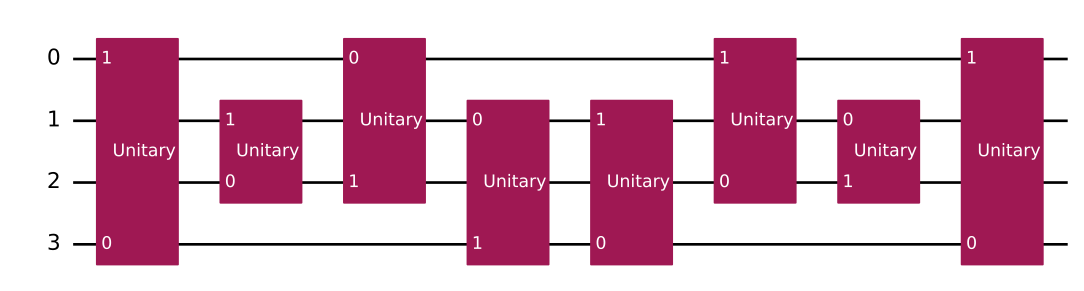
โค้ดต่อไปนี้แสดงตัวอย่าง quantum volume circuit ที่สร้างด้วย Qiskit สำหรับสี่ Qubit (บล็อก unitary คือ two-qubit gates แบบสุ่ม)
from qiskit.circuit.library import quantum_volume

quantum_volume(4).draw("mpl")
ไลบรารี Circuit ยังมี Circuit ที่เชื่อว่ายากต่อการจำลองแบบคลาสสิก เช่น instantaneous quantum polynomial (iqp) circuits Circuit เหล่านี้สอดแทรก diagonal gates บางตัว (ใน computational basis) ระหว่างบล็อกของเกต Hadamard
Circuit อื่น ๆ ได้แก่ grover_operator สำหรับใช้ในอัลกอริทึม Grover และ fourier_checking circuit สำหรับปัญหา Fourier checking ดู Circuit เหล่านี้ใน Particular quantum circuits ในเอกสาร API ของ circuit library
Circuit เชิงเลขคณิต
การดำเนินการทางเลขคณิตเป็นฟังก์ชันคลาสสิก เช่น การบวกจำนวนเต็มและการดำเนินการแบบ bit-wise สิ่งเหล่านี้อาจมีประโยชน์กับอัลกอริทึมเช่น amplitude estimation สำหรับแอปพลิเคชันทางการเงิน และในอัลกอริทึมอย่าง HHL algorithm ที่แก้ระบบสมการเชิงเส้น
ตัวอย่างเช่น ลองบวกเลขสามบิตสองตัวโดยใช้ "ripple-carry" circuit สำหรับการบวกแบบ in-place (FullAdderGate) adder นี้บวกตัวเลขสองตัว (เราเรียกว่า "A" และ "B") และเขียนผลลัพธ์ลงใน register ที่เก็บ B ในตัวอย่างต่อไปนี้ A=2 และ B=3
from qiskit.circuit.library import FullAdderGate
from qiskit import QuantumCircuit, QuantumRegister, ClassicalRegister

adder = FullAdderGate(3)  # Adder of 3-bit numbers

# Create the number A=2
reg_a = QuantumRegister(3, "a")
number_a = QuantumCircuit(reg_a)
number_a.initialize(2)  # Number 2; |010>

# Create the number B=3
reg_b = QuantumRegister(3, "b")
number_b = QuantumCircuit(reg_b)
number_b.initialize(3)  # Number 3; |011>

# Create a circuit to hold everything, including a classical register for
# the result
qregs = [
    QuantumRegister(1, "cin"),
    QuantumRegister(3, "a"),
    QuantumRegister(3, "b"),
    QuantumRegister(1, "cout"),
]
reg_result = ClassicalRegister(3)
circuit = QuantumCircuit(*qregs, reg_result)

# Compose number initializers with the adder. Adder stores the result to
# register B, so we'll measure those qubits.
circuit = (
    circuit.compose(number_a, qubits=reg_a)
    .compose(number_b, qubits=reg_b)
    .compose(adder)
)
circuit.measure(reg_b, reg_result)
circuit.draw("mpl")
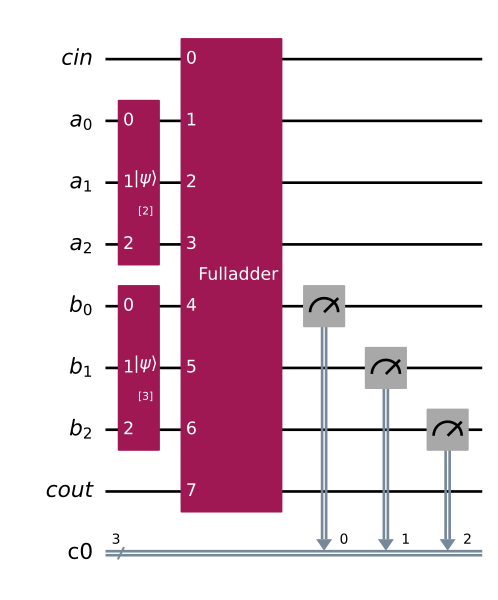
การจำลอง Circuit แสดงให้เห็นว่าผลลัพธ์คือ 5 สำหรับทุก 1024 shots (กล่าวคือวัดได้ด้วยความน่าจะเป็น 1.0)
from qiskit.primitives import StatevectorSampler

result = StatevectorSampler().run([circuit]).result()

print(f"Count data:\n {result[0].data.c0.get_int_counts()}")
Count data:
 {5: 1024}
ดู Arithmetic ในเอกสาร API ของ circuit library
ขั้นตอนต่อไป
- เรียนรู้วิธีขั้นสูงในการสร้าง Circuit ในหัวข้อ สร้าง Circuit
- ดูตัวอย่างการใช้ Circuit ในบทเรียน อัลกอริทึม Grover
- ดูเอกสารอ้างอิง circuit library API