สร้าง pass manager สำหรับ dynamical decoupling
เวอร์ชันของ package
โค้ดในหน้านี้พัฒนาโดยใช้ requirement ต่อไปนี้ แนะนำให้ใช้เวอร์ชันเหล่านี้หรือใหม่กว่า
qiskit[all]~=2.5.2
qiskit-ibm-runtime~=0.47.0
หน้านี้สาธิตวิธีใช้ pass PadDynamicalDecoupling เพื่อเพิ่มเทคนิคการยับยั้งข้อผิดพลาดที่เรียกว่า dynamical decoupling ให้กับ Circuit
Dynamical decoupling ทำงานโดยการเพิ่ม pulse sequence (เรียกว่า dynamical decoupling sequence) ให้กับ Qubit ที่ว่างอยู่เพื่อพลิก Qubit เหล่านั้นรอบ Bloch sphere ซึ่งยกเลิกผลของ noise channel ทำให้ลด decoherence ได้ pulse sequence เหล่านี้คล้ายกับ refocusing pulse ที่ใช้ใน nuclear magnetic resonance สำหรับคำอธิบายเต็มรูปแบบ ดู A Quantum Engineer's Guide to Superconducting Qubits
เนื่องจาก pass PadDynamicalDecoupling ทำงานเฉพาะกับ scheduled circuit และมี Gate ที่ไม่จำเป็นต้องเป็น basis gate ของ target จึงต้องใช้ pass ALAPScheduleAnalysis และ BasisTranslator ด้วย
ดึงข้อมูล target จาก backend และบันทึกชื่อ operation เป็น basis_gates เพราะ target จะต้องถูกแก้ไขเพื่อเพิ่มข้อมูล timing สำหรับ Gate ที่ใช้ใน dynamical decoupling
mock backend FakeSherbrooke จาก qiskit_ibm_runtime ถูกใช้ในตัวอย่างเหล่านี้ แต่คุณสามารถลองใช้กับ Backend จริงหรือ Backend ปลอมใดๆ ที่เข้ากันได้กับ Qiskit ได้ ผลลัพธ์ของคุณอาจแตกต่างออกไป
# Added by doQumentation — required packages for this notebook
!pip install -q numpy qiskit qiskit-ibm-runtime
from qiskit_ibm_runtime.fake_provider import FakeSherbrooke

backend = FakeSherbrooke()

target = backend.target
basis_gates = list(target.operation_names)
สร้าง Circuit efficient_su2 เป็นตัวอย่าง ขั้นแรก transpile Circuit ไปยัง Backend เพราะ dynamical decoupling pulse ต้องเพิ่มหลังจาก Circuit ถูก transpile และ scheduled แล้ว Dynamical decoupling มักทำงานได้ดีที่สุดเมื่อมี idle time มากใน quantum circuit กล่าวคือ มี Qubit ที่ไม่ได้ใช้งานในขณะที่ Qubit อื่นๆ กำลังทำงาน กรณีนี้เกิดขึ้นใน Circuit นี้เพราะ ecr Gate แบบ two-qubit ถูกนำไปใช้ตามลำดับใน ansatz นี้
from qiskit.transpiler import generate_preset_pass_manager
from qiskit.circuit.library import efficient_su2

qc = efficient_su2(12, entanglement="circular", reps=1)
pm = generate_preset_pass_manager(1, target=target, seed_transpiler=12345)
qc_t = pm.run(qc)
qc_t.draw("mpl", fold=-1, idle_wires=False)
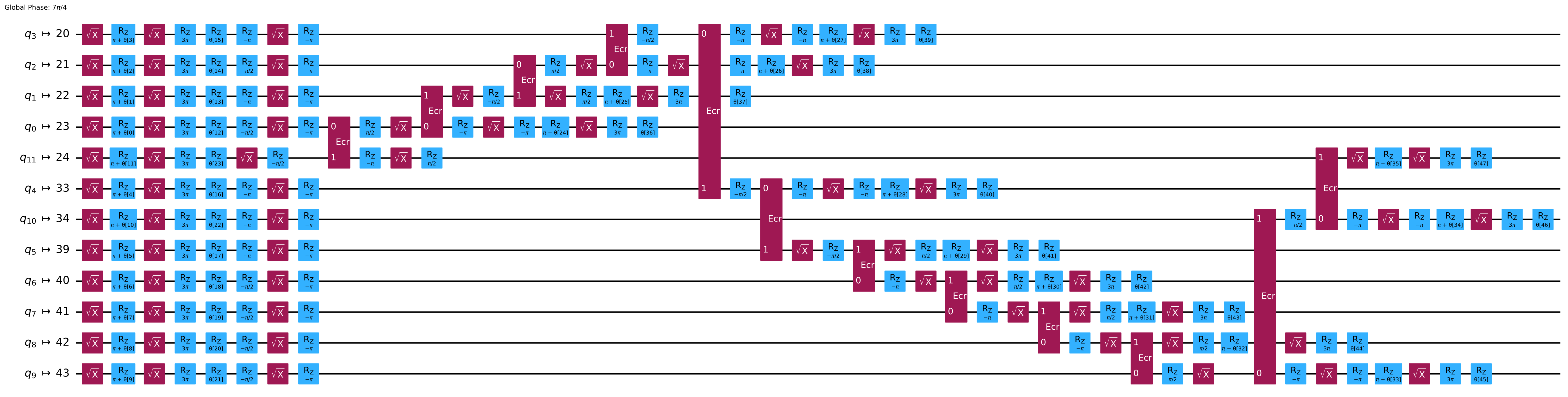
dynamical decoupling sequence คือชุดของ Gate ที่ประกอบกันเป็น identity และเว้นระยะห่างสม่ำเสมอตามเวลา ตัวอย่างเช่น เริ่มต้นด้วยการสร้าง sequence ง่ายๆ ชื่อ XY4 ที่ประกอบด้วย Gate สี่ตัว
from qiskit.circuit.library import XGate, YGate

X = XGate()
Y = YGate()

dd_sequence = [X, Y, X, Y]
เนื่องจากการจับเวลาที่สม่ำเสมอของ dynamical decoupling sequence ข้อมูลเกี่ยวกับ YGate ต้องถูกเพิ่มเข้าไปใน target เพราะมันไม่ใช่ basis gate ในขณะที่ XGate เป็น เรารู้ a priori ว่า YGate มีระยะเวลาและความผิดพลาดเหมือนกับ XGate ดังนั้นเราจึงสามารถดึงคุณสมบัติเหล่านั้นจาก target และเพิ่มกลับเข้าไปสำหรับอ็อบเจ็กต์ YGate ได้ นี่ก็เป็นเหตุผลที่ basis_gates ถูกบันทึกแยกต่างหาก เนื่องจากเรากำลังเพิ่มคำสั่ง YGate ลงใน target แม้ว่ามันจะไม่ใช่ basis gate จริงของ ibm_fez
from qiskit.transpiler import InstructionProperties

y_gate_properties = {}
for qubit in range(target.num_qubits):
    y_gate_properties.update(
        {
            (qubit,): InstructionProperties(
                duration=target["x"][(qubit,)].duration,
                error=target["x"][(qubit,)].error,
            )
        }
    )

target.add_instruction(YGate(), y_gate_properties)
Circuit ansatz เช่น efficient_su2 เป็นแบบ parameterized จึงต้องผูกค่าก่อนส่งไปยัง Backend ที่นี่กำหนด parameter แบบสุ่ม
import numpy as np

rng = np.random.default_rng(1234)
qc_t.assign_parameters(
    rng.uniform(-np.pi, np.pi, qc_t.num_parameters), inplace=True
)
ขั้นต่อไป รัน custom pass สร้าง PassManager ด้วย ALAPScheduleAnalysis และ PadDynamicalDecoupling รัน ALAPScheduleAnalysis ก่อนเพื่อเพิ่มข้อมูล timing ของ quantum circuit ก่อนที่จะเพิ่ม dynamical decoupling sequence ที่มีระยะสม่ำเสมอได้ pass เหล่านี้รันบน Circuit ด้วย .run()
from qiskit.transpiler import PassManager
from qiskit.transpiler.passes.scheduling import (
    ALAPScheduleAnalysis,
    PadDynamicalDecoupling,
)

dd_pm = PassManager(
    [
        ALAPScheduleAnalysis(target=target),
        PadDynamicalDecoupling(target=target, dd_sequence=dd_sequence),
    ]
)
qc_dd = dd_pm.run(qc_t)
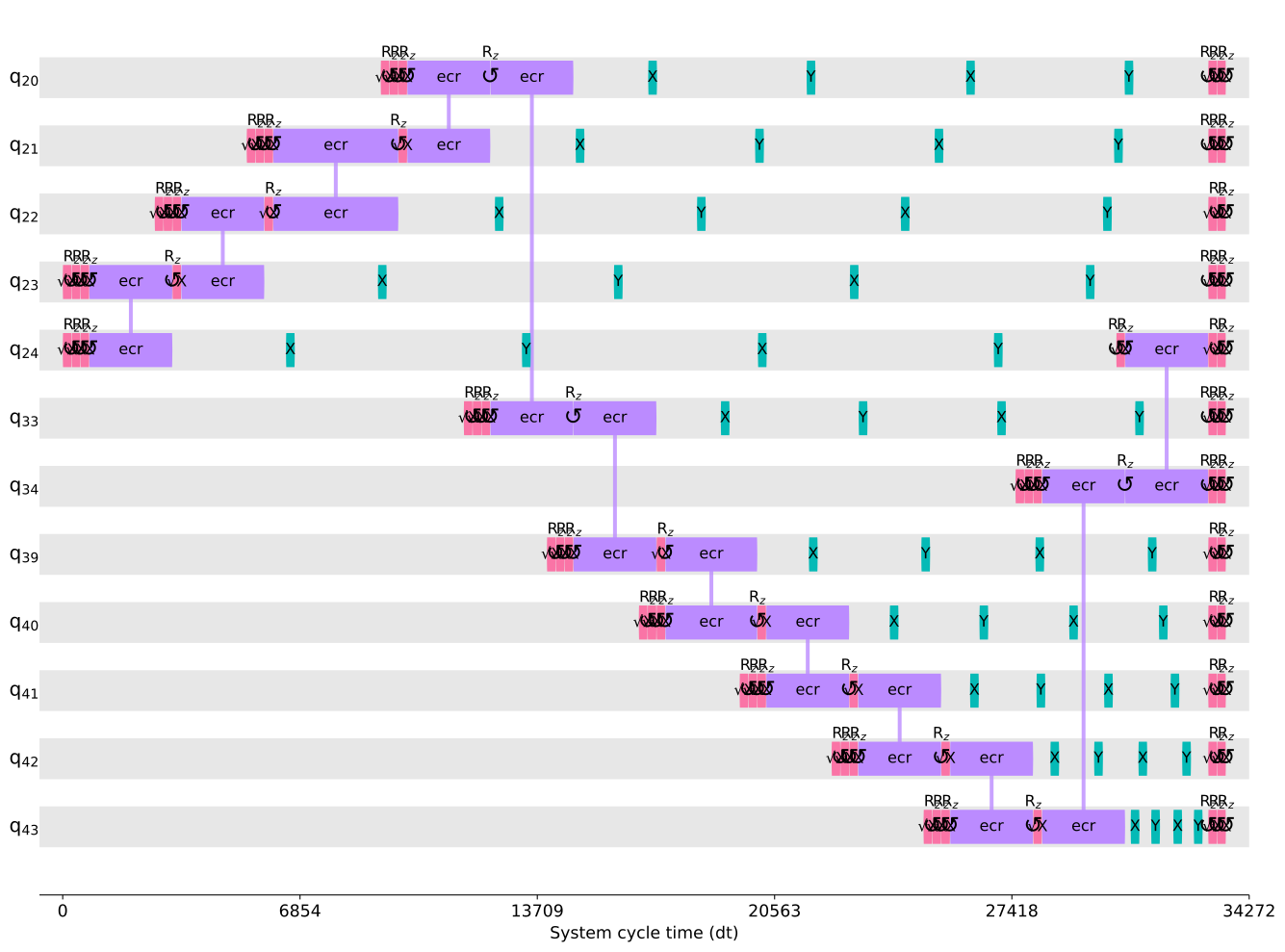
ใช้เครื่องมือ visualization timeline_drawer เพื่อดู timing ของ Circuit และยืนยันว่า sequence ของ object XGate และ YGate ที่มีระยะห่างสม่ำเสมอปรากฏใน Circuit
from qiskit.visualization import timeline_drawer

timeline_drawer(qc_dd, idle_wires=False, target=target)
สุดท้าย เนื่องจาก YGate ไม่ใช่ basis gate จริงของ Backend นำ pass BasisTranslator ไปใช้ด้วยตนเอง (เป็น pass เริ่มต้น แต่รันก่อน scheduling จึงต้องนำไปใช้อีกครั้ง) session equivalence library คือ library ของ circuit equivalence ที่ช่วยให้ Transpiler แตก Circuit ออกเป็น basis gate ตามที่ระบุเป็น argument ด้วย
from qiskit.circuit.equivalence_library import (
    SessionEquivalenceLibrary as sel,
)
from qiskit.transpiler.passes import BasisTranslator

qc_dd = BasisTranslator(sel, basis_gates)(qc_dd)
qc_dd.draw("mpl", fold=-1, idle_wires=False)
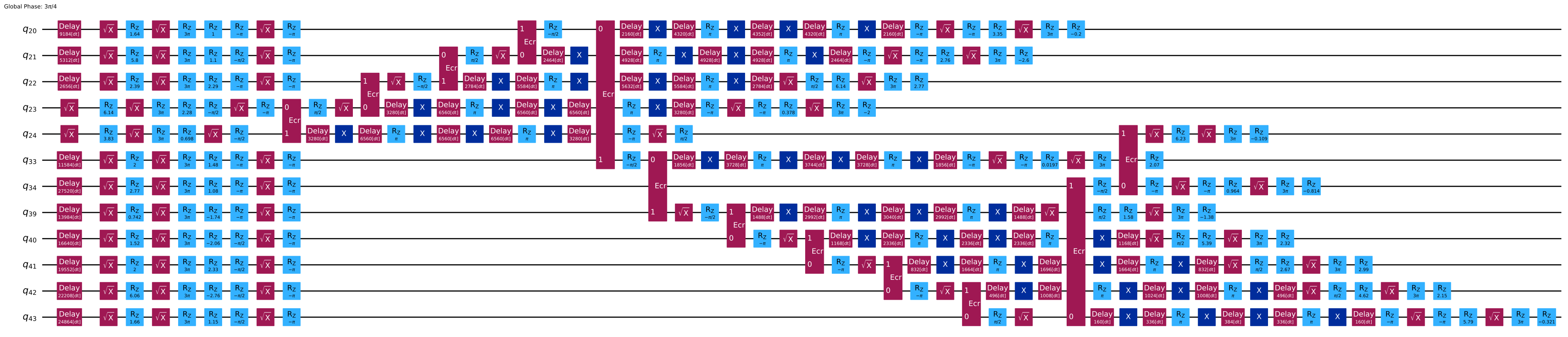
ตอนนี้ object YGate หายไปจาก Circuit แล้ว และมีข้อมูล timing ที่ชัดเจนในรูปของ Delay Gate Circuit ที่ transpile แล้วพร้อม dynamical decoupling นี้พร้อมส่งไปยัง Backend แล้ว
ขั้นตอนถัดไป
- หากต้องการเรียนรู้วิธีใช้ฟังก์ชัน
generate_preset_passmanagerแทนการเขียน pass เอง เริ่มต้นด้วยหัวข้อ Transpilation default settings and configuration options - ลองดู guide Compare transpiler settings
- ดู Transpile API documentation