เปรียบเทียบการตั้งค่า Transpiler
Package versions
โค้ดในหน้านี้พัฒนาโดยใช้ข้อกำหนดต่อไปนี้ เราแนะนำให้ใช้เวอร์ชันเหล่านี้หรือใหม่กว่า
qiskit[all]~=2.5.2
qiskit-ibm-runtime~=0.47.0
การตั้งค่า Transpiler ที่ต่างกันให้การเพิ่มประสิทธิภาพแก่ Circuit ในรูปแบบที่ต่างกัน ซึ่งมักแลกมาด้วยเวลาประมวลผลแบบคลาสสิกที่นานขึ้น คู่มือนี้พาไปผ่านกระบวนการสร้าง transpile และส่ง Circuit อย่างครบถ้วน เพื่อสาธิตการทดสอบประสิทธิภาพของการตั้งค่าต่าง ๆ
โปรดทราบว่าการตั้งค่าเดียวกันอาจปรับปรุงผลลัพธ์ของ Circuit หนึ่งได้ ขณะที่ทำให้อีก Circuit หนึ่งแย่ลง อย่าลืมตรวจสอบ Circuit ที่ transpile ออกมาก่อนรันบน hardware จริง
ตั้งค่าและสร้าง Circuit ตัวอย่าง
# Added by doQumentation — required packages for this notebook
!pip install -q qiskit qiskit-ibm-runtime
# Create circuit to test transpiler on
from qiskit import QuantumCircuit
from qiskit.transpiler.preset_passmanagers import generate_preset_pass_manager
from qiskit.circuit.library import grover_operator, DiagonalGate

# Use Statevector object to calculate the ideal output
from qiskit.quantum_info import Statevector
from qiskit.visualization import plot_histogram
from qiskit.transpiler import PassManager

from qiskit.circuit.library import XGate
from qiskit.quantum_info import hellinger_fidelity
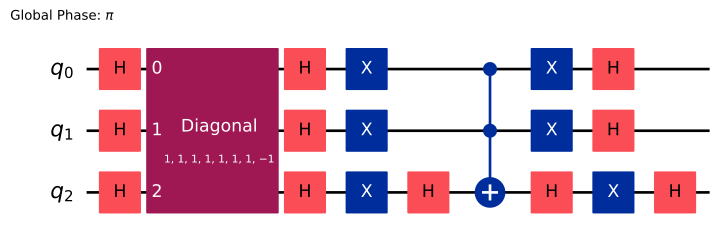
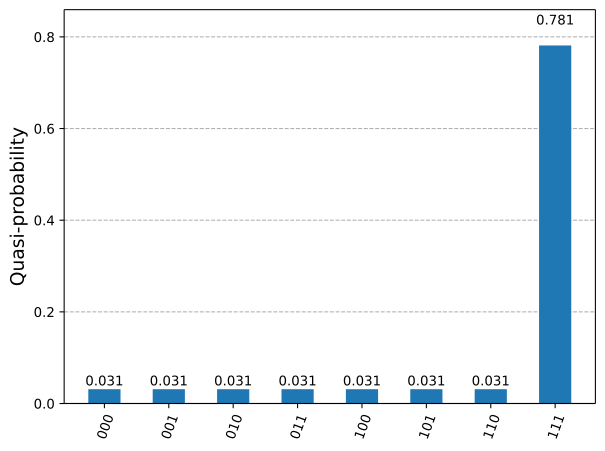
สร้าง Circuit ขนาดเล็กให้ Transpiler ลองเพิ่มประสิทธิภาพ ตัวอย่างนี้สร้าง Circuit ที่ทำ Grover's algorithm พร้อม oracle ที่ทำเครื่องหมายสถานะ 111 จากนั้น จำลองการแจกแจงในอุดมคติ (สิ่งที่คาดว่าจะวัดได้หากรันบนคอมพิวเตอร์ควอนตัมที่สมบูรณ์แบบจำนวนครั้งอนันต์) เพื่อเปรียบเทียบในภายหลัง
oracle = DiagonalGate([1] * 7 + [-1])
qc = QuantumCircuit(3)
qc.h([0, 1, 2])
qc = qc.compose(grover_operator(oracle))

qc.draw(output="mpl", style="iqp")
ideal_distribution = Statevector.from_instruction(qc).probabilities_dict()

plot_histogram(ideal_distribution)
Transpile
ต่อไป ทำการ transpile Circuit สำหรับ QPU คุณจะเปรียบเทียบประสิทธิภาพของ Transpiler โดยตั้ง optimization_level เป็น 0 (ต่ำสุด) กับ 3 (สูงสุด) ระดับการเพิ่มประสิทธิภาพต่ำสุดทำงานขั้นต่ำที่จำเป็นเพื่อให้ Circuit รันบนอุปกรณ์ได้ โดยแมป Qubit ของ Circuit ไปยัง Qubit ของอุปกรณ์และเพิ่ม swap Gate เพื่อให้การดำเนินการสองคิวบิตทั้งหมดเป็นไปได้ ระดับการเพิ่มประสิทธิภาพสูงสุดฉลาดกว่ามากและใช้เทคนิคหลายอย่างเพื่อลดจำนวน Gate โดยรวม เนื่องจาก Gate หลายคิวบิตมีอัตราข้อผิดพลาดสูงและ Qubit สูญเสียสภาพโคฮีเรนซ์ (decohere) เมื่อเวลาผ่านไป Circuit ที่สั้นกว่าจึงควรให้ผลลัพธ์ที่ดีกว่า
ตัวอย่างนี้ใช้ hardware ของ IBM Quantum® แต่คุณสามารถลองใช้กับ QPU ใดก็ได้ที่เข้ากันได้กับ Qiskit ผลลัพธ์ของคุณอาจแตกต่างออกไป
เซลล์ต่อไปนี้ทำการ transpile qc สำหรับทั้งสองค่าของ optimization_level พิมพ์จำนวน Gate สองคิวบิต และเพิ่ม Circuit ที่ transpile แล้วลงในรายการ อัลกอริทึมบางส่วนของ Transpiler เป็นแบบ randomized จึงกำหนด seed เพื่อให้ได้ผลลัพธ์ที่ reproducible
# Use IBM Quantum Compute Service to run jobs on hardware
from qiskit_ibm_runtime import (
    QiskitRuntimeService,
    SamplerV2 as Sampler,
)
# Select the backend with the fewest number of jobs in the queue
service = QiskitRuntimeService()
backend = service.least_busy(
    operational=True, simulator=False, min_num_qubits=127
)
backend.name
'ibm_fez'
# Need to add measurements to the circuit
qc.measure_all()

# Find the correct two-qubit gate
twoQ_gates = set(["ecr", "cz", "cx"])
for gate in backend.basis_gates:
    if gate in twoQ_gates:
        twoQ_gate = gate

circuits = []
for optimization_level in [0, 3]:
    pm = generate_preset_pass_manager(
        optimization_level, backend=backend, seed_transpiler=0
    )
    t_qc = pm.run(qc)
    print(
        f"Two-qubit gates (optimization_level={optimization_level}): ",
        t_qc.count_ops()[twoQ_gate],
    )
    circuits.append(t_qc)
Two-qubit gates (optimization_level=0):  21
Two-qubit gates (optimization_level=3):  12
เนื่องจาก CNOT มักมีอัตราข้อผิดพลาดสูง Circuit ที่ transpile ด้วย optimization_level=3 จึงควรทำงานได้ดีกว่ามาก
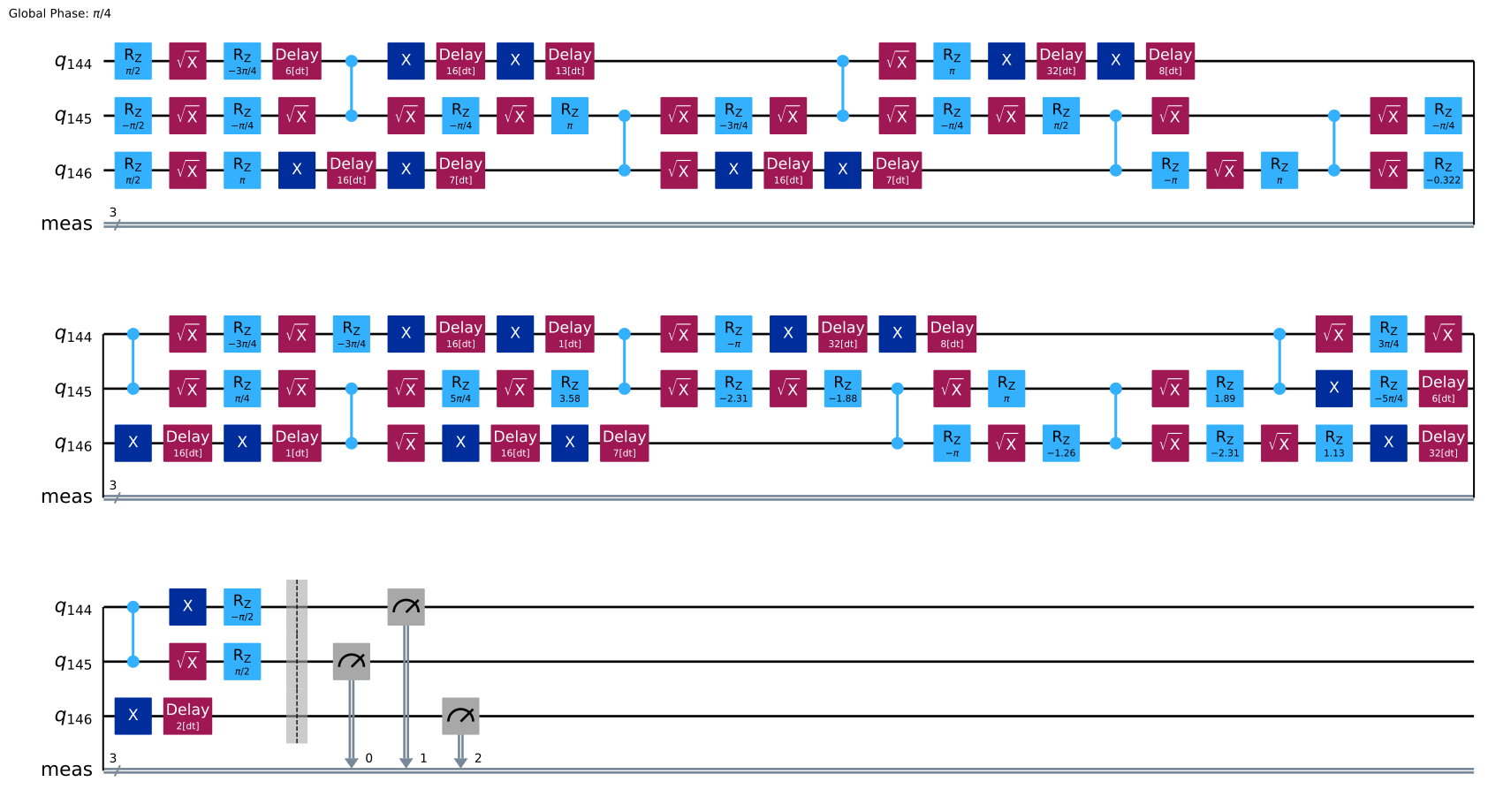
อีกวิธีในการปรับปรุงประสิทธิภาพคือการใช้ dynamical decoupling โดยการใช้ลำดับ Gate กับ Qubit ที่ว่างงาน ซึ่งจะหักล้างปฏิสัมพันธ์ที่ไม่ต้องการบางส่วนกับสภาพแวดล้อม เซลล์ต่อไปนี้เพิ่ม dynamic decoupling เข้าไปใน Circuit ที่ transpile ด้วย optimization_level=3 และเพิ่มลงในรายการ
from qiskit_ibm_runtime.transpiler.passes.scheduling import (
    ASAPScheduleAnalysis,
    PadDynamicalDecoupling,
)

# Get gate durations so the transpiler knows how long each operation takes
durations = backend.target.durations()

# This is the sequence we'll apply to idling qubits
dd_sequence = [XGate(), XGate()]

# Run scheduling and dynamic decoupling passes on circuit
pm = PassManager(
    [
        ASAPScheduleAnalysis(durations),
        PadDynamicalDecoupling(durations, dd_sequence),
    ]
)
circ_dd = pm.run(circuits[1])

# Add this new circuit to our list
circuits.append(circ_dd)
circ_dd.draw(output="mpl", style="iqp", idle_wires=False)
รัน Circuit
ณ จุดนี้ คุณมีรายการ Circuit ที่ transpile ด้วยการตั้งค่าต่าง ๆ ต่อไป รัน Circuit เหล่านี้โดยใช้ Sampler primitive และเก็บผลลัพธ์ไว้ใน result
sampler = Sampler(backend)
job = sampler.run(
    [(circuit) for circuit in circuits],  # sample all three circuits
    shots=8000,
)
result = job.result()
ดูผลลัพธ์
สุดท้าย plot ผลลัพธ์จากการรันบนอุปกรณ์เทียบกับการแจกแจงในอุดมคติ คุณจะเห็นว่าผลลัพธ์ที่ได้ด้วย optimization_level=3 ใกล้เคียงกับการแจกแจงในอุดมคติมากกว่า เนื่องจากจำนวน Gate น้อยกว่า และ optimization_level=3 + dd ใกล้เคียงยิ่งขึ้นไปอีกเนื่องจาก dynamical decoupling
binary_prob = [
    {
        k: v / res.data.meas.num_shots
        for k, v in res.data.meas.get_counts().items()
    }
    for res in result
]
plot_histogram(
    binary_prob + [ideal_distribution],
    bar_labels=False,
    legend=[
        "optimization_level=0",
        "optimization_level=3",
        "optimization_level=3 + dd",
        "ideal distribution",
    ],
)
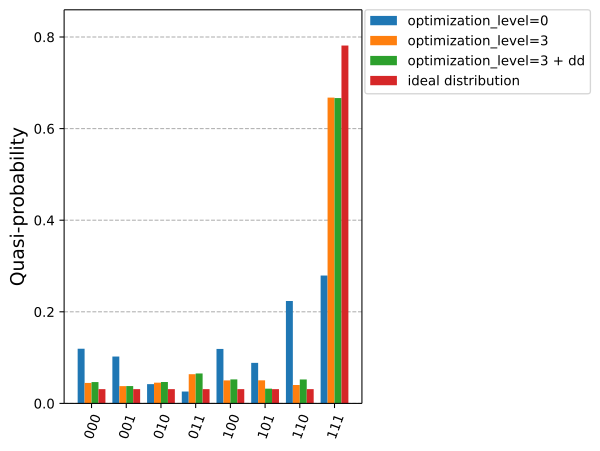
คุณสามารถยืนยันสิ่งนี้ได้โดยคำนวณ Hellinger fidelity ระหว่างผลลัพธ์แต่ละชุดกับการแจกแจงในอุดมคติ (ค่าสูงกว่าดีกว่า และ 1 คือ fidelity สมบูรณ์แบบ)
for prob in binary_prob:
    print(f"{hellinger_fidelity(prob, ideal_distribution):.3f}")
0.717
0.982
0.981
ขั้นตอนถัดไป
-
สำรวจแหล่งข้อมูลเกี่ยวกับ transpilation ขั้นสูง เช่น:
-
เรียกดู tutorials ที่มีอยู่