การแสดงภาพข้อมูลควอนตัม
Package versions
โค้ดในหน้านี้พัฒนาโดยใช้ข้อกำหนดต่อไปนี้ เราแนะนำให้ใช้เวอร์ชันเหล่านี้หรือใหม่กว่า
qiskit[all]~=2.5.2
ในหลายสถานการณ์ เช่น การเรียนรู้หรือการดีบัก การแสดงภาพสถานะของคอมพิวเตอร์ควอนตัมนั้นมีประโยชน์มาก ที่นี่เราสมมติว่าคุณมีสถานะเฉพาะเจาะจงแล้วจากการจำลองหรือ state tomography สามารถดูสถานะของระบบควอนตัมขนาดเล็กได้เท่านั้น
ฟังก์ชันทั้งหมดในหน้านี้คืนออบเจกต์ที่มีรูปแบบสวยงาม เมื่อบรรทัดสุดท้ายของ code cell แสดงออบเจกต์เหล่านี้ Jupyter notebooks จะแสดงไว้ใต้ cell นั้น ถ้าเรียกใช้ฟังก์ชันเหล่านี้ในสภาพแวดล้อมอื่นหรือใน script จะต้อง show หรือ save ผลลัพธ์อย่างชัดเจน
ฟังก์ชันส่วนใหญ่คืนภาพซึ่งเป็น matplotlib.Figure objects มีสองตัวเลือก:
- เรียก
.show()บนออบเจกต์ที่คืนมาเพื่อเปิดภาพในหน้าต่างใหม่ (สมมติว่า matplotlib backend ที่กำหนดค่าไว้เป็นแบบ interactive) - เรียก
.savefig("out.png")เพื่อบันทึก figure ไปที่out.pngใน working directory ปัจจุบัน เมธอดsavefig()รับ path ดังนั้นสามารถปรับตำแหน่งและชื่อไฟล์ที่บันทึกผลลัพธ์ได้ เช่นplot_state_city(psi).savefig("out.png")
ผลลัพธ์ LaTeX เป็น IPython.display.Latex objects ตัวเลือกที่ดีที่สุดในสภาพแวดล้อมที่ไม่ใช่ Jupyter คือหลีกเลี่ยงผลลัพธ์นี้โดยการพิมพ์สถานะเพื่อแสดงเป็นข้อความ หรือเปลี่ยนไปใช้ latex_source drawer เพื่อคืน LaTeX source string
สถานะควอนตัมคือ density matrix (Hermitian matrix) หรือ statevector (complex vector) ความสัมพันธ์ระหว่าง density matrix กับ statevector คือ
และมีความทั่วไปกว่า เนื่องจากสามารถแทน mixed states ได้ (ผลรวมเชิงบวกของ statevectors)
Qiskit แทนสถานะควอนตัมผ่านคลาส Statevector และ DensityMatrix และมีฟังก์ชันการแสดงภาพมากมาย ดูส่วนถัดจาก code cell ด้านล่างเพื่อดูว่าฟังก์ชันการแสดงภาพต่างๆ ของ Qiskit พล็อตสถานะควอนตัมต่อไปนี้อย่างไร
# Added by doQumentation — required packages for this notebook
!pip install -q qiskit
from math import pi
from qiskit import QuantumCircuit
from qiskit.quantum_info import Statevector

# Create a Bell state for demonstration
qc = QuantumCircuit(2)
qc.h(0)
qc.crx(pi / 2, 0, 1)
psi = Statevector(qc)
- LaTeX
- City
- Hinton
- Pauli vector
- Qsphere
- Bloch
แม้จะไม่ใช่ "พล็อต" ในทางเทคนิค แต่ Qiskit สามารถเรนเดอร์การแทนค่า LaTeX ของทั้ง Statevector และ DensityMatrix objects ที่แสดงได้สวยงามใน Jupyter notebooks ซึ่งเป็นไปตามแบบแผนทางคณิตศาสตร์มาตรฐานในการเขียนสถานะควอนตัม อ่านเพิ่มเติมใน Basics of quantum information: Single systems
Statevectors ใช้ "ket notation" เป็นค่าเริ่มต้น ส่วน density matrices แสดงเป็น matrix 2×2
นอกจากนี้ยังสามารถแทนที่ "latex" ด้วย "latex_source" เพื่อรับ raw LaTeX string
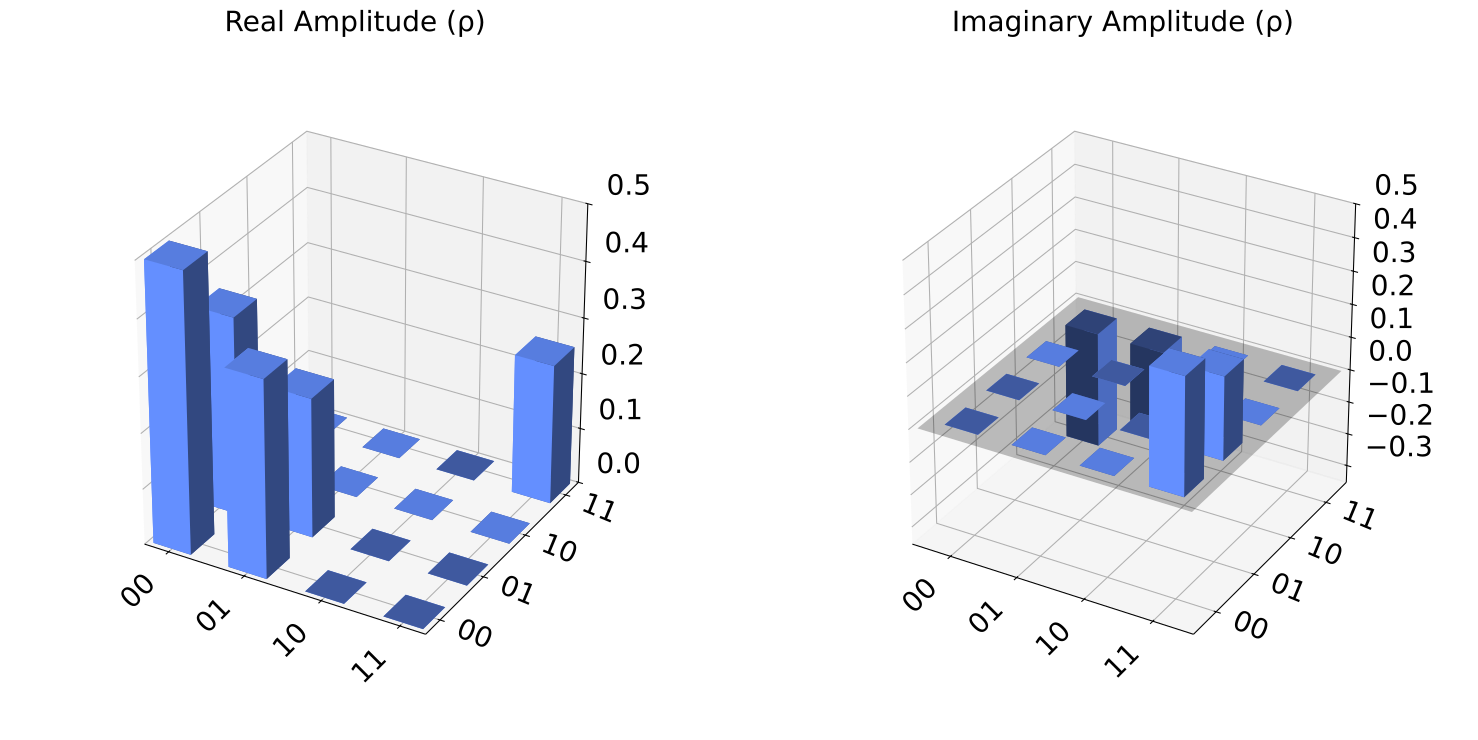
พล็อตนี้แสดงส่วนจริงและส่วนจินตภาพของแต่ละสมาชิก density matrix ในแผนภูมิแท่ง 3 มิติสองชุด เรียกว่าพล็อต "city" เพราะแท่งเหล่านั้นคล้ายตึกระฟ้าในเมือง สถานะที่เราพล็อตมี density matrix ดังต่อไปนี้
ดู API documentation สำหรับข้อมูลเพิ่มเติม
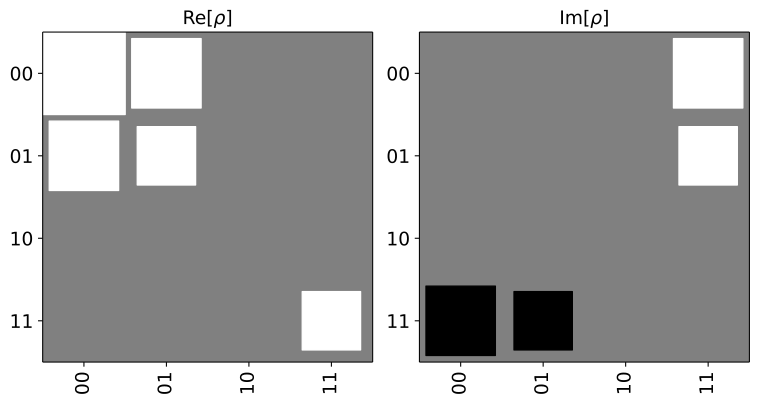
พล็อตนี้คล้ายกับพล็อต "city" มาก แต่ขนาดของ element แต่ละตัวแทนด้วยขนาดของสี่เหลี่ยมแทนที่จะเป็นความสูงของแท่ง สี่เหลี่ยมสีขาวแทน elements ที่มีค่าบวก ส่วนสี่เหลี่ยมสีดำแทน elements ที่มีค่าลบ สถานะที่เราพล็อตมี density matrix ดังต่อไปนี้
ดู API documentation สำหรับข้อมูลเพิ่มเติม
Observable คือวิธีการวัดสถานะควอนตัมที่ผลลัพธ์การวัดที่เป็นไปได้เป็นจำนวนจริง ค่าที่คาดหวังของผลลัพธ์เรียกอีกอย่างว่า expectation value ของ observable บนสถานะนั้น และสามารถมองได้ว่าเป็นค่าเฉลี่ยของการสังเกตสถานะนั้นอย่างไม่สิ้นสุด
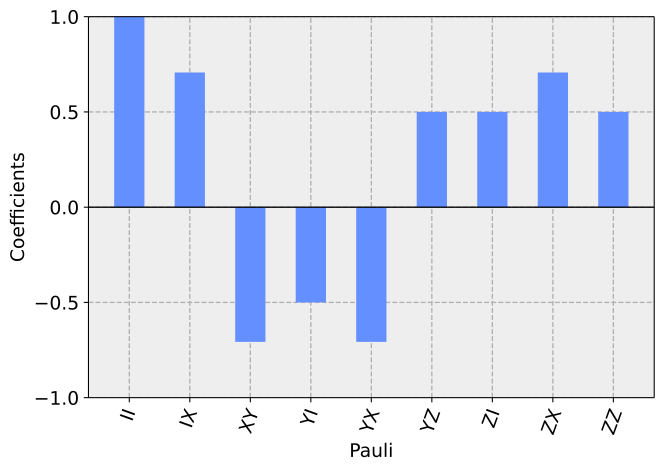
Tensor products ของ Pauli matrices เป็น observables ทั้งหมดที่คืน +1 หรือ -1 พล็อตนี้แสดง expectation values ของสถานะบน Pauli operators ต่างๆ เป็นแผนภูมิแท่ง Density matrices ทั้งหมดสามารถเขียนเป็นผลรวมของ Pauli matrices เหล่านี้ โดยถ่วงน้ำหนักด้วย expectation values ของมัน
ตัวอย่างเช่น สถานะนี้สามารถเขียนเป็นผลรวมของเทอม:
นอกจากนี้ยังสามารถคำนวณ coefficients เหล่านี้โดยใช้ SparsePauliOp
ดู API documentation สำหรับข้อมูลเพิ่มเติม
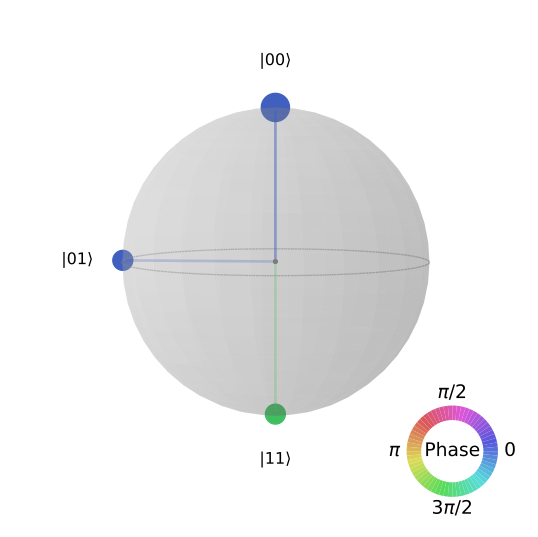
"QSphere" เป็นมุมมองเฉพาะของ Qiskit สำหรับสถานะควอนตัม โดย amplitude และ phase ของแต่ละ element ใน statevector จะถูกพล็อตบนพื้นผิวของทรงกลม ความหนาของจุดแต่ละจุดแทน amplitude และสีแทน phase สำหรับ mixed states จะแสดงทรงกลมสำหรับแต่ละองค์ประกอบ
ดู API documentation สำหรับข้อมูลเพิ่มเติม
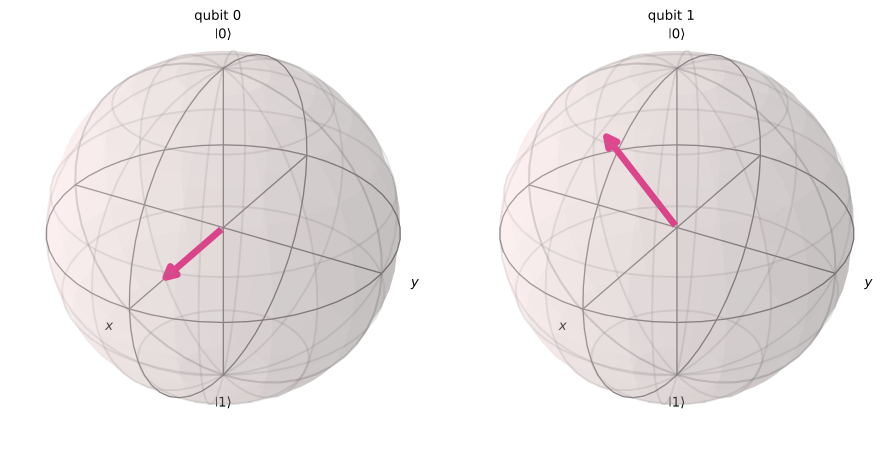
Bloch vector ของสถานะ qubit คือ expectation value ของมันใน X, Y และ Z Pauli observables ที่ mapping ไปยังแกน X, Y และ Z ในพื้นที่ 3 มิติ พล็อตนี้ project สถานะควอนตัมหลาย-qubit ลงบนพื้นที่ qubit เดียวและพล็อตแต่ละ qubit บน Bloch sphere การแสดงภาพนี้แสดงเฉพาะ expectation values ของ qubits แต่ละตัว ไม่สามารถแสดง correlations ระหว่าง qubits ได้ จึงไม่สามารถอธิบายสถานะควอนตัมแบบ entangled ได้อย่างครบถ้วน
ดู API documentation สำหรับข้อมูลเพิ่มเติม
psi.draw("latex") # psi is a Statevector object
from qiskit.quantum_info import DensityMatrix

DensityMatrix(psi).draw("latex")  # convert to a DensityMatrix and draw
from qiskit.visualization import plot_state_city

plot_state_city(psi)
# Alternative: psi.draw("city")
from qiskit.visualization import plot_state_hinton

plot_state_hinton(psi)
# Alternative: psi.draw("hinton")
from qiskit.visualization import plot_state_paulivec

plot_state_paulivec(psi)
# Alternative: psi.draw("paulivec")
from qiskit.quantum_info import SparsePauliOp

SparsePauliOp.from_operator(psi)
SparsePauliOp(['II', 'IX', 'XY', 'YI', 'YX', 'YZ', 'ZI', 'ZX', 'ZZ'],
              coeffs=[ 0.25     +0.j,  0.1767767+0.j, -0.1767767+0.j, -0.125    +0.j,
 -0.1767767+0.j,  0.125    +0.j,  0.125    +0.j,  0.1767767+0.j,
  0.125    +0.j])
from qiskit.visualization import plot_state_qsphere

plot_state_qsphere(psi)
# Alternative: psi.draw("qsphere")
from qiskit.visualization import plot_bloch_multivector

plot_bloch_multivector(psi)
# Alternative: psi.draw("bloch")
ตัวเลือกสำหรับฟังก์ชันพล็อตสถานะ
ฟังก์ชันพล็อตสถานะทั้งหมดรับ arguments ต่อไปนี้ (ยกเว้น LaTeX drawer ที่ไม่คืน Matplotlib figure และ plot_state_qsphere ที่รับเฉพาะ figsize):
- title (str): string สำหรับชื่อพล็อต แสดงที่ด้านบนของพล็อต
- figsize (tuple): ขนาด figure เป็นนิ้ว (กว้าง, สูง)
ฟังก์ชัน plot_state_city และ plot_state_paulivec ยังรับ argument color (list ของ strings) ที่ระบุสีของแท่ง ดู API documentation สำหรับข้อมูลเพิ่มเติม
ขั้นตอนถัดไป
- ต้องการทบทวนความรู้ด้านข้อมูลควอนตัม? ดูหลักสูตร Basics of quantum information บน IBM Quantum Learning
- อ่าน contributing guidelines ถ้าต้องการมีส่วนร่วมใน open-source Qiskit SDK