แสดงผลลัพธ์
เวอร์ชันแพ็กเกจ
โค้ดในหน้านี้พัฒนาโดยใช้ requirement ต่อไปนี้ แนะนำให้ใช้เวอร์ชันเหล่านี้หรือใหม่กว่า
qiskit[all]~=2.5.2
พล็อต histogram
ฟังก์ชัน plot_histogram แสดงผลลัพธ์จากการ sampling quantum circuit บน QPU
ฟังก์ชันนี้คืน object matplotlib.Figure เมื่อบรรทัดสุดท้ายของ code cell output เป็น object เหล่านี้ Jupyter notebook จะแสดงไว้ใต้ cell ถ้าเรียกใช้ฟังก์ชันเหล่านี้ในสภาพแวดล้อมอื่นหรือใน script คุณต้องแสดงหรือบันทึก output โดยตรง
มีสองตัวเลือก:
- เรียก
.show()บน object ที่คืนมาเพื่อเปิดรูปภาพในหน้าต่างใหม่ (สมมติว่า matplotlib backend ที่กำหนดค่าไว้เป็นแบบ interactive) - เรียก
.savefig("out.png")เพื่อบันทึก figure ไปที่out.pngใน working directory ปัจจุบัน เมธอดsavefig()รับ path เพื่อให้ปรับตำแหน่งและชื่อไฟล์ได้ ตัวอย่างเช่นplot_state_city(psi).savefig("out.png")
ตัวอย่างเช่น สร้าง Bell state สองqubit:
# Added by doQumentation — required packages for this notebook
!pip install -q matplotlib numpy qiskit
from qiskit.primitives import StatevectorSampler as Sampler
from qiskit.transpiler import generate_preset_pass_manager

from qiskit.circuit import QuantumCircuit
from qiskit.visualization import plot_histogram
# Quantum circuit to make a Bell state
bell = QuantumCircuit(2)
bell.h(0)
bell.cx(0, 1)
bell.measure_all()

pm = generate_preset_pass_manager(optimization_level=1)
isa_circuit = pm.run(bell)

# execute the quantum circuit
sampler = Sampler()
job = sampler.run([isa_circuit])
result = job.result()

print(result)
PrimitiveResult([SamplerPubResult(data=DataBin(meas=BitArray(<shape=(), num_shots=1024, num_bits=2>)), metadata={'shots': 1024, 'circuit_metadata': {}})], metadata={'version': 2})
plot_histogram(result[0].data.meas.get_counts())

option เมื่อพล็อต histogram
ใช้ option ต่อไปนี้สำหรับ plot_histogram เพื่อปรับกราฟผลลัพธ์
-
legend: ให้ label สำหรับการรัน รับรายการ string ที่ใช้ label ผลลัพธ์ของแต่ละการรัน มีประโยชน์มากที่สุดเมื่อพล็อตผลลัพธ์หลายการรันใน histogram เดียวกัน -
sort: ปรับลำดับของแท่งใน histogram สามารถตั้งเป็นลำดับจากน้อยไปมากด้วยascหรือจากมากไปน้อยด้วยdesc -
number_to_keep: รับจำนวนเต็มสำหรับจำนวน term ที่จะแสดง ส่วนที่เหลือจะถูกรวมเป็นแท่งเดียวชื่อ "rest" -
color: ปรับสีของแท่ง รับ string หรือรายการ string ของสีที่ใช้สำหรับแท่งในแต่ละการรัน -
bar_labels: ปรับว่าจะพิมพ์ label เหนือแท่งหรือไม่ -
figsize: รับ tuple ของขนาดเป็นนิ้วสำหรับ figure ผลลัพธ์
# Execute two-qubit Bell state again

job = sampler.run([isa_circuit], shots=1000)
second_result = job.result()

# Plot results with custom options
plot_histogram(
    [
        result[0].data.meas.get_counts(),
        second_result[0].data.meas.get_counts(),
    ],
    legend=["first", "second"],
    sort="desc",
    figsize=(15, 12),
    color=["orange", "black"],
    bar_labels=False,
)

พล็อตผลลัพธ์ Estimator
Qiskit ไม่มีฟังก์ชัน built-in สำหรับพล็อตผลลัพธ์ Estimator แต่สามารถใช้ bar plot ของ Matplotlib สำหรับการแสดงผลอย่างรวดเร็ว
เพื่อสาธิต cell ต่อไปนี้ประมาณค่า expectation value ของ observable เจ็ดตัวที่แตกต่างกันบน quantum state
import numpy as np
from qiskit import QuantumCircuit
from qiskit.quantum_info import SparsePauliOp
from qiskit.primitives import StatevectorEstimator as Estimator
from qiskit.transpiler import generate_preset_pass_manager
from matplotlib import pyplot as plt

# Simple estimation experiment to create results
qc = QuantumCircuit(2)
qc.h(0)
qc.crx(1.5, 0, 1)

observables_labels = ["ZZ", "XX", "YZ", "ZY", "XY", "XZ", "ZX"]
observables = [SparsePauliOp(label) for label in observables_labels]

pm = generate_preset_pass_manager(optimization_level=1)
isa_circuit = pm.run(qc)
isa_observables = [
    operator.apply_layout(isa_circuit.layout) for operator in observables
]

# Reshape observable array for broadcasting
reshaped_ops = np.fromiter(isa_observables, dtype=object)
reshaped_ops = reshaped_ops.reshape((7, 1))

estimator = Estimator()
job = estimator.run([(isa_circuit, reshaped_ops)])
result = job.result()[0]
exp_val = job.result()[0].data.evs
print(result)

# Since the result array is structured as a 2D array where each element is a
# list containing a single value, you need to flatten the array.

# Plot using Matplotlib
plt.bar(observables_labels, exp_val.flatten())
PubResult(data=DataBin(evs=np.ndarray(<shape=(7, 1), dtype=float64>), stds=np.ndarray(<shape=(7, 1), dtype=float64>), shape=(7, 1)), metadata={'target_precision': 0.0, 'circuit_metadata': {}})
<BarContainer object of 7 artists>

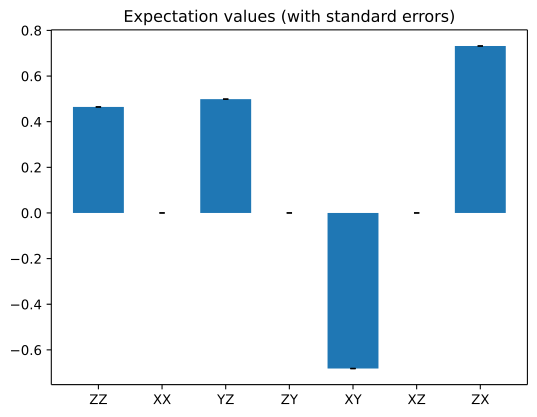
cell ต่อไปนี้ใช้ standard error ที่ประมาณการของแต่ละผลลัพธ์และเพิ่มเป็น error bar ดู เอกสาร bar plot สำหรับคำอธิบายเต็มของพล็อต
standard_error = job.result()[0].data.stds

_, ax = plt.subplots()
ax.bar(
    observables_labels,
    exp_val.flatten(),
    yerr=standard_error.flatten(),
    capsize=2,
)
ax.set_title("Expectation values (with standard errors)")
Text(0.5, 1.0, 'Expectation values (with standard errors)')