การคอมไพล์วงจรควอนตัมแบบประมาณสำหรับการวิวัฒน์ตามเวลา
ประมาณการการใช้งาน: 15 วินาทีบนโปรเซสเซอร์ Heron (หมายเหตุ: นี่เป็นเพียงการประมาณการ ระยะเวลาจริงอาจแตกต่างกัน)
ผลการเรียนรู้
-
วิธีใช้ AQC-Tensor Qiskit addon เพื่อบีบอัด Trotter circuit ที่ลึกให้เป็น ansatz circuit ที่ตื้นกว่า
-
วิธีสร้าง parametrized ansatz จาก Trotter circuit และปรับแต่งพารามิเตอร์โดยใช้วิธี tensor network (MPS)
-
วิธีประเมิน fidelity ของวงจรที่บีบอัดแล้วเทียบกับ target evolution และรันบนฮาร์ดแวร์ควอนตัม
สิ่งที่ควรรู้ก่อน
ภูมิหลัง
บทช่วยสอนนี้สาธิตวิธีการใช้งาน Approximate Quantum Compilation โดยใช้ tensor network (AQC-Tensor) กับ Qiskit เพื่อเพิ่มประสิทธิภาพของวงจรควอนตัม AQC-Tensor บีบอัด Trotter circuit ที่ลึกให้เป็นวงจรที่ตื้นกว่าและเหมาะกับฮาร์ดแวร์มากขึ้น โดยรักษาความแม่นยำของการจำลองไว้
AQC-Tensor ทำงานอย่างไร
สมมติว่าต้องการจำลอง Hamiltonian ตลอดเวลารวม โดยใช้ Trotter steps วงจร Trotter แบบเต็มคือ:
วิธีง่ายๆ ใช้ Trotter step น้อยเพื่อรักษาความลึกของวงจรให้จัดการได้ แต่จะเกิด Trotter error มาก AQC-Tensor แก้ปัญหานี้โดยแยกความแม่นยำออกจากความลึก:
-
Target circuit (ความแม่นยำสูง ลึก): สร้าง Trotter circuit ที่มีหลาย step ประมาณ สำหรับเวลาวิวัฒนาการเดิม circuit นี้มี Trotter error น้อยกว่ามาก แต่ลึกเกินไปสำหรับฮาร์ดแวร์ เนื่องจากจำลองแบบคลาสสิกในรูป matrix product state (MPS) ความลึกจึงไม่ใช่ปัญหา
-
Ansatz circuit (ความลึกต่ำ มีพารามิเตอร์): กำหนด parametrized circuit ที่มีโครงสร้างเดียวกับ Trotter circuit แบบ single-step กำหนดค่าเริ่มต้นให้ จากนั้นปรับ ซ้ำๆ เพื่อให้ ให้ผลลัพธ์ของ target state ที่มีความแม่นยำสูงได้ใกล้เคียงที่สุด
ผลลัพธ์คือวงจรที่รักษาความลึกของ Trotter step เดียว แต่ได้ความแม่นยำเทียบเท่ากับหลาย step ทำให้เหมาะกับฮาร์ดแวร์ควอนตัมในยุคใกล้
เมื่อไหรที่ควรใช้ AQC-Tensor
AQC-Tensor มีประสิทธิภาพสูงสุดเมื่อ:
-
ความลึกของวงจรเกิน coherence time ของฮาร์ดแวร์ หาก Trotter simulation ต้องการ Trotter step มากกว่าที่ device รองรับ AQC-Tensor สามารถบีบอัด evolution ให้เป็นวงจรที่ตื้นกว่าได้
-
Entanglement ยังจัดการได้แบบคลาสสิก entanglement รวมในสถานะที่วิวัฒน์ตามเวลาขึ้นกับเวลา เป็นหลัก ไม่ใช่จำนวน Trotter step ซึ่งหมายความว่า target circuit ที่มี step มักไม่ยากกว่าในการแสดงเป็น MPS มากกว่า circuit ที่มี step ตราบใดที่ สั้นพอที่ bond dimension ยังจัดการได้
-
มี ansatz ที่เป็นธรรมชาติ เนื่องจาก ansatz สะท้อนโครงสร้างของ Trotter circuit จึงมีจุดเริ่มต้นที่มีแรงจูงใจทางฟิสิกส์พร้อมพารามิเตอร์เริ่มต้นที่กำหนดชัดเจน ช่วยหลีกเลี่ยงปัญหาการ convergence ที่มักเกิดกับ variational ansatze แบบทั่วไป
วิธีนี้แตกต่างจากการบีบอัดวงจรทั่วไป แทนที่จะพยายามประมาณ unitary ที่กำหนดเองด้วย gate น้อยลง AQC-Tensor คงโครงสร้าง gate เดิมและปรับพารามิเตอร์เพื่อลด Trotter error ดูรายละเอียดเพิ่มเติมได้ใน AQC-Tensor documentation
บทช่วยสอนนี้นำทางคุณผ่าน AQC-Tensor workflow แบบ full state-preparation: กำหนด Hamiltonian สร้าง Trotter circuit บีบอัดด้วยการปรับแต่ง tensor-network และรันผลลัพธ์บนฮาร์ดแวร์ IBM Quantum®
ข้อกำหนดเบื้องต้น
ก่อนเริ่มบทช่วยสอนนี้ ตรวจสอบให้แน่ใจว่าคุณได้ติดตั้งสิ่งต่อไปนี้:
-
Qiskit SDK v2.0 หรือใหม่กว่า พร้อมรองรับ visualization
-
Qiskit Runtime v0.22 หรือใหม่กว่า (
pip install qiskit-ibm-runtime) -
ส่วนเสริม Qiskit AQC-Tensor (
pip install 'qiskit-addon-aqc-tensor[aer,quimb-jax]')
การตั้งค่า
# Added by doQumentation — required packages for this notebook
!pip install -q matplotlib numpy qiskit qiskit-addon-aqc-tensor qiskit-addon-utils qiskit-ibm-runtime quimb rustworkx scipy
import numpy as np
import quimb.tensor
import datetime
import matplotlib.pyplot as plt

from scipy.linalg import expm
from scipy.optimize import OptimizeResult, minimize

from qiskit.quantum_info import SparsePauliOp, Pauli
from qiskit.transpiler import CouplingMap
from qiskit.transpiler.preset_passmanagers import generate_preset_pass_manager
from qiskit import QuantumCircuit
from qiskit.synthesis import SuzukiTrotter

from qiskit_addon_utils.problem_generators import (
    generate_time_evolution_circuit,
)
from qiskit_addon_aqc_tensor.ansatz_generation import (
    generate_ansatz_from_circuit,
)
from qiskit_addon_aqc_tensor.objective import MaximizeStateFidelity
from qiskit_addon_aqc_tensor.simulation.quimb import QuimbSimulator
from qiskit_addon_aqc_tensor.simulation import tensornetwork_from_circuit
from qiskit_addon_aqc_tensor.simulation import compute_overlap

from qiskit_ibm_runtime import QiskitRuntimeService
from qiskit_ibm_runtime import EstimatorV2 as Estimator
from qiskit_ibm_runtime.fake_provider import FakeKyiv

from rustworkx.visualization import graphviz_draw
ตัวอย่างขนาดเล็กด้วย simulator
ส่วนนี้ใช้ระบบ 10 ไซต์เพื่ออธิบาย AQC-Tensor workflow ทีละขั้นตอน เราจำลองพลวัตของ XXZ spin chain ขนาด 10 ไซต์ ซึ่งเป็นโมเดลที่ได้รับการศึกษาอย่างแพร่หลายสำหรับการตรวจสอบปฏิสัมพันธ์ spin และคุณสมบัติทางแม่เหล็ก
Hamiltonian คือ:
โดยที่ คือสัมประสิทธิ์แบบสุ่มสำหรับเส้น และ
ขั้นตอนที่ 1: แมป input แบบคลาสสิกไปยังปัญหาควอนตัม
ในขั้นตอนนี้ เราจะ:
- กำหนด Hamiltonian, observable และสถานะเริ่มต้น
- คำนวณค่า expectation value ที่แม่นยำแบบคลาสสิกสำหรับการเปรียบเทียบในภายหลัง
- สร้าง Trotter circuit ที่มีความแม่นยำสูง (AQC target) และบีบอัดให้เป็น ansatz ที่มีความลึกต่ำโดยใช้ AQC-Tensor
ตั้งค่า Hamiltonian, observable และสถานะเริ่มต้น
# L is the number of sites in the 1D spin chain
L = 10

# Generate the coupling map
edge_list = [(i - 1, i) for i in range(1, L)]
even_edges = edge_list[::2]
odd_edges = edge_list[1::2]
coupling_map = CouplingMap(edge_list)

# Generate random coefficients for our XXZ Hamiltonian
np.random.seed(0)
Js = np.random.rand(L - 1) + 0.5 * np.ones(L - 1)
hamiltonian = SparsePauliOp(Pauli("I" * L))
for i, edge in enumerate(even_edges + odd_edges):
    hamiltonian += SparsePauliOp.from_sparse_list(
        [
            ("XX", (edge), Js[i] / 2),
            ("YY", (edge), Js[i] / 2),
            ("ZZ", (edge), Js[i]),
        ],
        num_qubits=L,
    )

# Generate a ZZ observable between the two middle qubits
observable = SparsePauliOp.from_sparse_list(
    [("ZZ", (L // 2 - 1, L // 2), 1.0)], num_qubits=L
)

# Generate an initial Néel state |1010101010⟩
initial_state_circuit = QuantumCircuit(L)
for i in range(L):
    if i % 2:
        initial_state_circuit.x(i)

print("Hamiltonian:", hamiltonian)
print("Observable:", observable)
graphviz_draw(coupling_map.graph, method="circo")
Hamiltonian: SparsePauliOp(['IIIIIIIIII', 'IIIIIIIIXX', 'IIIIIIIIYY', 'IIIIIIIIZZ', 'IIIIIIXXII', 'IIIIIIYYII', 'IIIIIIZZII', 'IIIIXXIIII', 'IIIIYYIIII', 'IIIIZZIIII', 'IIXXIIIIII', 'IIYYIIIIII', 'IIZZIIIIII', 'XXIIIIIIII', 'YYIIIIIIII', 'ZZIIIIIIII', 'IIIIIIIXXI', 'IIIIIIIYYI', 'IIIIIIIZZI', 'IIIIIXXIII', 'IIIIIYYIII', 'IIIIIZZIII', 'IIIXXIIIII', 'IIIYYIIIII', 'IIIZZIIIII', 'IXXIIIIIII', 'IYYIIIIIII', 'IZZIIIIIII'],
              coeffs=[1.        +0.j, 0.52440675+0.j, 0.52440675+0.j, 1.0488135 +0.j,
 0.60759468+0.j, 0.60759468+0.j, 1.21518937+0.j, 0.55138169+0.j,
 0.55138169+0.j, 1.10276338+0.j, 0.52244159+0.j, 0.52244159+0.j,
 1.04488318+0.j, 0.4618274 +0.j, 0.4618274 +0.j, 0.9236548 +0.j,
 0.57294706+0.j, 0.57294706+0.j, 1.14589411+0.j, 0.46879361+0.j,
 0.46879361+0.j, 0.93758721+0.j, 0.6958865 +0.j, 0.6958865 +0.j,
 1.391773  +0.j, 0.73183138+0.j, 0.73183138+0.j, 1.46366276+0.j])
Observable: SparsePauliOp(['IIIIZZIIII'],
              coeffs=[1.+0.j])

คำนวณค่า expectation value ที่แม่นยำ
สำหรับระบบขนาดนี้ เราสามารถคำนวณค่า expectation value ที่วิวัฒน์ตามเวลาแบบแม่นยำได้โดยตรงโดยใช้การ exponentiation matrix ซึ่งเป็น ground truth สำหรับการประเมินความแม่นยำของ AQC circuit
aqc_evolution_time = 0.2

# Each baseline Trotter step covers dt = aqc_evolution_time / 3
# The subsequent (uncompressed) step covers 1 additional dt
subsequent_evolution_time = aqc_evolution_time / 3
total_evolution_time = aqc_evolution_time + subsequent_evolution_time

# Compute exact expectation value via matrix exponentiation
H_matrix = hamiltonian.to_matrix()
U_exact = expm(-1j * H_matrix * total_evolution_time)

# Build the initial state vector (Néel state)
initial_state_vec = np.zeros(2**L)
state_idx = sum(2**i for i in range(L) if i % 2)
initial_state_vec[state_idx] = 1.0

# Evolve and compute expectation value
evolved_state = U_exact @ initial_state_vec
obs_matrix = observable.to_matrix()
exact_expval = (evolved_state.conj() @ obs_matrix @ evolved_state).real

print(f"AQC evolution time: {aqc_evolution_time}")
print(f"Subsequent evolution time: {subsequent_evolution_time:.6f}")
print(f"Total evolution time: {total_evolution_time:.6f}")
print(f"Exact expectation value: {exact_expval:.6f}")
AQC evolution time: 0.2
Subsequent evolution time: 0.066667
Total evolution time: 0.266667
Exact expectation value: -0.700899
สร้าง AQC target circuit
ตอนนี้เราสร้าง Trotter circuit ที่จะเป็น AQC target circuit นี้ใช้ Trotter step จำนวนมาก (32) เพื่อความแม่นยำสูง เนื่องจากจะถูกจำลองแบบคลาสสิกในรูป MPS เท่านั้น ไม่ใช่รันบนฮาร์ดแวร์ ความลึกมากจึงไม่ใช่ปัญหา
aqc_target_num_trotter_steps = 32

aqc_target_circuit = initial_state_circuit.copy()
aqc_target_circuit.compose(
    generate_time_evolution_circuit(
        hamiltonian,
        synthesis=SuzukiTrotter(reps=aqc_target_num_trotter_steps),
        time=aqc_evolution_time,
    ),
    inplace=True,
)
สร้าง ansatz, พารามิเตอร์เริ่มต้น, subsequent circuit และ baseline circuit
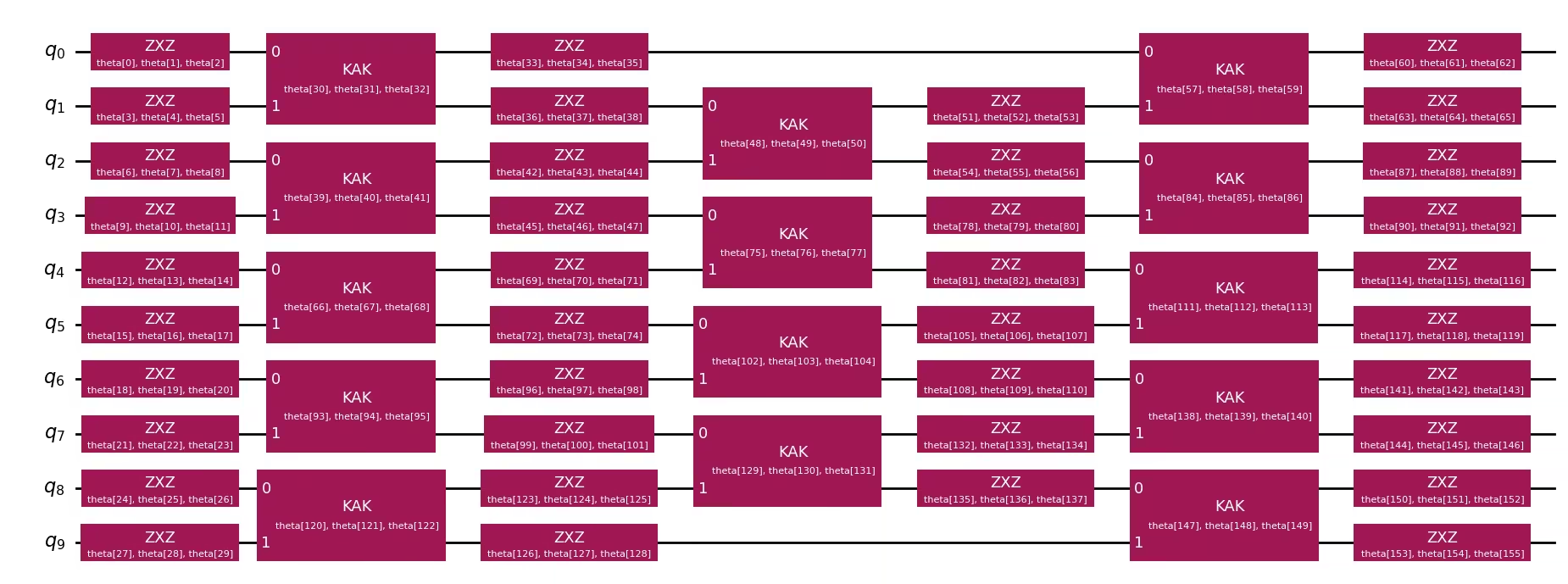
ต่อไป เราสร้างวงจร "good" ที่มีเวลาวิวัฒนาการเดียวกับ AQC target แต่มี Trotter step น้อยกว่ามาก (แค่หนึ่ง step) เราส่งวงจรนี้ไปยัง generate_ansatz_from_circuit ซึ่งส่งคืน:
-
วงจร ansatz ที่มีพารามิเตอร์ทั่วไปพร้อมการเชื่อมต่อ two-qubit เดียวกัน
-
พารามิเตอร์เริ่มต้น ที่ให้ผลลัพธ์เป็นวงจร input เมื่อใส่เข้าไปใน ansatz
นอกจากนี้เรายังสร้าง:
- subsequent circuit ที่มี Trotter step เดียวที่จะต่อท้าย (ไม่บีบอัด) หลังส่วนที่ปรับด้วย AQC ตามแนวทางใน AQC-Tensor initial state tutorial
- baseline Trotter circuit ที่ใช้ Trotter step สี่ step ตลอดเวลาวิวัฒนาการทั้งหมด (
aqc_evolution_time + subsequent_evolution_time) ใช้เป็นการเปรียบเทียบ: แสดงสิ่งที่จะรันบนฮาร์ดแวร์โดยไม่ใช้ AQC AQC ansatz (3 step บีบอัด + 1 step ไม่บีบอัด) ให้ความแม่นยำที่ดีกว่าที่ความลึกต่ำกว่า
aqc_ansatz_num_trotter_steps = 1

aqc_good_circuit = initial_state_circuit.copy()
aqc_good_circuit.compose(
    generate_time_evolution_circuit(
        hamiltonian,
        synthesis=SuzukiTrotter(reps=aqc_ansatz_num_trotter_steps),
        time=aqc_evolution_time,
    ),
    inplace=True,
)

aqc_ansatz, aqc_initial_parameters = generate_ansatz_from_circuit(
    aqc_good_circuit
)

# Subsequent circuit: 1 non-compressed Trotter step appended after AQC
subsequent_num_trotter_steps = 1
subsequent_circuit = generate_time_evolution_circuit(
    hamiltonian,
    synthesis=SuzukiTrotter(reps=subsequent_num_trotter_steps),
    time=subsequent_evolution_time,
)

# Baseline Trotter circuit: 4 Trotter steps over total evolution time, no AQC
baseline_num_trotter_steps = 4
baseline_circuit = initial_state_circuit.copy()
baseline_circuit.compose(
    generate_time_evolution_circuit(
        hamiltonian,
        synthesis=SuzukiTrotter(reps=baseline_num_trotter_steps),
        time=total_evolution_time,
    ),
    inplace=True,
)

print(
    f"Target circuit:      depth {aqc_target_circuit.depth(lambda x: x.operation.num_qubits == 2)}"
)
print(
    f"Baseline circuit:    depth {baseline_circuit.depth(lambda x: x.operation.num_qubits == 2)} ({baseline_num_trotter_steps} Trotter steps, time={total_evolution_time:.4f})"
)
print(
    f"Subsequent circuit:  depth {subsequent_circuit.depth(lambda x: x.operation.num_qubits == 2)} ({subsequent_num_trotter_steps} Trotter step, time={subsequent_evolution_time:.4f})"
)
print(
    f"Ansatz circuit:      depth {aqc_ansatz.depth(lambda x: x.operation.num_qubits == 2)}, with {len(aqc_initial_parameters)} parameters"
)
aqc_ansatz.draw("mpl", fold=-1)
Target circuit:      depth 384
Baseline circuit:    depth 48 (4 Trotter steps, time=0.2667)
Subsequent circuit:  depth 12 (1 Trotter step, time=0.0667)
Ansatz circuit:      depth 3, with 156 parameters
ตั้งค่าการจำลอง tensor network และสร้าง target MPS
เราใช้ quimb matrix-product state (MPS) circuit simulator โดยมี JAX ให้ gradient อัตโนมัติสำหรับการปรับแต่งแบบ gradient-based จากนั้นเราสร้างการแสดง MPS ของ target state และประเมิน starting fidelity ระหว่าง initial ansatz กับ target เนื่องจากปัญหานี้เป็นตัวอย่างขนาดค่อนข้างเล็ก starting fidelity จึงค่อนข้างสูง
simulator_settings = QuimbSimulator(
    quimb.tensor.CircuitMPS, autodiff_backend="jax"
)

aqc_target_mps = tensornetwork_from_circuit(
    aqc_target_circuit, simulator_settings
)
print("Target MPS maximum bond dimension:", aqc_target_mps.psi.max_bond())

good_mps = tensornetwork_from_circuit(aqc_good_circuit, simulator_settings)
starting_fidelity = abs(compute_overlap(good_mps, aqc_target_mps)) ** 2
print(f"Starting fidelity: {starting_fidelity:.6f}")
Target MPS maximum bond dimension: 5
Starting fidelity: 0.998246
ปรับแต่งพารามิเตอร์ ansatz
เราใช้ L-BFGS-B optimizer เพื่อย่อ cost function MaximizeStateFidelity optimizer ปรับพารามิเตอร์ ansatz ซ้ำๆ เพื่อเพิ่ม fidelity ระหว่าง ansatz circuit กับ target MPS
aqc_stopping_fidelity = 1
aqc_max_iterations = 500

stopping_point = 1.0 - aqc_stopping_fidelity
objective = MaximizeStateFidelity(
    aqc_target_mps, aqc_ansatz, simulator_settings
)

def callback(intermediate_result: OptimizeResult):
    fidelity = 1 - intermediate_result.fun
    print(
        f"{datetime.datetime.now()} Intermediate result: Fidelity {fidelity:.8f}"
    )
    if intermediate_result.fun < stopping_point:
        raise StopIteration

result = minimize(
    objective,
    aqc_initial_parameters,
    method="L-BFGS-B",
    jac=True,
    options={"maxiter": aqc_max_iterations},
    callback=callback,
)
if result.status not in (0, 1, 99):
    raise RuntimeError(
        f"Optimization failed: {result.message} (status={result.status})"
    )

print(f"Done after {result.nit} iterations.")
aqc_final_parameters = result.x
2026-05-18 13:14:49.731596 Intermediate result: Fidelity 0.99952882
2026-05-18 13:14:49.734425 Intermediate result: Fidelity 0.99958531
2026-05-18 13:14:49.737101 Intermediate result: Fidelity 0.99960093
2026-05-18 13:14:49.739813 Intermediate result: Fidelity 0.99961046
2026-05-18 13:14:49.742969 Intermediate result: Fidelity 0.99962560
2026-05-18 13:14:49.745916 Intermediate result: Fidelity 0.99964395
2026-05-18 13:14:49.748615 Intermediate result: Fidelity 0.99968150
2026-05-18 13:14:49.753684 Intermediate result: Fidelity 0.99970569
2026-05-18 13:14:49.756208 Intermediate result: Fidelity 0.99973788
2026-05-18 13:14:49.759067 Intermediate result: Fidelity 0.99975385
2026-05-18 13:14:49.762321 Intermediate result: Fidelity 0.99976458
2026-05-18 13:14:49.765526 Intermediate result: Fidelity 0.99977661
2026-05-18 13:14:49.768496 Intermediate result: Fidelity 0.99978663
2026-05-18 13:14:49.771278 Intermediate result: Fidelity 0.99980236
2026-05-18 13:14:49.773735 Intermediate result: Fidelity 0.99981607
2026-05-18 13:14:49.776339 Intermediate result: Fidelity 0.99982811
2026-05-18 13:14:49.779177 Intermediate result: Fidelity 0.99985827
2026-05-18 13:14:49.782243 Intermediate result: Fidelity 0.99988354
2026-05-18 13:14:49.784904 Intermediate result: Fidelity 0.99991608
2026-05-18 13:14:49.787737 Intermediate result: Fidelity 0.99993336
2026-05-18 13:14:49.790414 Intermediate result: Fidelity 0.99993956
2026-05-18 13:14:49.793029 Intermediate result: Fidelity 0.99994421
2026-05-18 13:14:49.795585 Intermediate result: Fidelity 0.99994743
2026-05-18 13:14:49.835045 Intermediate result: Fidelity 0.99994791
2026-05-18 13:14:49.839786 Intermediate result: Fidelity 0.99994803
2026-05-18 13:14:49.842403 Intermediate result: Fidelity 0.99994898
2026-05-18 13:14:49.873779 Intermediate result: Fidelity 0.99994898
Done after 27 iterations.
ประกอบ AQC circuit สุดท้าย
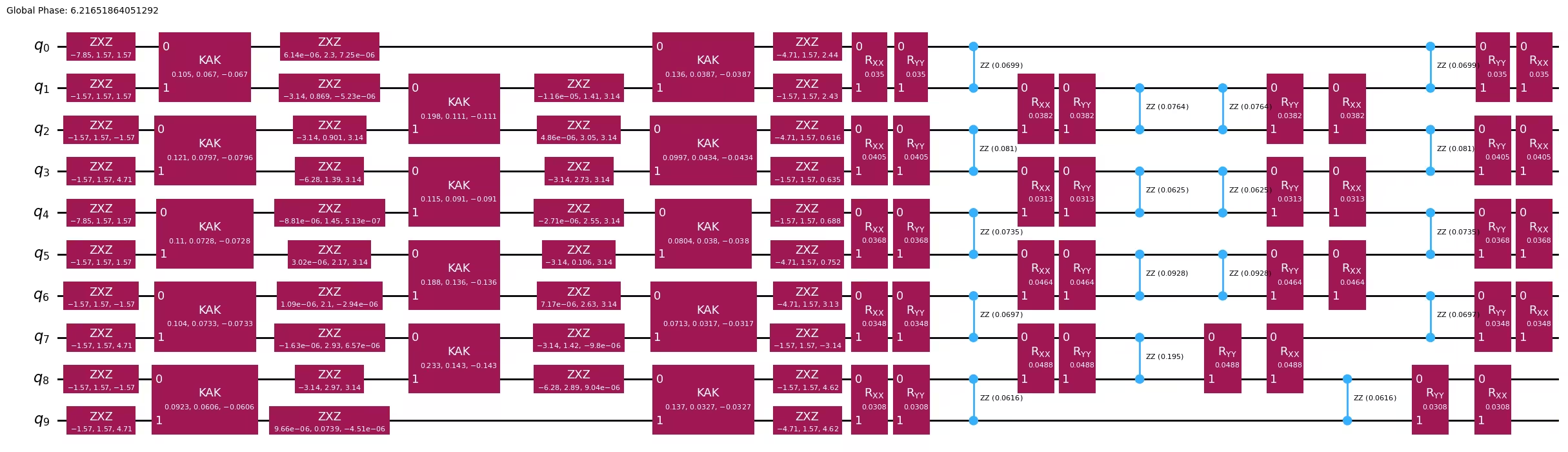
เมื่อได้พารามิเตอร์ที่ปรับแต่งแล้ว เราผูกพารามิเตอร์เหล่านั้นกับ ansatz และต่อท้ายด้วย subsequent (ไม่บีบอัด) Trotter step วงจรที่ได้มีความลึกเท่ากับ Trotter step เดียวที่บีบอัดแล้วบวก step ที่ไม่บีบอัด แต่ส่วนที่บีบอัดประมาณความแม่นยำของ Trotter step 32 step
aqc_final_circuit = aqc_ansatz.assign_parameters(aqc_final_parameters)
aqc_final_circuit.compose(subsequent_circuit, inplace=True)
aqc_final_circuit.draw("mpl", fold=-1)
ขั้นตอนที่ 2: ปรับแต่งปัญหาสำหรับการรันบน quantum hardware
สำหรับตัวอย่างขนาดเล็กนี้ เราใช้ fake backend (FakeKyiv) เพื่อจำลองการรันบนฮาร์ดแวร์แบบ local เรา transpile ทั้ง AQC-optimized circuit (aqc_final_circuit) และ baseline Trotter circuit (baseline_circuit ที่มี Trotter step สี่ step ตลอดเวลาวิวัฒนาการทั้งหมด ไม่มี AQC) ไปยัง instruction set architecture (ISA) ของ backend ด้วย optimization_level=3 เพื่อลด circuit depth ต่อไป
backend = FakeKyiv()

pass_manager = generate_preset_pass_manager(
    backend=backend, optimization_level=3
)

# Transpile the AQC-optimized circuit (compressed + subsequent step)
isa_circuit = pass_manager.run(aqc_final_circuit)
isa_observable = observable.apply_layout(isa_circuit.layout)
print(
    "AQC circuit depth:",
    isa_circuit.depth(lambda x: x.operation.num_qubits == 2),
)

# Transpile the baseline Trotter circuit (no AQC optimization)
isa_baseline_circuit = pass_manager.run(baseline_circuit)
isa_baseline_observable = observable.apply_layout(isa_baseline_circuit.layout)
print(
    "Baseline Trotter circuit depth:",
    isa_baseline_circuit.depth(lambda x: x.operation.num_qubits == 2),
)
AQC circuit depth: 15
Baseline Trotter circuit depth: 27
ขั้นตอนที่ 3: รันด้วย Qiskit primitives
เราใช้ primitive EstimatorV2 กับ fake backend เพื่อรันทั้ง AQC-optimized circuit และ baseline Trotter circuit วัด ZZ observable สำหรับแต่ละ circuit
estimator = Estimator(backend)

# Run both circuits
aqc_result = estimator.run([(isa_circuit, isa_observable)]).result()
baseline_result = estimator.run(
    [(isa_baseline_circuit, isa_baseline_observable)]
).result()
ขั้นตอนที่ 4: ประมวลผลและแสดงผลลัพธ์ในรูปแบบที่ต้องการ
เราดึงค่า expectation value จากทั้งสอง run และเปรียบเทียบกับผลแม่นยำ baseline Trotter circuit แสดงสิ่งที่เราจะได้โดยไม่มี AQC ที่ความลึกของวงจรเดียวกัน ในขณะที่ AQC circuit แสดงการปรับปรุงจากการปรับแต่งด้วย tensor-network
aqc_expval = aqc_result[0].data.evs.tolist()
baseline_expval = baseline_result[0].data.evs.tolist()

print(f"Exact:              {exact_expval:.4f}")
print(
    f"Baseline Trotter:   {baseline_expval:.4f}, |\u0394| = {np.abs(exact_expval - baseline_expval):.4f}  (depth {isa_baseline_circuit.depth(lambda x: x.operation.num_qubits == 2)}, {baseline_num_trotter_steps} steps)"
)
print(
    f"AQC (3+1):          {aqc_expval:.4f}, |\u0394| = {np.abs(exact_expval - aqc_expval):.4f}  (depth {isa_circuit.depth(lambda x: x.operation.num_qubits == 2)}, compressed+subsequent)"
)
Exact:              -0.7009
Baseline Trotter:   -0.5400, |Δ| = 0.1609  (depth 27, 4 steps)
AQC (3+1):          -0.5728, |Δ| = 0.1281  (depth 15, compressed+subsequent)
plt.style.use("seaborn-v0_8")

labels = [
    f"Baseline Trotter\n({baseline_num_trotter_steps} steps, depth {isa_baseline_circuit.depth(lambda x: x.operation.num_qubits == 2)})",
    f"AQC (3+1)\n(depth {isa_circuit.depth(lambda x: x.operation.num_qubits == 2)})",
]
values = [baseline_expval, aqc_expval]
colors = ["tab:orange", "tab:blue"]

plt.figure(figsize=(8, 5))
bars = plt.bar(labels, values, color=colors, width=0.5)
plt.axhline(
    y=exact_expval,
    color="tab:green",
    linestyle="--",
    linewidth=2,
    label=f"Exact ({exact_expval:.4f})",
)
plt.ylabel("Expected Value")
plt.title(
    "AQC-Tensor (3 compressed + 1 uncompressed) vs Baseline Trotter (10-site XXZ)"
)
plt.legend()
for bar in bars:
    y_val = bar.get_height()
    plt.text(
        bar.get_x() + bar.get_width() / 2.0,
        y_val,
        f"{y_val:.4f}",
        ha="center",
        va="bottom" if y_val >= 0 else "top",
    )
plt.axhline(y=0, color="black", linewidth=0.3)
plt.tight_layout()
plt.show()

ตัวอย่างขนาดใหญ่บนฮาร์ดแวร์จริง
ตอนนี้เราขยายไปยังโมเดล XXZ แบบ 50 ไซต์เพื่อสาธิต AQC-Tensor บนปัญหาที่มีขนาดสมจริงกว่า workflow เหมือนกับตัวอย่างขนาดเล็ก: เราบีบอัด Trotter step สาม step ผ่าน AQC และต่อท้ายด้วยหนึ่ง step ที่ไม่บีบอัด
สำหรับระบบขนาดนี้ การ exponentiation matrix ไม่สามารถทำได้ ( มิติ) ดังนั้นเราคำนวณค่า reference expectation value โดยตรงจาก MPS ที่มีความแม่นยำสูงซึ่งวิวัฒน์ตลอดเวลาทั้งหมด
ขั้นตอนที่ 1–4 รวมกัน
# -------------------------Step 1-------------------------

# Define the 50-site spin chain
L = 50
edge_list = [(i - 1, i) for i in range(1, L)]
even_edges = edge_list[::2]
odd_edges = edge_list[1::2]
coupling_map = CouplingMap(edge_list)

# Random XXZ Hamiltonian
np.random.seed(0)
Js = np.random.rand(L - 1) + 0.5 * np.ones(L - 1)
hamiltonian = SparsePauliOp(Pauli("I" * L))
for i, edge in enumerate(even_edges + odd_edges):
    hamiltonian += SparsePauliOp.from_sparse_list(
        [
            ("XX", (edge), Js[i] / 2),
            ("YY", (edge), Js[i] / 2),
            ("ZZ", (edge), Js[i]),
        ],
        num_qubits=L,
    )

observable = SparsePauliOp.from_sparse_list(
    [("ZZ", (L // 2 - 1, L // 2), 1.0)], num_qubits=L
)

# Initial Néel state
initial_state_circuit = QuantumCircuit(L)
for i in range(L):
    if i % 2:
        initial_state_circuit.x(i)

# Time parameters
aqc_evolution_time = 0.2
subsequent_evolution_time = aqc_evolution_time / 3
total_evolution_time = aqc_evolution_time + subsequent_evolution_time

# AQC target circuit (high-accuracy, 32 Trotter steps for AQC portion)
aqc_target_num_trotter_steps = 32

aqc_target_circuit = initial_state_circuit.copy()
aqc_target_circuit.compose(
    generate_time_evolution_circuit(
        hamiltonian,
        synthesis=SuzukiTrotter(reps=aqc_target_num_trotter_steps),
        time=aqc_evolution_time,
    ),
    inplace=True,
)

# Generate ansatz from 1-step Trotter circuit
aqc_good_circuit = initial_state_circuit.copy()
aqc_good_circuit.compose(
    generate_time_evolution_circuit(
        hamiltonian,
        synthesis=SuzukiTrotter(reps=1),
        time=aqc_evolution_time,
    ),
    inplace=True,
)

aqc_ansatz, aqc_initial_parameters = generate_ansatz_from_circuit(
    aqc_good_circuit
)

# Subsequent circuit: 1 non-compressed Trotter step
subsequent_circuit = generate_time_evolution_circuit(
    hamiltonian,
    synthesis=SuzukiTrotter(reps=1),
    time=subsequent_evolution_time,
)

# Baseline Trotter circuit: 4 Trotter steps over total evolution time, no AQC
baseline_num_trotter_steps = 4
baseline_circuit = initial_state_circuit.copy()
baseline_circuit.compose(
    generate_time_evolution_circuit(
        hamiltonian,
        synthesis=SuzukiTrotter(reps=baseline_num_trotter_steps),
        time=total_evolution_time,
    ),
    inplace=True,
)
print(
    f"Target circuit:  depth {aqc_target_circuit.depth(lambda x: x.operation.num_qubits == 2)}"
)
print(
    f"Ansatz circuit:  depth {aqc_ansatz.depth(lambda x: x.operation.num_qubits == 2)}, with {len(aqc_initial_parameters)} parameters"
)
print(
    f"Subsequent circuit: depth {subsequent_circuit.depth(lambda x: x.operation.num_qubits == 2)}"
)
print(
    f"Baseline circuit:   depth {baseline_circuit.depth(lambda x: x.operation.num_qubits == 2)} ({baseline_num_trotter_steps} steps, time={total_evolution_time:.4f})"
)

# Build target MPS and compute reference expectation value
simulator_settings = QuimbSimulator(
    quimb.tensor.CircuitMPS, autodiff_backend="jax"
)
aqc_target_mps = tensornetwork_from_circuit(
    aqc_target_circuit, simulator_settings
)
print("Target MPS maximum bond dimension:", aqc_target_mps.psi.max_bond())

# For the reference expectation value, we need the full evolution (AQC + subsequent)
# Build a high-accuracy full circuit for MPS reference
full_target_circuit = initial_state_circuit.copy()
full_target_circuit.compose(
    generate_time_evolution_circuit(
        hamiltonian,
        synthesis=SuzukiTrotter(reps=aqc_target_num_trotter_steps),
        time=total_evolution_time,
    ),
    inplace=True,
)
full_target_mps = tensornetwork_from_circuit(
    full_target_circuit, simulator_settings
)
exact_expval = full_target_mps.local_expectation(
    quimb.pauli("Z") & quimb.pauli("Z"), (L // 2 - 1, L // 2)
).real.item()
print(f"Reference expectation value (from MPS): {exact_expval:.6f}")

# Optimize ansatz parameters
objective = MaximizeStateFidelity(
    aqc_target_mps, aqc_ansatz, simulator_settings
)

def callback(intermediate_result: OptimizeResult):
    fidelity = 1 - intermediate_result.fun
    print(
        f"{datetime.datetime.now()} Intermediate result: Fidelity {fidelity:.8f}"
    )

result = minimize(
    objective,
    aqc_initial_parameters,
    method="L-BFGS-B",
    jac=True,
    options={"maxiter": 500},
    callback=callback,
)
if result.status not in (0, 1, 99):
    raise RuntimeError(
        f"Optimization failed: {result.message} (status={result.status})"
    )
print(f"Done after {result.nit} iterations.")

# Assemble the final AQC circuit: optimized ansatz + subsequent Trotter step
aqc_final_circuit = aqc_ansatz.assign_parameters(result.x)
aqc_final_circuit.compose(subsequent_circuit, inplace=True)

# -------------------------Step 2-------------------------

service = QiskitRuntimeService()
backend = service.least_busy(min_num_qubits=127)
print(backend)

pass_manager = generate_preset_pass_manager(
    backend=backend, optimization_level=3
)
isa_circuit = pass_manager.run(aqc_final_circuit)
isa_observable = observable.apply_layout(isa_circuit.layout)
print(
    "AQC circuit depth:",
    isa_circuit.depth(lambda x: x.operation.num_qubits == 2),
)

# Also transpile the baseline Trotter circuit (4 Trotter steps, no AQC)
isa_baseline_circuit = pass_manager.run(baseline_circuit)
isa_baseline_observable = observable.apply_layout(isa_baseline_circuit.layout)
print(
    "Baseline Trotter circuit depth:",
    isa_baseline_circuit.depth(lambda x: x.operation.num_qubits == 2),
)

# -------------------------Step 3-------------------------

# Submit both circuits in a single job
estimator = Estimator(backend)
estimator.options.environment.job_tags = ["TUT_AQCTE"]

job = estimator.run(
    [
        (isa_circuit, isa_observable),
        (isa_baseline_circuit, isa_baseline_observable),
    ]
)
print("Job ID:", job.job_id())
Target circuit:  depth 385
Ansatz circuit:  depth 7, with 816 parameters
Subsequent circuit: depth 12
Baseline circuit:   depth 49 (4 steps, time=0.2667)
Target MPS maximum bond dimension: 5
Reference expectation value (from MPS): -0.738669
2026-05-18 13:02:11.219150 Intermediate result: Fidelity 0.99795732
2026-05-18 13:02:11.232256 Intermediate result: Fidelity 0.99822481
2026-05-18 13:02:11.245160 Intermediate result: Fidelity 0.99829520
2026-05-18 13:02:11.257765 Intermediate result: Fidelity 0.99832379
2026-05-18 13:02:11.270280 Intermediate result: Fidelity 0.99836416
2026-05-18 13:02:11.284116 Intermediate result: Fidelity 0.99840073
2026-05-18 13:02:11.296856 Intermediate result: Fidelity 0.99846863
2026-05-18 13:02:11.309602 Intermediate result: Fidelity 0.99865244
2026-05-18 13:02:11.322012 Intermediate result: Fidelity 0.99872665
2026-05-18 13:02:11.334195 Intermediate result: Fidelity 0.99892335
2026-05-18 13:02:11.346570 Intermediate result: Fidelity 0.99901045
2026-05-18 13:02:11.359202 Intermediate result: Fidelity 0.99907181
2026-05-18 13:02:11.371511 Intermediate result: Fidelity 0.99911125
2026-05-18 13:02:11.383870 Intermediate result: Fidelity 0.99918585
2026-05-18 13:02:11.396184 Intermediate result: Fidelity 0.99921504
2026-05-18 13:02:11.408543 Intermediate result: Fidelity 0.99924936
2026-05-18 13:02:11.422557 Intermediate result: Fidelity 0.99929226
2026-05-18 13:02:11.436275 Intermediate result: Fidelity 0.99933099
2026-05-18 13:02:11.449511 Intermediate result: Fidelity 0.99935792
2026-05-18 13:02:11.462093 Intermediate result: Fidelity 0.99937925
2026-05-18 13:02:11.475783 Intermediate result: Fidelity 0.99940690
2026-05-18 13:02:11.490254 Intermediate result: Fidelity 0.99944409
2026-05-18 13:02:11.503292 Intermediate result: Fidelity 0.99946840
2026-05-18 13:02:11.516064 Intermediate result: Fidelity 0.99949378
2026-05-18 13:02:11.532861 Intermediate result: Fidelity 0.99951380
2026-05-18 13:02:11.546182 Intermediate result: Fidelity 0.99955313
2026-05-18 13:02:11.559168 Intermediate result: Fidelity 0.99955707
2026-05-18 13:02:11.571753 Intermediate result: Fidelity 0.99959306
2026-05-18 13:02:11.584257 Intermediate result: Fidelity 0.99960486
2026-05-18 13:02:11.597610 Intermediate result: Fidelity 0.99961714
2026-05-18 13:02:11.610106 Intermediate result: Fidelity 0.99962953
2026-05-18 13:02:11.622515 Intermediate result: Fidelity 0.99963525
2026-05-18 13:02:11.635543 Intermediate result: Fidelity 0.99964658
2026-05-18 13:02:11.649044 Intermediate result: Fidelity 0.99965027
2026-05-18 13:02:11.664148 Intermediate result: Fidelity 0.99965802
2026-05-18 13:02:11.678033 Intermediate result: Fidelity 0.99966731
2026-05-18 13:02:11.692714 Intermediate result: Fidelity 0.99967780
2026-05-18 13:02:11.706753 Intermediate result: Fidelity 0.99968567
2026-05-18 13:02:11.720780 Intermediate result: Fidelity 0.99969139
2026-05-18 13:02:11.733471 Intermediate result: Fidelity 0.99969628
2026-05-18 13:02:11.745998 Intermediate result: Fidelity 0.99970331
2026-05-18 13:02:11.758424 Intermediate result: Fidelity 0.99970796
2026-05-18 13:02:11.771986 Intermediate result: Fidelity 0.99971165
2026-05-18 13:02:11.785841 Intermediate result: Fidelity 0.99971892
2026-05-18 13:02:11.799105 Intermediate result: Fidelity 0.99972226
2026-05-18 13:02:11.811623 Intermediate result: Fidelity 0.99972441
2026-05-18 13:02:11.824114 Intermediate result: Fidelity 0.99972679
2026-05-18 13:02:11.837179 Intermediate result: Fidelity 0.99972965
2026-05-18 13:02:12.345479 Intermediate result: Fidelity 0.99972965
Done after 49 iterations.
<IBMBackend('ibm_pittsburgh')>
AQC circuit depth: 71
Baseline Trotter circuit depth: 111
Job ID: d85kc6o0bvlc73d5nhn0
# -------------------------Step 4-------------------------

hw_results = job.result()
aqc_expval = hw_results[0].data.evs.tolist()
baseline_expval = hw_results[1].data.evs.tolist()

print(f"Exact (MPS):        {exact_expval:.4f}")
print(
    f"Baseline Trotter:   {baseline_expval:.4f}, |\u0394| = {np.abs(exact_expval - baseline_expval):.4f}"
)
print(
    f"AQC (3+1):          {aqc_expval:.4f}, |\u0394| = {np.abs(exact_expval - aqc_expval):.4f}"
)

labels = [
    f"Baseline Trotter\n({baseline_num_trotter_steps} steps, depth {isa_baseline_circuit.depth(lambda x: x.operation.num_qubits == 2)})",
    f"AQC (3+1)\n(depth {isa_circuit.depth(lambda x: x.operation.num_qubits == 2)})",
]
values = [baseline_expval, aqc_expval]
colors = ["tab:orange", "tab:blue"]

plt.figure(figsize=(8, 5))
bars = plt.bar(labels, values, color=colors, width=0.5)
plt.axhline(
    y=exact_expval,
    color="tab:green",
    linestyle="--",
    linewidth=2,
    label=f"Exact ({exact_expval:.4f})",
)
plt.ylabel("Expected Value")
plt.title(
    "AQC-Tensor (3 compressed + 1 uncompressed) vs Baseline Trotter (50-site XXZ)"
)
plt.legend()
for bar in bars:
    y_val = bar.get_height()
    plt.text(
        bar.get_x() + bar.get_width() / 2.0,
        y_val,
        f"{y_val:.4f}",
        ha="center",
        va="bottom" if y_val >= 0 else "top",
    )
plt.axhline(y=0, color="black", linewidth=0.3)
plt.tight_layout()
plt.show()
Exact (MPS):        -0.7387
Baseline Trotter:   -0.5955, |Δ| = 0.1432
AQC (3+1):          -0.6734, |Δ| = 0.0653

ขั้นตอนถัดไป
ถ้าคุณสนใจในงานนี้ อาจสนใจเนื้อหาต่อไปนี้ด้วย:
- AQC-Tensor addon documentation — รวมเทคนิค unitary AQC ที่เกี่ยวข้อง ซึ่งปรับแต่ง parametrized circuit เพื่อประมาณ target unitary operator แทนที่จะเป็น prepared state
- เทคนิคการลดและกำจัด error
- รวมเทคนิคการลด error