การจำลอง kicked Ising model ด้วยฟังก์ชัน TEM
วิธี Tensor-network Error Mitigation (TEM) ของ Algorithmiq เป็นอัลกอริทึมแบบผสมผสานระหว่างควอนตัมและคลาสสิก ที่ออกแบบมาเพื่อทำการลดข้อผิดพลาดจากสัญญาณรบกวนทั้งหมดในขั้นตอนการประมวลผลหลังการทดลองแบบคลาสสิก ด้วย TEM ผู้ใช้สามารถคำนวณค่าคาดหวังของ observable โดยลดข้อผิดพลาดที่เกิดจากสัญญาณรบกวนที่หลีกเลี่ยงไม่ได้บนฮาร์ดแวร์ควอนตัม ด้วยความแม่นยำและประสิทธิภาพด้านต้นทุนที่เพิ่มขึ้น ทำให้เป็นตัวเลือกที่น่าสนใจอย่างมากสำหรับนักวิจัยควอนตัมและผู้ประกอบวิชาชีพในอุตสาหกรรม
บทช่วยสอนนี้แสดงให้เห็นว่า TEM สามารถได้รับผลลัพธ์ที่มีความหมายสำหรับพลศาสตร์ของระบบควอนตัม ซึ่งจะไม่สามารถเข้าถึงได้หากไม่มีการลดข้อผิดพลาด และต้องการทรัพยากรควอนตัมมากกว่าอย่างมีนัยสำคัญหากใช้วิธีลดข้อผิดพลาดอื่น เช่น PEC และ ZNE
การประมาณการใช้งาน: โน้ตบุ๊กนี้ใช้ประมาณ 10 QPU นาทีบนอุปกรณ์ Heron r3 เวลาการรันอาจแตกต่างกันอย่างมีนัยสำคัญขึ้นอยู่กับอุปกรณ์ที่เลือก ค่าประมาณการใช้งานต่อส่วนสามารถดูได้ด้านล่าง
รันการทดลองฟิสิกส์หลายอนุภาคที่มีการลดข้อผิดพลาดด้วยฟังก์ชัน TEM
บทช่วยสอนนี้อ้างอิงจาก: L. E. Fischer et al., Nat. Phys. (2026) ซึ่งกล่าวถึงการจำลองจริงบนฮาร์ดแวร์ควอนตัมที่มีขนาดถึง 91 qubit ในบทช่วยสอนนี้เราจะสร้างการจำลองที่คล้ายกันในขนาดวงจรที่เล็กกว่า
โมเดล kicked Ising สอดคล้องกับโมเดล Ising ปกติ:
ซึ่งมีการใช้ transverse kick:
เป้าหมายคือการจำลองพลศาสตร์ของสถานะภายใต้ Hamiltonian ของ transverse kicked Ising ซึ่งการวิวัฒนาการตามเวลาสามารถนำไปใช้งานได้โดย Floquet unitary สถานะเริ่มต้นที่จะวิวัฒนาการคือสถานะที่ qubit แรกอยู่ในสถานะ ในขณะที่สถานะอื่นๆ จับคู่กันและตั้งค่าใน Bell state
ปริมาณที่เราต้องการสังเกตคือฟังก์ชันสหสัมพันธ์ บทความอ้างอิง อธิบายว่าปริมาณนี้สามารถเขียนใหม่เป็น Pauli operator บน qubit ได้ หลังจากจำนวนขั้นเวลาทางฟิสิกส์ เราคำนวณค่าของ Pauli operator ขึ้นอยู่กับพารามิเตอร์ของระบบ ค่าของ observable นี้เท่ากับค่าที่สามารถคำนวณได้อย่างแม่นยำ หรือจำลองได้โดยวิธีการโดยประมาณเท่านั้น โดยเฉพาะสำหรับ จะเท่ากับ ซึ่งเป็นค่าที่เราจะใช้เป็นเกณฑ์มาตรฐานสำหรับผลลัพธ์ของบทช่วยสอนนี้ นอกจากนี้ ณ ขั้นเวลาที่กำหนด ค่า เป็นศูนย์ สำหรับรายละเอียดในการรับค่าเหล่านี้ และสำหรับการเปรียบเทียบกับผลลัพธ์การจำลองแบบคลาสสิกโดยประมาณนอกเหนือจากพารามิเตอร์เหล่านี้ โปรดดู L. E. Fischer et al., Nat. Phys. (2026)
TEM ทำงานโดยการระบุสัญญาณรบกวนสำหรับแต่ละเลเยอร์ที่ไม่ซ้ำกันของ two-qubit gate ในวงจรก่อน รวมถึงการระบุข้อผิดพลาดในการอ่านค่า จากนั้นวงจรจะถูกดำเนินการบนเครื่องควอนตัม สุดท้ายการลดข้อผิดพลาดด้วย tensor network จะถูกดำเนินการบนทรัพยากรแบบคลาสสิกใน IBM Cloud® และค่าที่ถูกลดข้อผิดพลาดจะถูกส่งคืน ในตัวอย่างนี้วงจรมีสองเลเยอร์ที่ไม่ซ้ำกันที่ต้องระบุ
การตั้งค่า
เป็นข้อกำหนดเบื้องต้น ให้ตรวจสอบว่าได้ติดตั้ง dependencies ที่จำเป็นแล้ว
%pip install numpy matplotlib qiskit qiskit-ibm-catalog qiskit-ibm-runtime pylatexenc qiskit_qasm3_import
import os
from matplotlib import pyplot as plt
import numpy as np

from qiskit.quantum_info import SparsePauliOp
from qiskit.qasm3 import load

from qiskit_ibm_catalog import QiskitFunctionsCatalog
การลดข้อผิดพลาดด้วย TEM
เราจัดเตรียมวงจรที่นำ kicked Ising model มาใช้งานตามที่อธิบายไว้ด้านบน วงจรถูกเตรียมดังนี้ ขั้นแรกมีช่วงการเตรียมสถานะ ซึ่ง qubit แรกอยู่ในสถานะ ในขณะที่สถานะอื่นๆ อยู่ใน Bell pairs ตามด้วยโครงสร้าง brickwork ที่นำการวิวัฒนาการ unitary มาใช้ จำนวนขั้นเวลาทางฟิสิกส์สอดคล้องกับ เลเยอร์ของวงจร โค้ดต่อไปนี้ดาวน์โหลดไฟล์ QASM สองไฟล์ที่จำเป็นสำหรับบทช่วยสอนนี้
# Download required QASM files
import urllib

urllib.request.urlretrieve(
    "https://ibm.box.com/shared/static/swy5jtq309b0xpzluzlmsmj908yphes8.qasm",
    "ki_30q.qasm",
)
urllib.request.urlretrieve(
    "https://ibm.box.com/shared/static/et3gkodonw6gsp2trs43lzaozrdtiu7s.qasm",
    "ki_12q.qasm",
)
เราสามารถแสดงภาพวงจรขนาดเล็กที่มี 12 qubit และหกขั้นเวลา:
# Parameters of the kicked Ising model
h = 0.0
num_qubits = 12
t_steps = 6

# Load the circuit for the kicked Ising model
small_circuit = load("ki_12q.qasm")

# Draw the circuit
small_circuit.draw("mpl", scale=0.25, fold=-1)
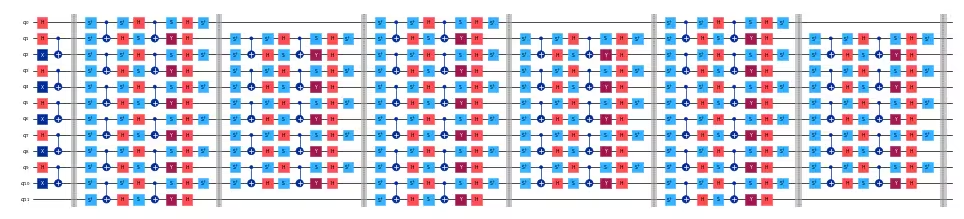
ถัดไป สร้าง observable โดยสร้างเป็น Pauli string ง่ายๆ ที่มีลำดับตรงกับที่ Qiskit ใช้:
def xt_observable(n_qubits, t_steps):
    pauli_str = "".join(["I" * t_steps, "X", "I" * (n_qubits - t_steps - 1)])
    pauli_str = pauli_str[::-1]  # Reverse the string to match qiskit order
    return SparsePauliOp(data=pauli_str, coeffs=1.0)
ในตัวอย่างขนาดเล็กที่มี 12 qubit observable มีลักษณะดังนี้:
# Build the observable for the kicked Ising model
small_observable = xt_observable(n_qubits=12, t_steps=6)
print(small_observable)
SparsePauliOp(['IIIIIXIIIIII'],
              coeffs=[1.+0.j])
Qiskit Functions ใช้ PUB เป็นวิธีรวบรวม input ในกรณีของเรา ให้พิจารณาวงจรและ observable เดี่ยวเป็น PUB:
# Collect the input PUBs, in this case composed of a
# single circuit and observable
pubs = [(small_circuit, [small_observable])]
ถัดไป เราเข้าถึงฟังก์ชัน TEM ก่อนอื่น ตั้งค่าการตรวจสอบสิทธิ์ที่จำเป็นสำหรับ IBM Cloud และเลือก backend จากอุปกรณ์ที่มีอยู่ token, backend ที่มีอยู่ และชื่อทรัพยากรคลาวด์ (CRN) ที่สอดคล้องกันสามารถรับได้โดยการเข้าสู่ระบบบัญชีของคุณบน IBM Quantum Platform dashboard
# Set IBM Quantum credentials and backend configuration
personal_token = os.environ.get(
    "QISKIT_IBM_TOKEN", "<API-KEY>"
)  # Replace with your personal token or set the environment variable
channel = "ibm_quantum_platform"
crn = "your_crn"  # Replace with the Cloud Resource Name (CRN)

# Select the QPU backend
backend_name = "ibm_qpu_name"  # Replace with your desired backend's name
โหลดฟังก์ชัน TEM จาก Qiskit Functions Catalog:
# Load the TEM function from the Qiskit Functions Catalog
catalog = QiskitFunctionsCatalog(
    channel=channel,
    token=personal_token,
    instance=crn,
)
tem = catalog.load("algorithmiq/tem")
ตอนนี้เราสามารถรันการทดลองบนวงจร kicked Ising ด้วยการลดข้อผิดพลาดที่ TEM จัดเตรียมไว้ การใช้การตั้งค่าเริ่มต้น TEM สามารถรันได้ง่ายๆ โดยมีเวลาการรัน QPU ที่คาดหวังประมาณ 2.5 นาที ขึ้นอยู่กับ QPU:
tem_job = tem.run(pubs=pubs, backend_name=backend_name)
ด้วยตัวเลือกเริ่มต้น ฟังก์ชัน TEM จะรันงานสามชิ้นบนคอมพิวเตอร์ควอนตัม: การเรียนรู้สัญญาณรบกวน การลดข้อผิดพลาดในการอ่านค่า และการสุ่มตัวอย่างวงจร จำนวน shots ที่แต่ละงานใช้สามารถเปลี่ยนแปลงได้ในตัวเลือกที่ส่งไปยังฟังก์ชัน โดยค่าเริ่มต้น พารามิเตอร์เหล่านี้ถูกตั้งค่าให้บรรลุความแม่นยำ 0.05 ในค่าคาดหวังที่ถูกลดข้อผิดพลาด คุณสามารถตรวจสอบสถานะของงานบน IBM Quantum Platform dashboard หรือด้วย:
print(tem_job.status())
QUEUED
เมื่อสถานะเป็น DONE เราสามารถตรวจสอบผลลัพธ์ดิบและที่ถูกลดข้อผิดพลาด tem_evs ที่กำหนดด้านล่างคือค่าคาดหวังของ observable ที่ร้องขอ ในกรณีนี้คือ observable เดียว และ tem_std คือส่วนเบี่ยงเบนมาตรฐานที่สอดคล้องกัน
# Get the results of the TEM job
tem_results = tem_job.result()[
    0
]  # Get the first and only result from the job
tem_evs = tem_results.data.evs[0]
tem_std = tem_results.data.stds[0]

print(f"TEM Result: {tem_evs:.3f} ± {tem_std:.3f}")
TEM Result: 1.031 ± 0.046
เราสามารถตรวจสอบว่าใช้เวลาการรันควอนตัมเท่าใดสำหรับแต่ละการเรียกที่ IBM Quantum Platform หรือโดยการตรวจสอบ metadata ของผลลัพธ์จากโค้ด Python
# Get the TEM job runtime
tem_runtime = tem_job.result().metadata["resource_usage"][
    "RUNNING: EXECUTING_QPU"
]["QPU_TIME"]

print(f"TEM Runtime: {tem_runtime} seconds")
TEM Runtime: 155.0 seconds
ปรับแต่งพารามิเตอร์ TEM และตัวเลือกขั้นสูง
ฟังก์ชัน TEM มีตัวเลือกขั้นสูงหลายอย่างเพื่อปรับแต่งเวิร์กโฟลว์การลดข้อผิดพลาดของคุณ ตัวเลือกเหล่านี้ช่วยให้คุณควบคุมความแม่นยำ จำนวน shots กลยุทธ์การเรียนรู้สัญญาณรบกวน และพารามิเตอร์อื่นๆ เพื่อให้เหมาะสมกับข้อกำหนดของการทดลองและทรัพยากรควอนตัมที่มีอยู่มากขึ้น
ตัวเลือกขั้นสูงที่ใช้บ่อยได้แก่:
-
precision: ระบุความแม่นยำเป้าหมายสำหรับค่าคาดหวังที่ถูกลดข้อผิดพลาด -
default_shots: แทนที่จะใช้precisionคุณสามารถระบุจำนวน shots ที่ใช้โดยงานการวัด -
tem_max_bond_dimension: มิติพันธะสูงสุดที่ใช้ใน tensor network -
tem_compression_cutoff: ค่าตัดทอนที่จะใช้สำหรับ tensor network -
ตัวเลือกการเรียนรู้สัญญาณรบกวน: กำหนดค่าว่าจะระบุสัญญาณรบกวนอย่างไร เช่น จำนวนการทำซ้ำหรือวงจรการปรับเทียบเฉพาะ
-
private: ให้วงจรและผลการทดลองเป็นส่วนตัวสำหรับคุณ และปิดใช้งานการดาวน์โหลดผลลัพธ์งานหลายครั้ง
ดูรายการตัวเลือกที่รองรับทั้งหมดและคำอธิบายได้ที่ เอกสาร TEM หรือ Qiskit Functions Catalog คุณสามารถปรับพารามิเตอร์เหล่านี้เพื่อสร้างความสมดุลระหว่างเวลาการรัน การใช้ทรัพยากร และความแม่นยำของผลลัพธ์
คุณสามารถส่งตัวเลือกเหล่านี้เป็น dictionary ไปยังอาร์กิวเมนต์ options เมื่อรันฟังก์ชัน TEM:
options = {
    "default_shots": 10_000,
    "tem_max_bond_dimension": 512,
    "tem_compression_cutoff": 1e-16,
    # This option helps optimizing the measurement
    # stage since the observable is strongly biased
    # toward the X operator for all the qubits.
    "compute_shadows_bias_from_observable": True,
    # set to True to keep experiment results private,
    # recommended for confidential circuits
    "private": False,
}
ตัวเลือกแบบกำหนดเองสำหรับตัวเรียนรู้สัญญาณรบกวนก็สามารถส่งได้เช่นกัน ซึ่งเป็นไปตามคำนิยามที่ใช้ใน qiskit-ibm-runtime NoiseLearnerOptions:
nl_options = {
    "num_randomizations": 32,
    "max_layers_to_learn": 2,
    "shots_per_randomization": 128,
    "layer_pair_depths": [0, 1, 2, 4, 16, 32],
}

# add noise learning options to the overall options
options |= nl_options
รันการทดลองซ้ำด้วยตัวเลือกแบบกำหนดเองเหล่านี้ที่ปรับแต่งสำหรับวงจรของเรา เวลาการรันที่คาดหวังอยู่ที่ประมาณสี่ QPU นาที
tem_job_custom = tem.run(
    pubs=pubs, backend_name=backend_name, options=options
)
หากงานไม่ได้ตั้งค่าเป็นส่วนตัว เราสามารถกู้คืนผลลัพธ์ในภายหลังได้ โดยบันทึก job ID ที่แสดงที่นี่และใช้ tem_job_custom = catalog.get_job_by_id("your-job-id")
job_id = tem_job_custom.job_id
print(f"Job ID: {job_id}")
Job ID: 1ba10094-a541-457a-9287-dbd49306d12d
results_custom = tem_job_custom.result()
tem_evs = results_custom[0].data.evs[0]
tem_std = results_custom[0].data.stds[0]

print(f"TEM Result: {tem_evs:.3f} ± {tem_std:.3f}")
TEM Result: 0.956 ± 0.018
ตอนนี้เราสามารถตรวจสอบผลลัพธ์และ metadata เพื่อรับข้อมูลเชิงลึกเกี่ยวกับการทดลอง:
metadata_custom = results_custom[0].metadata

unmitigated_evs = metadata_custom["evs_non_mitigated"][0]
unmitigated_stds = metadata_custom["stds_non_mitigated"][0]
print(f"Unmitigated Result: {unmitigated_evs:.3f} ± {unmitigated_stds:.3f}")

# Exact result for the kicked Ising model from the reference paper
exact_evs = np.cos(2 * h) ** t_steps
print("Exact Result:", exact_evs)
Unmitigated Result: 0.894 ± 0.015
Exact Result: 1.0
# Plot comparing the different expectation values
plt.bar(
    ["Unmitigated", "TEM"],
    [unmitigated_evs, tem_evs],
    yerr=[unmitigated_stds, tem_std],
    color=["grey", "c"],
)
plt.hlines(y=exact_evs, xmin=-0.5, xmax=1.5, colors="r", linestyles="dashed")
plt.ylabel("Expectation Value")
plt.ylim(0, 1.1)
plt.show()

สุดท้าย เราสามารถตรวจสอบผลกระทบของตัวเลือกแบบกำหนดเองต่อ QPU และเวลาการรันแบบคลาสสิก:
# Get the metadata of the TEM job
job_metadata = results_custom.metadata

# Get the runtime of the TEM job
qpu_runtime = job_metadata["resource_usage"]["RUNNING: EXECUTING_QPU"][
    "QPU_TIME"
]
classical_runtime = (
    job_metadata["resource_usage"]["RUNNING: OPTIMIZING_FOR_HARDWARE"][
        "CPU_TIME"
    ]
    + job_metadata["resource_usage"]["RUNNING: POST_PROCESSING"]["CPU_TIME"]
)

print(f"QPU Runtime: {qpu_runtime} seconds")
print(f"Classical Runtime: {classical_runtime} seconds")
QPU Runtime: 342.0 seconds
Classical Runtime: 107.632604 seconds
ขยาย TEM ไปสู่วงจรขนาดใหญ่
วงจรขนาดใหญ่สามารถรันด้วยฟังก์ชัน TEM ได้ในหลักการ อย่างไรก็ตาม สิ่งสำคัญคือต้องตระหนักถึงข้อจำกัดของทรัพยากรแบบคลาสสิก เนื่องจาก TEM ทำงานบน IBM Cloud runners ซึ่งอาจมีเวลาการรันที่นานมาก สำหรับวงจรขนาดใหญ่มาก ติดต่อทีมสนับสนุน TEM ที่ qiskit_ibm@algorithmiq.fi
ที่นี่เราจะรันตัวอย่างด้วยวงจร 30 qubit ขนาดใหญ่ระดับยูทิลิตี้ โดยปรับพารามิเตอร์ TEM เพื่อความเร็วมากกว่าความแม่นยำ
# Kicked Ising model parameters
n_qubits = 30
t_steps = 15
h = 0.0

# Load the circuit for the kicked Ising model
circuit = load("ki_30q.qasm")

# Build the observable for the kicked Ising model
observable = xt_observable(n_qubits=n_qubits, t_steps=t_steps)

# Collect the input PUBs, in this case composed of a
# single circuit and observable
pubs = [(circuit, [observable])]
กำหนดตัวเลือกที่เน้นประสิทธิภาพ:
options = {
    "num_randomizations": 32,
    "max_layers_to_learn": 2,
    "shots_per_randomization": 128,
    "layer_pair_depths": [0, 1, 2, 4, 16, 32, 64],
    "default_shots": 5_000,
    "tem_max_bond_dimension": 128,
    "tem_compression_cutoff": 1e-10,
    "compute_shadows_bias_from_observable": True,
    "private": False,
}
สุดท้าย รันการทดลอง รับผลลัพธ์ และแสดงผล ซึ่งจะใช้เวลาประมาณ 3.5 QPU นาที
tem_job_large = tem.run(pubs=pubs, backend_name=backend_name, options=options)
job_id = tem_job_large.job_id
print(f"Job ID: {job_id}")
Job ID: 9f3f190f-f4b0-4dcb-bb83-5f71f37d0d77
results_large = tem_job_large.result()
tem_evs = results_large[0].data.evs[0]
tem_std = results_large[0].data.stds[0]

print(f"TEM Result: {tem_evs:.3f} ± {tem_std:.3f}")

# Get the metadata of the TEM job
job_metadata = tem_job_large.result().metadata

# Get the runtime of the TEM job
qpu_runtime = job_metadata["resource_usage"]["RUNNING: EXECUTING_QPU"][
    "QPU_TIME"
]
classical_runtime = (
    job_metadata["resource_usage"]["RUNNING: OPTIMIZING_FOR_HARDWARE"][
        "CPU_TIME"
    ]
    + job_metadata["resource_usage"]["RUNNING: POST_PROCESSING"]["CPU_TIME"]
)

print(f"QPU Runtime: {qpu_runtime} seconds")
print(f"Classical Runtime: {classical_runtime} seconds")
TEM Result: 0.794 ± 0.026
QPU Runtime: 203.0 seconds
Classical Runtime: 251.71805499999996 seconds
# Plot comparing the different expectation values
metadata_large = results_large[0].metadata
unmitigated_evs = metadata_large["evs_non_mitigated"][0]
unmitigated_stds = metadata_large["stds_non_mitigated"][0]

exact_evs = np.cos(2 * h) ** t_steps

plt.bar(
    ["Unmitigated", "TEM"],
    [unmitigated_evs, tem_evs],
    yerr=[unmitigated_stds, tem_std],
    color=["grey", "c"],
)
plt.hlines(y=exact_evs, xmin=-0.5, xmax=1.5, colors="r", linestyles="dashed")
plt.ylabel("Expectation Value")
plt.ylim(0, 1.1)
plt.show()
